


ODM Cloud Series — Crawl / Walk / Run · Article 9 of 10
From zero to a self-hosted cloud processing pipeline
This series builds a production WebODM setup from scratch — starting with the ecosystem fundamentals, moving through AWS spot instance setup and cost control, and finishing with auto-scaling, security, and a head-to-head comparison with commercial platforms. Each article stands alone; read in order to build the full stack.
Pricing note: AWS figures are list prices for US East (Ohio) taken from the AWS Price List files and AWS pricing pages on 2 October 2026. Spot prices are the values AWS published on its Spot pricing page that day and change hourly. Competitor prices were checked the same day. Re-check everything before you budget.
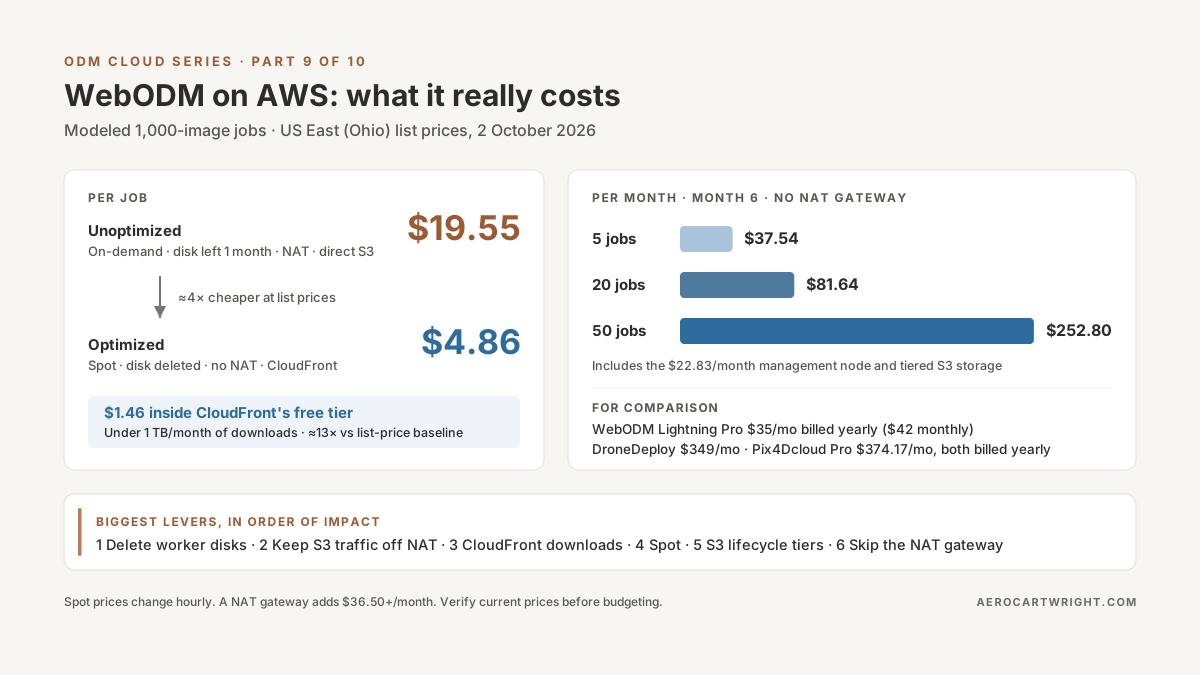
Here’s a hypothetical. You launch Monday with the naive setup below: on-demand workers in a private subnet, a worker disk nobody deletes, results uploaded through a NAT gateway, and clients downloading straight from S3. Each 1,000-image job costs about $19.55 in its own line items. Run 25 of them in a month and that’s about $489 (25 × $19.55) before the fixed costs of the management node and NAT gateway.
The same job costs $4.86 at list prices once the fixes below are in, or $1.46 while your CloudFront downloads stay inside the 1 TB monthly free allowance. The table shows where each dollar goes.
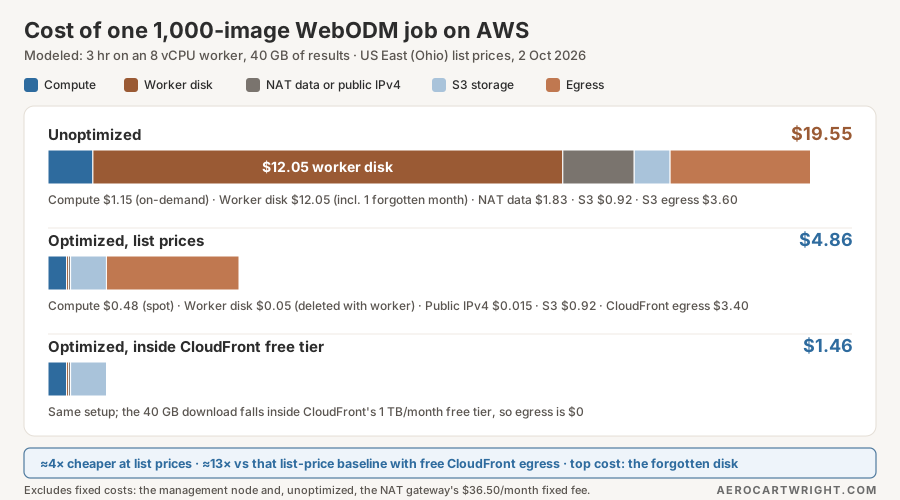
Cost breakdown: Where the money goes
Most people optimize compute first because it’s the most visible line item. In this model it isn’t the biggest one.
The worked example uses these assumptions. They’re a model, not measurements, so swap in your own numbers:
- One 1,000-image job runs for 3 hours on an m5.2xlarge-class worker (8 vCPU, 32 GiB), the size Part 5 recommends for 500–1,000 images.
- The worker has a 150 GB gp3 disk ($0.08/GB-month).
- The job leaves 40 GB of results in S3 (Standard, $0.023/GB-month), and the client downloads all 40 GB once.
- Unoptimized workers sit in a private subnet behind a NAT gateway, which charges $0.045/hr plus $0.045/GB processed. Everything they send or fetch goes through it: the 40 GB of results and the
webodm/nodeodx:latestDocker image (0.67 GB compressed on Docker Hub on 2 October 2026). - Optimized workers sit in a public subnet with no NAT gateway, as in Part 8’s cluster design. Each holds a public IPv4 address ($0.005/hr) only while it runs, and its security group allows no inbound traffic from the internet.
- Per-job figures use list rates and ignore free allowances. The monthly tables further down apply them.
Unoptimized (1,000 images):
| Cost Component | Amount | Arithmetic |
|---|---|---|
| Compute (on-demand m5.2xlarge) | $1.152 | 3 hr × $0.384/hr |
| Worker disk while running | $0.049 | 150 GB × $0.08 × 3 hr ÷ 730 hr |
| Worker disk left behind for a month | $12.000 | 150 GB × $0.08/GB-month |
| NAT data (results to S3 + image pull) | $1.830 | (40 + 0.67) GB × $0.045/GB |
| S3 Standard, first month | $0.920 | 40 GB × $0.023 |
| Egress (direct S3 download) | $3.600 | 40 GB × $0.09/GB |
| Total for One Job | $19.55 | $19.551; plus the NAT gateway’s fixed $36.50/month ($32.85 hourly fee + $3.65 for its public IPv4 address) and the management node |
Optimized (same 1,000 images):
| Cost Component | Amount | Optimization |
|---|---|---|
| Compute (spot, 3 hr) | $0.476 | 3 hr × $0.1586/hr budget spot rate |
| Worker disk while running | $0.049 | Deleted when the worker terminates |
| Worker public IPv4 (no NAT gateway) | $0.015 | 3 hr × $0.005/hr |
| S3 Standard, first month | $0.920 | 40 GB × $0.023; lifecycle tiering starts at day 30 |
| Egress (CloudFront, list rate) | $3.400 | 40 GB × $0.085/GB |
| Total for One Job | $4.86 | $4.860; $1.46 while CloudFront egress stays inside the 1 TB/month free tier |
That’s about 4x cheaper at list prices ($19.55 ÷ $4.86), and about 13x ($19.55 ÷ $1.46) while CloudFront delivery is free. That 13x compares against the list-price baseline: AWS’s 100 GB/month free data-transfer allowance would cover a single 40 GB direct download too, which brings the unoptimized job to $15.95 and the gap to about 11x. The single biggest item is the forgotten worker disk, not compute. The same results come out either way, because none of these changes touch processing settings.
Sources for those rates: on-demand and gp3 prices from the AWS Price List for US East (Ohio), retrieved 2 October 2026; spot prices from the EC2 Spot pricing page; S3 storage from the S3 Price List; NAT gateway fees ($0.045/hr and $0.045/GB) from the EC2 Price List for Ohio; internet egress from the Data Transfer Price List and the 100 GB/month free allowance; CloudFront from its pay-as-you-go pricing page; public IPv4 ($0.005/hr) from the VPC Price List. If you keep a NAT gateway, an S3 gateway endpoint, which AWS says has “no additional charge,” keeps S3 traffic off it.
Management node pattern: Separate concerns
Run a minimal always-on node for UI and state, paired with ephemeral workers that scale up and down.
Design:
Management Node (t3.small, always-on, public subnet):
  - WebODM web interface (port 8000), started with --default-nodes 0
  - WebODM's bundled PostgreSQL database (project metadata, results tracking)
  - ClusterODX, plus the locked reference NodeODX node it requires
  Cost: ~$22.83/month (instance + 50 GB gp3 + public IPv4)

Worker Nodes (auto-scaling, spot instances, public subnet, no inbound from internet):
  - NodeODX API and ODX processing engine
  - Launched only when jobs arrive
  - Terminated after processing completes
  Cost: ~$0.48 per 3-hour job at $0.1586/hr spot
The management node is cheap because it doesn’t process anything. WebODM’s installation docs say the interface “is just a user interface and does not require many resources” and runs on 1 or 2 GB of RAM when processing happens elsewhere (pass --default-nodes 0 so it doesn’t start its own processing node). A t3.small has 2 GiB. ClusterODX also has to run somewhere, and its README requires at least one locked “reference” NodeODX node even when the autoscaler does all the work. If those squeeze a t3.small, a t3.medium (4 GiB, $0.0416/hr) adds $15.18/month. Heavy lifting — feature extraction, bundle adjustment, dense reconstruction — happens on workers.
The fixed cost of the node is $22.83/month no matter how many jobs you run: t3.small $0.0208/hr × 730 hr = $15.18, plus 50 GB gp3 × $0.08 = $4.00, plus one public IPv4 address at $0.005/hr × 730 hr = $3.65 (VPC Price List).
WebODM stores task data in its media directory on this node (the install docs cover moving it with --media-dir), so a 50 GB disk fills after one 40 GB job. Copy finished results to S3 (see Part 4) and delete old tasks in WebODM, or size the disk for what you keep.
Scaling has a quota to plan for. AWS manages Spot quotas in vCPUs, not instance counts. The default for standard (A, C, D, H, I, M, R, T, Z) Spot requests is listed as 5 vCPUs, which is less than one 8-vCPU worker. AWS adjusts quotas with usage, but on a new account, request an increase in Service Quotas before your first job.
Terraform for Management Node:
variable "vpc_id" {
  type = string
}

variable "public_subnet_id" {
  type = string
}

variable "trusted_cidr" {
  type        = string
  description = "Your office IP as a /32, e.g. 203.0.113.10/32"
}

variable "results_bucket" {
  type = string
}

# Latest Ubuntu 24.04 LTS AMI for this region, published by Canonical
data "aws_ssm_parameter" "ubuntu_2404" {
  name = "/aws/service/canonical/ubuntu/server/noble/stable/current/amd64/hvm/ebs-gp3/ami-id"
}

data "aws_iam_policy_document" "ec2_assume" {
  statement {
    actions = ["sts:AssumeRole"]
    principals {
      type        = "Service"
      identifiers = ["ec2.amazonaws.com"]
    }
  }
}

# Least privilege: list the bucket, read/write only under projects/
data "aws_iam_policy_document" "results_rw" {
  statement {
    actions   = ["s3:ListBucket"]
    resources = ["arn:aws:s3:::${var.results_bucket}"]
  }
  statement {
    actions   = ["s3:GetObject", "s3:PutObject"]
    resources = ["arn:aws:s3:::${var.results_bucket}/projects/*"]
  }
}

resource "aws_iam_role" "webodm_mgmt" {
  name               = "webodm-mgmt"
  assume_role_policy = data.aws_iam_policy_document.ec2_assume.json
}

resource "aws_iam_role_policy" "webodm_mgmt_s3" {
  name   = "webodm-results-rw"
  role   = aws_iam_role.webodm_mgmt.name
  policy = data.aws_iam_policy_document.results_rw.json
}

resource "aws_iam_instance_profile" "webodm_mgmt" {
  name = "webodm-mgmt"
  role = aws_iam_role.webodm_mgmt.name
}

resource "aws_security_group" "webodm_mgmt" {
  vpc_id = var.vpc_id

  ingress {
    from_port   = 22
    to_port     = 22
    protocol    = "tcp"
    cidr_blocks = [var.trusted_cidr]  # SSH from your office IP only
  }

  ingress {
    from_port   = 8000
    to_port     = 8000
    protocol    = "tcp"
    cidr_blocks = [var.trusted_cidr]  # WebODM UI; put HTTPS in front before opening wider
  }

  egress {
    from_port   = 0
    to_port     = 0
    protocol    = "-1"
    cidr_blocks = ["0.0.0.0/0"]
  }
}

resource "aws_instance" "webodm_management" {
  ami                         = data.aws_ssm_parameter.ubuntu_2404.insecure_value
  instance_type               = "t3.small"
  subnet_id                   = var.public_subnet_id
  associate_public_ip_address = true
  vpc_security_group_ids      = [aws_security_group.webodm_mgmt.id]
  iam_instance_profile        = aws_iam_instance_profile.webodm_mgmt.name

  metadata_options {
    http_tokens = "required"  # IMDSv2 only
  }

  root_block_device {
    volume_type           = "gp3"
    volume_size           = 50
    delete_on_termination = true
    encrypted             = true
  }

  # Installs Docker and starts WebODM with --default-nodes 0.
  # Keep secrets out of this file: user data is readable from the
  # instance metadata service and is stored in Terraform state.
  user_data = file("${path.module}/userdata.sh")

  tags = {
    Name          = "webodm-management"
    "Cost-Center" = "Infrastructure"
  }
}
Save the script below as userdata.sh next to the .tf file. file() reads it whenever Terraform evaluates the configuration, so terraform validate and terraform plan fail if it’s missing. The Docker steps follow Docker’s apt-repository instructions for Ubuntu, and the WebODM steps follow WebODM’s installation docs. Cloud-init runs it once, as root, at first boot.
#!/bin/bash
# userdata.sh: first-boot setup for the WebODM management node. No secrets here.
set -euo pipefail
export DEBIAN_FRONTEND=noninteractive

# Docker Engine + Compose plugin from Docker's apt repository
apt-get update
apt-get install -y ca-certificates curl git
install -m 0755 -d /etc/apt/keyrings
curl -fsSL https://download.docker.com/linux/ubuntu/gpg -o /etc/apt/keyrings/docker.asc
chmod a+r /etc/apt/keyrings/docker.asc
tee /etc/apt/sources.list.d/docker.sources <<EOF
Types: deb
URIs: https://download.docker.com/linux/ubuntu
Suites: $(. /etc/os-release && echo "${UBUNTU_CODENAME:-$VERSION_CODENAME}")
Components: stable
Architectures: $(dpkg --print-architecture)
Signed-By: /etc/apt/keyrings/docker.asc
EOF
apt-get update
apt-get install -y docker-ce docker-ce-cli containerd.io docker-buildx-plugin docker-compose-plugin

# WebODM without its built-in processing node; runs in the background
git clone https://github.com/WebODM/WebODM --config core.autocrlf=input --depth 1 /opt/WebODM
cd /opt/WebODM
./webodm.sh start --detached --default-nodes 0
This starts WebODM once. After a reboot, run ./webodm.sh start --detached --default-nodes 0 from /opt/WebODM again, or wrap it in a systemd unit.
The instance gets no stored credentials. Its role can list the results bucket and read or write objects under projects/, and nothing else. WebODM’s bundled PostgreSQL runs inside its Docker network, so no database password has to pass through user data. If you add ClusterODX’s AWS autoscaler, its configuration file takes an access key. Give that key its own IAM user limited to what the autoscaler needs, and make the file readable only by root.
With workers in a public subnet, the $22.83 node is the whole fixed cost. Put workers in a private subnet instead and a NAT gateway adds $36.50/month before any data: $32.85 in hourly charges ($0.045/hr × 730 hr) plus $3.65 for its public IPv4 address ($0.005/hr × 730 hr), making $59.33 before you process anything. That’s more than WebODM Lightning’s Pro plan, which is $35/month billed yearly or $42 billed monthly (unlimited maps up to 1,500 images, 100 GB cloud storage, per webodm.net/pricing on 2 October 2026). It’s well under DroneDeploy’s Flight & Analysis plan, which is $4,188/year billed annually, or $349/month as a straight division (DroneDeploy publishes no monthly price) on dronedeploy.com/pricing the same day. Self-hosting pays off in control and data ownership, and in price once your volume is high enough. The monthly tables below show where that happens.
Spot Fleet strategy: Diversification cuts cost and interruptions
An m5.2xlarge in Ohio costs $0.384/hr on demand. AWS’s published spot price on 2 October 2026 was $0.0803/hr, about 79% off ($0.0803 ÷ $0.384 = 0.209). But that instance type was also in the Spot Instance Advisor’s highest interruption band. If you ask for one type and that pool is short of capacity, your request waits.
ClusterODX’s autoscaler requests one instance type per image-count bracket (the slug in its imageSizeMapping), so diversifying across types is something you set up when you launch workers yourself. AWS’s own guidance is to use an EC2 Auto Scaling group for this, or EC2 Fleet if you manage instance lifecycles yourself. It “strongly discourage[s] using Spot Fleet because it uses a legacy API with no planned investment.” The JSON below uses Spot Fleet because it shows the idea compactly. The same instance list and allocation strategy carry over to an Auto Scaling group’s mixed-instances policy.
Bad (single instance type):
{
  "TargetCapacity": 1,
  "Type": "request",
  "IamFleetRole": "arn:aws:iam::ACCOUNT_ID:role/fleet-role",
  "LaunchSpecifications": [
    {
      "ImageId": "ami-xxxxxxxx",
      "InstanceType": "m5.2xlarge",
      "KeyName": "webodm-key"
    }
  ]
}
If m5.2xlarge capacity is short in your Availability Zones, the request waits unfulfilled and your job sits in the queue.
Good (diversified):
{
  "TargetCapacity": 1,
  "Type": "request",
  "IamFleetRole": "arn:aws:iam::ACCOUNT_ID:role/fleet-role",
  "AllocationStrategy": "priceCapacityOptimized",
  "LaunchSpecifications": [
    { "ImageId": "ami-xxxxxxxx", "InstanceType": "m5.2xlarge",  "WeightedCapacity": 1.0 },
    { "ImageId": "ami-xxxxxxxx", "InstanceType": "m5a.2xlarge", "WeightedCapacity": 1.0 },
    { "ImageId": "ami-xxxxxxxx", "InstanceType": "r5.2xlarge",  "WeightedCapacity": 1.0 },
    { "ImageId": "ami-xxxxxxxx", "InstanceType": "r5a.2xlarge", "WeightedCapacity": 1.0 }
  ]
}
Notes on what changed, per the Spot Fleet API reference:
AllocationStrategytakes camelCase values:lowestPrice,diversified,capacityOptimized,capacityOptimizedPrioritizedorpriceCapacityOptimized. AWS recommendspriceCapacityOptimized. It picks the pools “that we believe have the lowest chance of interruption in the near term,” then the cheapest of those. The default islowestPrice, which AWS says “has the highest risk of interruption.”- No
SpotPrice. AWS doesn’t recommend setting one because “it can lead to increased interruptions.” Without it you pay the current spot price. Type: requestasks once and doesn’t try to replace interrupted instances. That suits a single job, because a replacement would start the job over anyway.- All four types have 8 vCPU and at least 32 GiB, which is enough for a 1,000-image job by Part 5’s sizing.
Spot prices and interruption bands for these four in Ohio on 2 October 2026 (from AWS Spot pricing and the Spot Instance Advisor, whose interruption figure is “the rate at which Spot has reclaimed capacity during the trailing month”):
| Type | On-demand | Spot | Interruption band |
|---|---|---|---|
| m5.2xlarge | $0.384 | $0.0803 | >20% |
| m5a.2xlarge | $0.344 | $0.1177 | 15–20% |
| r5.2xlarge | $0.504 | $0.1305 | 10–15% |
| r5a.2xlarge | $0.452 | $0.1586 | <5% |
The cheapest pool was also the most likely to be interrupted that day. That’s why this article budgets at $0.1586/hr, the highest of the four. Whatever the fleet picks, each 3-hour job costs at most $0.48 in compute at those prices, against $1.15 on demand.
Re-checked 8 November 2026 against the same AWS feed: m5.2xlarge $0.0851, m5a.2xlarge $0.1218, r5.2xlarge $0.1158, r5a.2xlarge $0.1627. The ceiling had moved up to $0.1627, about 2.6% above the budget rate used here, which changes the per-job compute figure by about a cent. The Advisor bands were unchanged.
Storage cost reduction: Compression and lifecycle
Egress costs $0.09/GB from S3. Before data leaves AWS it sits in storage, and storage is cheaper per GB than egress but builds up every month you keep it.
Strategy 1: Check what’s already compressed
ODX already compresses its main outputs. Its options default --orthophoto-compression to DEFLATE, the same algorithm gzip uses. The georeferenced point cloud is written as LAZ; an uncompressed LAS is written alongside it only if you ask for --pc-las. LAZ is the LASzip-compressed form of LAS, which LASzip says shrinks files to “7-20% of the original size”, losslessly. So:
- LAS and PLY are uncompressed. If you exported LAS (
--pc-las) or kept PLY intermediates, converting LAS to LAZ is the big win. Don’t deliver LAS when LAZ will do. - LAZ and DEFLATE GeoTIFFs are already compressed. Gzipping them again is unlikely to shrink them much. Measure on your own files before building a workflow around it.
To test, keep the original. gzip deletes the source file by default, and -k stops that:
# -k keeps the original; without it, gzip replaces orthophoto.tif with orthophoto.tif.gz
gzip -k -9 -v /results/odm_orthophoto/odm_orthophoto.tif
ls -l /results/odm_orthophoto/
Another real lever is --orthophoto-compression JPEG, which is lossy and much smaller. Use it for preview deliverables only, never where pixel values matter.
Strategy 2: S3 lifecycle tiers
S3 Standard costs $0.023/GB-month in Ohio. After 30 days, move objects to Standard-IA at $0.0125/GB-month. After 90 days, move them to Glacier Instant Retrieval (GLACIER_IR) at $0.004/GB-month (all from the S3 Price List, published 28 September 2026). The storage class identifier matters. GLACIER in a lifecycle rule means Glacier Flexible Retrieval ($0.0036/GB-month), and you have to restore objects from it before you can download them. AWS’s retrieval options range from minutes (Expedited, typically 1–5 minutes for objects under 250 MB, at extra cost) to hours (Standard 3–5 hours, Bulk 5–12 hours). GLACIER_IR serves downloads in milliseconds.
Storage builds up. At 20 jobs/month × 40 GB, you add 800 GB every month and keep it. With tiering, each month’s batch spends its first month in Standard, months 2–3 in IA, and month 4 onward in Glacier IR:
| Month | Without tiering (all Standard) | With tiering |
|---|---|---|
| 1 | 800 GB × $0.023 = $18.40 | $18.40 |
| 2 | 1,600 GB × $0.023 = $36.80 | $18.40 + $10.00 = $28.40 |
| 3 | $55.20 | $18.40 + $20.00 = $38.40 |
| 4 | $73.60 | $38.40 + $3.20 = $41.60 |
| 5 | $92.00 | $38.40 + $6.40 = $44.80 |
| 6 | $110.40 | $38.40 + $9.60 = $48.00 |
| 6-month total | $386.40 | $219.60 |
At month 6 the bill is $48.00 instead of $110.40. Over the six months you save $166.80. Without tiering the bill keeps growing by $18.40 every month. With tiering it grows by $3.20 a month once the pipeline fills. Two catches:
- Standard-IA has a 30-day minimum storage charge and Glacier IR a 90-day minimum. Both charge per GB retrieved, on top of egress: $0.01/GB for IA and $0.03/GB for Glacier IR. Re-downloading a 40 GB job from Glacier IR adds 40 × $0.03 = $1.20. Tier only results clients have stopped downloading.
- By default, S3 won’t transition objects smaller than 128 KB (AWS docs), so tile pyramids full of small files mostly stay in Standard.
Implement with this S3 lifecycle policy, scoped to the projects/ prefix used in Part 4. Part 4 keeps each job’s raw images under projects/<job>/images/ alongside its outputs/, so this rule tiers the input photos too. That’s usually what you want once a job is delivered, but a job still queued or reprocessed after 30 days pays IA retrieval fees on its images. Use "Prefix": "projects/" only if that’s acceptable, or scope rules per job. The table above counts only the 40 GB of results.
{
  "Rules": [
    {
      "ID": "tier-project-results",
      "Status": "Enabled",
      "Filter": { "Prefix": "projects/" },
      "Transitions": [
        { "Days": 30, "StorageClass": "STANDARD_IA" },
        { "Days": 90, "StorageClass": "GLACIER_IR" }
      ]
    }
  ]
}
Warning before you apply it: aws s3api put-bucket-lifecycle-configuration replaces the bucket’s whole lifecycle configuration. The CLI reference puts it this way: “this will overwrite an existing lifecycle configuration.” If you already have Part 4’s rules (for example, the temp/ expiry), merge them into one file first. Save the current rules with aws s3api get-bucket-lifecycle-configuration before you change anything.
Strategy 3: CloudFront CDN
Direct S3 egress costs $0.09/GB after AWS’s 100 GB/month account-wide free allowance. CloudFront’s pay-as-you-go plan includes “1 TB of data transfer out to the internet per month” in its always-free tier, then $0.085/GB for the next 9 TB in the US, Mexico and Canada. Transfer from S3 to CloudFront is free. This article treats 1 TB as 1,024 GB, the unit AWS’s price list uses for its tiers.
At 200 GB/month of downloads: direct S3 costs (200 − 100) × $0.09 = $9.00, and CloudFront costs $0. At 2,000 GB/month: direct S3 costs (2,000 − 100) × $0.09 = $171.00, and CloudFront costs (2,000 − 1,024) × $0.085 = $82.96. This article doesn’t stack the two free allowances. Use CloudFront signed URLs to keep client links private.
Processing parameter tuning: Speed vs. quality
Processing time is compute cost: each hour cut saves $0.16 at the spot budget rate, or $0.38 on demand. Three options trade quality for speed. Here’s what each one does, from ODX’s option definitions (also documented at docs.opendronemap.org):
--fast-orthophoto — “Skips dense reconstruction and 3D model generation. It generates an orthophoto directly from the sparse reconstruction.” The help text adds: “On flat terrain with no objects/structures, turn this on to save time.” You get no dense point cloud and no 3D model, and buildings and trees are likely to look worse.
Use for: previews, GCP iteration, flat sites. Skip for: final deliverables with structures, anything needing a point cloud or volumes.
--feature-quality medium — The default is high. In ODX’s source, high extracts features from images resized to half their largest dimension, and medium uses a quarter (for photos between 2 and 42 megapixels). Smaller images mean faster extraction and matching, but fewer features. That can hurt weakly textured scenes.
--pc-quality low — The default is medium. ODX’s help says: “Each step up in quality increases processing time roughly by a factor of 4x.” By that rule of thumb, low makes the dense step roughly a quarter as long as medium, in exchange for a sparser cloud. It still builds a point cloud. To skip dense reconstruction entirely, use --fast-orthophoto. Don’t combine the two expecting extra savings: --fast-orthophoto already skips the step --pc-quality controls.
Use for: previews, visualization-only. Skip for: regulatory work, volumetric analysis.
How much will you save? It depends on the dataset, and the docs don’t give a total-job figure, so measure it. Process one representative dataset with default settings and again with your tuned settings, and compare the processing times WebODM reports. If tuning takes a 3-hour job down to 2 hours, compute falls from $0.48 to $0.32 on spot (2 hr × $0.1586). The tables below assume default settings (3 hours) so they don’t depend on a guessed speed-up.
Monthly costs: 5 jobs vs. 20 vs. 50
Modelled monthly costs for 1,000-image jobs, using the optimized per-job figures above: workers in a public subnet, no NAT gateway. Storage is shown at month 6 of continuous operation with lifecycle tiering, so it already includes six months of build-up. Free allowances are applied: CloudFront’s 1 TB, and CloudWatch’s 10 free alarm metrics (CloudWatch pricing), so a handful of alarms costs $0. Each table ends with the private-subnet alternative: add the NAT gateway’s fixed $36.50/month ($32.85 hourly fee plus $3.65 for its public IPv4 address) and its $0.045/GB data charge (0.67 GB image pull per job, with S3 traffic on a gateway endpoint), and drop the worker IPv4 line.
5 jobs/month (small team)
| Item | Cost | Arithmetic |
|---|---|---|
| Management node (t3.small + 50 GB gp3 + IPv4) | $22.83 | $15.18 + $4.00 + $3.65 |
| Worker public IPv4 | $0.08 | 5 × 3 hr × $0.005 = $0.075 |
| Compute (spot) | $2.38 | 5 × 3 hr × $0.1586 |
| Worker disks while running | $0.25 | 5 × $0.0493 |
| S3 storage, month 6 (tiered) | $12.00 | 200 GB/month: $4.60 Standard + $5.00 IA + $2.40 Glacier IR |
| Egress (200 GB via CloudFront) | $0.00 | Under the 1 TB free tier |
| Monthly Total | $37.54 | $7.51 per job |
With a NAT gateway instead: $37.54 − $0.08 + $36.50 + $0.15 (5 × 0.67 GB × $0.045) = $74.11. At this volume the NAT gateway’s fixed charge is the largest single line, about half the bill.
WebODM Lightning (prices on webodm.net/pricing, 2 October 2026) competes hard at this volume. Its Pro plan is $35/month billed yearly, which is cheaper than the $37.54 no-NAT setup. Billed monthly it’s $42, which is more. Pro gives unlimited maps up to 1,500 images, 2 concurrent tasks and 100 GB of cloud storage. The Starter plan ($24/month yearly, $29 monthly) covers 12 maps per 30 days, enough for 5 jobs.
20 jobs/month (active practice)
| Item | Cost | Arithmetic |
|---|---|---|
| Management node | $22.83 | Fixed |
| Worker public IPv4 | $0.30 | 20 × 3 hr × $0.005 |
| Compute (spot) | $9.52 | 20 × 3 hr × $0.1586 |
| Worker disks while running | $0.99 | 20 × $0.0493 |
| S3 storage, month 6 (tiered) | $48.00 | From the lifecycle table above |
| Egress (800 GB via CloudFront) | $0.00 | Under the 1 TB free tier |
| Monthly Total | $81.64 | $4.08 per job |
With a NAT gateway instead: $81.64 − $0.30 + $36.50 + $0.60 = $118.44.
DroneDeploy’s Flight & Analysis plan works out to $349/month ($4,188 ÷ 12), about 4x the no-NAT total here ($349 ÷ $81.64 = 4.3). WebODM Lightning’s Business plan (unlimited maps up to 3,000 images, 1,000 GB cloud storage) is $99/month billed yearly or $119 monthly, more than $81.64. Its Pro plan ($35 yearly, $42 monthly) is still cheaper if your maps stay under 1,500 images and you don’t need more than 100 GB of storage. At 40 GB per job, that’s two jobs’ worth, so you’d be downloading and deleting.
50 jobs/month (production firm)
| Item | Cost | Arithmetic |
|---|---|---|
| Management node | $22.83 | Fixed |
| Worker public IPv4 | $0.75 | 50 × 3 hr × $0.005 |
| Compute (spot) | $23.79 | 50 × 3 hr × $0.1586 |
| Worker disks while running | $2.47 | 50 × $0.0493 |
| S3 storage, month 6 (tiered) | $120.00 | 2,000 GB/month: $46.00 + $50.00 + $24.00 |
| Egress (2,000 GB via CloudFront) | $82.96 | (2,000 − 1,024) GB × $0.085 |
| Monthly Total | $252.80 | $5.06 per job |
With a NAT gateway instead: $252.80 − $0.75 + $36.50 + $1.51 = $290.06.
DroneDeploy at $349/month is $6.98 per job at this volume ($349 ÷ 50). Pix4Dcloud Pro was listed at $4,490/year ($374.17/month) on 2 October 2026, with 2,500 processing credits a year. Self-hosted comes in under both, but by less than you might expect: $252.80 against $349 is 28% cheaper (17% with a NAT gateway). Storage is now the biggest line, and it keeps growing by $8.00 a month (2,000 GB × $0.004) for as long as you keep everything. A retention policy, such as handing results to the client and expiring them after a year, is the next lever.
Spot interruption handling
Spot saves about 59–79% on compute here (from $1.15 to between $0.24 and $0.48 per job, depending on which pool the fleet lands in), but AWS can take the instance back with two minutes’ notice. Be clear about what happens then: the running task is lost. Neither ClusterODX’s AWS documentation nor its README describes checkpointing or automatic resumption on another node. Two minutes isn’t enough to finish a photogrammetry stage anyway. The realistic goal is to know the job died so you can re-submit it, rather than finding out from a client.
The simplest option needs no code. AWS emits an “EC2 Spot Instance Interruption Warning” event to EventBridge two minutes ahead, so a rule on that event that targets an SNS topic emails you. If you’d rather alert from the instance itself, the poller below uses IMDSv2 (which the Terraform above enforces) and the 5-second interval AWS recommends.
#!/usr/bin/env python3
"""Poll IMDSv2 for a Spot interruption notice and send one SNS alert.

Requires: boto3, and an instance role allowing sns:Publish on SNS_TOPIC_ARN.
Run as a systemd service on each worker. It alerts; it cannot save the task.
"""
import json
import os
import sys
import time
import urllib.error
import urllib.request

import boto3

IMDS = "http://169.254.169.254/latest"
TOPIC_ARN = os.environ["SNS_TOPIC_ARN"]
REGION = os.environ.get("AWS_REGION", "us-east-2")


def imds_get(path):
    """Return the metadata value, or None if the path doesn't exist (HTTP 404)."""
    token_req = urllib.request.Request(
        f"{IMDS}/api/token",
        method="PUT",
        headers={"X-aws-ec2-metadata-token-ttl-seconds": "300"},
    )
    token = urllib.request.urlopen(token_req, timeout=2).read().decode()
    req = urllib.request.Request(
        f"{IMDS}/meta-data/{path}", headers={"X-aws-ec2-metadata-token": token}
    )
    try:
        return urllib.request.urlopen(req, timeout=2).read().decode()
    except urllib.error.HTTPError as err:
        if err.code == 404:  # no interruption scheduled
            return None
        raise


def main():
    instance_id = imds_get("instance-id")
    sns = boto3.client("sns", region_name=REGION)
    while True:
        try:
            action = imds_get("spot/instance-action")
        except (urllib.error.URLError, TimeoutError) as err:
            print(f"IMDS check failed: {err}", file=sys.stderr)
            action = None
        if action:
            notice = json.loads(action)
            sns.publish(
                TopicArn=TOPIC_ARN,
                Subject=f"Spot interruption: {instance_id}",
                Message=(
                    f"{instance_id} will {notice['action']} at {notice['time']}. "
                    "The task running on it will not finish; re-submit it in WebODM."
                ),
            )
            return
        time.sleep(5)


if __name__ == "__main__":
    main()
Cost of an interruption: you lose whatever compute the dead instance had used, up to one full job’s worth ($0.48 at the budget rate), plus the turnaround time. That’s why the instance-type choice above leans on the Advisor’s interruption bands as well as price. For jobs much longer than 3 hours, Part 5 makes the case for on-demand.
Optimization checklist: In order of impact
In this model, here’s the order that moves the needle most:
- Delete worker disks with the worker. A forgotten 150 GB gp3 volume costs $12.00/month. ClusterODX’s sample AWS config gives the m5.2xlarge bracket 640 GB, which would cost $51.20/month if left behind. Check
DeleteOnTermination, and list leftovers withaws ec2 describe-volumes --filters Name=status,Values=available. - Keep S3 traffic off any NAT gateway. Results uploaded through a NAT gateway cost $0.045/GB, or $1.80 per 40 GB job. Workers in a public subnet, or an S3 gateway endpoint on a private subnet’s route table, avoid that charge.
- CloudFront for downloads. $3.60 per 40 GB download becomes $0 inside the 1 TB/month free tier. Above it, the rate is $0.085/GB against $0.09/GB direct.
- Spot instances. $1.15 drops to $0.48 or less per job.
- S3 lifecycle to IA and Glacier IR. At 20 jobs/month, month-6 storage is $48.00 instead of $110.40.
- Skip the NAT gateway. Its fixed charge is $36.50/month: $32.85 in hourly fees plus $3.65 for its public IPv4 address. At 5 jobs/month that’s the largest single line, about half of the $74.11 bill. Workers in a public subnet with no inbound access pay $0.015 per job in IPv4 instead.
- Tune processing parameters where the output allows it, and measure the savings.
6-month comparison: 50 jobs/month
“Unoptimized” here means on-demand workers in a private subnet behind a NAT gateway, each worker disk left for a month before cleanup, results uploaded through NAT, no lifecycle rules, and direct S3 downloads. “Optimized” is the public-subnet, no-NAT setup from the monthly tables. Both columns use the same management node.
| Metric | Unoptimized | Optimized |
|---|---|---|
| Management node | $136.98 | $136.98 |
| NAT gateway, fixed (hourly + IPv4) | $219.00 | $0.00 |
| NAT gateway, data | $549.06 | $0.00 |
| Worker public IPv4 | $0.00 | $4.50 |
| Compute | $345.60 | $142.74 |
| Worker disks | $3,614.82 | $14.82 |
| S3 storage (cumulative) | $966.00 | $549.00 |
| Egress | $1,026.00 | $497.76 |
| 6-Month Total | $6,857.46 | $1,345.80 |
| Cost Per Job (300 jobs) | $22.86 | $4.49 |
| vs. DroneDeploy ($2,094 for 6 months) | 3.3x more expensive | 36% cheaper |
How the rows are built (monthly figure × 6):
- Management node: $22.83 × 6.
- NAT gateway, fixed (unoptimized only): ($32.85 hourly + $3.65 public IPv4) = $36.50 × 6.
- NAT data (unoptimized only): 50 × 40.67 GB × $0.045 = $91.51 × 6.
- Worker IPv4 (optimized only): 50 × $0.015 = $0.75 × 6.
- Compute: 50 × $1.152 = $57.60 × 6, against 50 × $0.4758 = $23.79 × 6.
- Worker disks: 50 × $12.0493 = $602.47 × 6, against 50 × $0.0493 = $2.47 × 6.
- Storage: 2,000 GB × $0.023 × (1+2+3+4+5+6) = $966.00, against $46 + $71 + $96 + $104 + $112 + $120 = $549.00.
- Egress: (2,000 − 100) × $0.09 = $171.00 × 6, against $82.96 × 6.
- DroneDeploy: $4,188 ÷ 2 = $2,094.
Cost monitoring and alerts
CloudWatch alarms:
- Billing alarm on
EstimatedCharges, with an SNS notification. Billing metrics live only in US East (N. Virginia), so create the alarm there (AWS docs). Set the threshold just above your expected month, such as $130 for the 20-job setup. - Egress watch. If downloads approach 1 TB/month, CloudFront starts billing at $0.085/GB.
- Orphaned disks. Run a scheduled check with
aws ec2 describe-volumes --filters Name=status,Values=availableand alert on anything it returns.
AWS Cost Explorer:
- Group by: Service, then Usage Type (NAT gateway hours and bytes show up as separate usage types)
- Filter by: 30-day window, region
- Chart: Stacked bar (trend)
Review monthly. Cost per job drifting up? Check spot prices, orphaned volumes, NAT charges if you use one (is the S3 endpoint attached to the private route table?), and storage growth.
Bottom Line
Without optimization, the setup modelled here costs $22.86 per job over six months at 50 jobs/month. That’s more than DroneDeploy’s plan, which defeats the purpose. Delete worker disks, drop the NAT gateway, serve downloads through CloudFront, use spot, and tier storage, and the same 300 jobs cost $4.49 each.
The upfront work is real: Terraform, ClusterODX configuration, lifecycle rules, monitoring. After that it mostly runs itself. The two lines that keep growing are storage and egress, so watch those.
Be honest about the comparison. At 5 jobs/month the modelled bill is $37.54, or $74.11 with a NAT gateway. WebODM Lightning’s Pro plan is $35/month billed yearly ($42 billed monthly) and far simpler. At 20 jobs ($81.64) and 50 jobs ($252.80) self-hosting beats DroneDeploy’s $349/month, but the margin at 50 jobs is about 28%, not a multiple. Lightning Pro stays cheaper still if your maps and storage fit its limits. Self-hosting wins on control: your data stays in your account, you keep it as long as you like, and the pipeline does what you configure. Run 10 real jobs, read the line items in Cost Explorer, and compare them with these tables.
Related Articles in ODM Cloud Series
- Crawl 1: OpenDroneMap, WebODM, NodeODM & ClusterODM Explained — How the pieces fit together
- Reading Your First AWS Bill — Where these line items show up on your invoice
- S3 + WebODM: Upload Images, Download Results — Bucket layout and lifecycle rules
- Walk 5: Instance Sizing for ODM Workloads — RAM and CPU requirements
- Why Move WebODM to the Cloud? (And When Not To) — Cost-benefit framework