


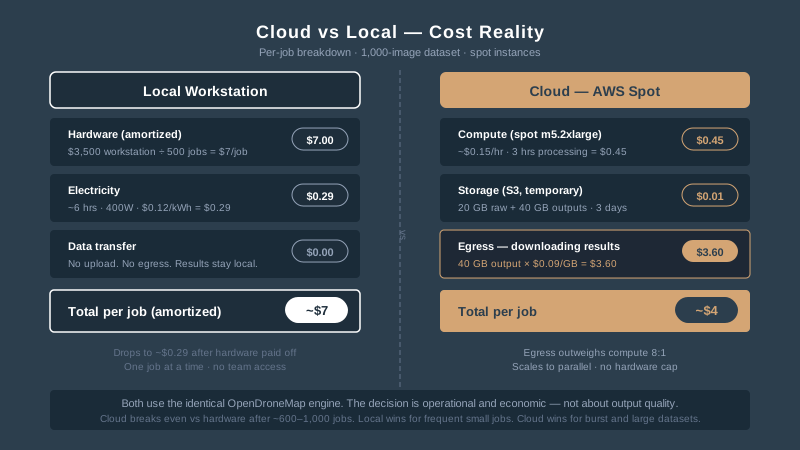
You get the AWS bill. Compute: $4.12. Storage: $0.87. Data transfer: $14.60.
Wait — the transfer costs more than the processing? Yes. And that’s the first thing every guide gets wrong about running WebODM in the cloud. They talk about instance types and Docker configurations. They never mention that downloading your own orthomosaic is the most expensive part of the job.
OpenDroneMap runs equally well on a $600 refurbished workstation and on a fleet of AWS spot instances. Both work. Neither is universally better. The decision comes down to dataset size, team structure, and how often data actually gets processed.
Here’s the decision framework.
The Real Cost of Local Processing
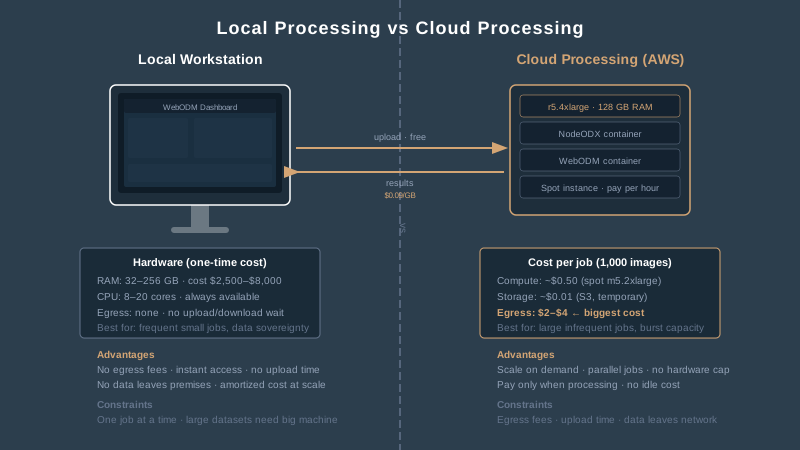
Local processing means a dedicated workstation sitting under your desk or in a closet. For WebODM to handle serious datasets — 1,000 to 5,000 images at 20 megapixels — you need real hardware.
Minimum specs for production work:
| Component | 500 images | 1,000 images | 5,000 images |
|---|---|---|---|
| RAM | 32 GB | 64 GB | 128–256 GB |
| CPU | 8 cores | 16 cores | 20+ cores |
| Storage | 500 GB SSD | 1 TB NVMe | 2+ TB NVMe |
| Processing time | 1–2 hours | 3–6 hours | 12–48 hours |
A workstation that handles 1,000-image datasets costs $2,500 to $4,000. One that reliably processes 5,000 images without crashing or swapping to disk runs $5,000 to $8,000. Add a CUDA-compatible GPU and you’re looking at another $500 to $2,000 — WebODM supports GPU acceleration on Linux, and it cuts feature extraction time significantly.
That sounds expensive. It is — upfront. But the machine sits there, amortizing. Process 200 jobs over three years and your per-job cost drops below $20. No internet upload required. No egress fees. No waiting for a spot instance to become available.
The catch: your workstation is a single point of failure. It processes one job at a time. If you’re running a 5,000-image dataset, that machine is unavailable for 12 to 48 hours. Your team can’t process anything else while it’s grinding.
The Real Cost of Cloud Processing
Cloud processing on AWS means spinning up an EC2 instance, running WebODM or NodeODX — formerly NodeODM — in Docker, processing your dataset, downloading the results, and terminating the instance. You pay only for the hours the machine runs.
Here’s what that actually costs using spot instances in us-east-2 (Ohio — typically the cheapest region):
Spot instance pricing for photogrammetry workloads:
| Dataset size | Instance type | RAM | Spot price/hr | Processing time | Compute cost |
|---|---|---|---|---|---|
| 500 images | m5.xlarge | 16 GB | ~$0.07 | 1–2 hours | $0.07–$0.14 |
| 1,000 images | m5.2xlarge | 32 GB | ~$0.15 | 2–4 hours | $0.30–$0.60 |
| 2,500 images | r5.2xlarge | 64 GB | ~$0.25 | 4–8 hours | $1.00–$2.00 |
| 5,000 images | r5.4xlarge | 128 GB | ~$0.45 | 8–16 hours | $3.60–$7.20 |
ClusterODX — the WebODM reverse-proxy/load-balancer fork targeting NodeODX (ClusterODM continues separately under OpenDroneMap for NodeODM users) — automates this. It selects the least powerful instance that can handle your image count, spins it up as a spot instance, processes the job, and terminates it. The configuration maps image counts to instance types automatically.
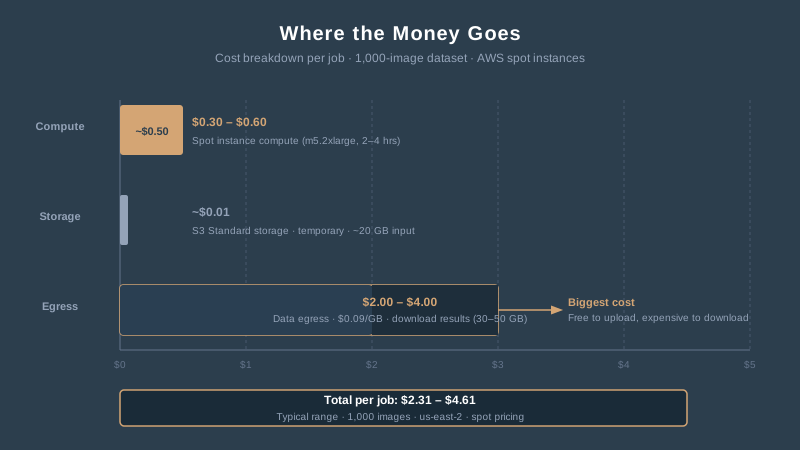
Compute is cheap. A 1,000-image job costs $0.30 to $0.60 in spot compute. Round it up to a dollar with overhead. That’s less than a cup of coffee.
Now add the costs nobody talks about.
Where the Money Actually Goes
Storage (S3): Your raw images need to live somewhere during processing. A 1,000-image dataset at 20 megapixels runs about 15 to 20 GB. S3 Standard storage costs $0.023 per GB per month. Storing 20 GB for a week costs roughly $0.01. Negligible.
But your outputs — orthomosaics, point clouds, DSMs, 3D models — add up. A full processing run can produce 30 to 50 GB of outputs. Store 10 projects and you’re at 300 to 500 GB, costing $7 to $12 per month. Leave old projects sitting in S3 Standard for a year and you’ve spent $84 to $144 on storage alone.
Data transfer (egress): This is the line item that surprises people. AWS charges $0.09 per GB for data leaving their network. Download a 40 GB orthomosaic and point cloud from a single job: $3.60. Process 10 jobs a month and download everything: $36 in transfer fees alone. The first 100 GB per month is free across all AWS services, which helps — but if you’re doing serious production work, you blow through that fast.
Upload costs: Free. AWS never charges for ingress. Uploading 20 GB of drone images costs nothing except your time and bandwidth.
The real per-job cost breakdown for a 1,000-image dataset:
| Cost component | Amount |
|---|---|
| Compute (spot) | $0.30–$0.60 |
| Storage (temporary) | ~$0.01 |
| Egress (downloading results) | $2.00–$4.00 |
| Total per job | $2.31–$4.61 |
Storage dominates over time. Egress dominates per job. Compute — the thing everyone optimizes for — is the cheapest part.
When Cloud Wins
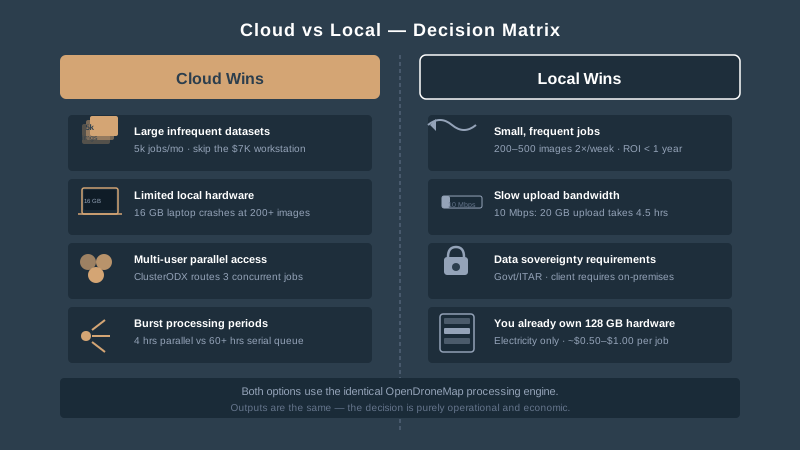
Large datasets you process occasionally. If you run a 5,000-image job once a month, the cloud saves you from buying a $7,000 workstation that sits idle 29 days out of 30. At $5 to $8 per job, you’d need to process 875 jobs to break even on the hardware. That’s 73 years of monthly processing.
No workstation available. You’re a solo operator running WebODM on a laptop with 16 GB of RAM. Anything over 200 images crashes. Spinning up an r5.2xlarge with 64 GB for two hours costs less than $0.50 and processes 1,000 images without breaking a sweat.
Team access. Three operators need to submit jobs simultaneously. A single workstation queues them serially — person two waits for person one to finish. ClusterODX on AWS spins up parallel nodes. Three jobs run at once. Total wall-clock time drops by two-thirds.
Burst capacity. End-of-quarter rush. You have 15 datasets to process in three days. Your workstation handles one at a time, 4 hours each — that’s 60 hours, almost three straight days with no interruptions. ClusterODX processes all 15 in parallel. Total time: 4 hours. Total cost: maybe $30 in spot instances.
When Cloud Doesn’t Win
Small, frequent jobs. If you process 200 to 500 images twice a week, a $3,000 workstation pays for itself within a year and eliminates the upload-download cycle entirely. Processing locally takes 1 to 2 hours. Uploading 10 GB, processing, and downloading 20 GB of results takes longer and costs more per job when you factor in your time.
Upload bandwidth is the bottleneck. Rural office with 10 Mbps upload? Pushing 20 GB of raw images to AWS takes 4.5 hours. The cloud instance processes the job in 2 hours. You spent more time uploading than processing. That math never works.
Data sovereignty requirements. Government contracts, ITAR-controlled imagery, or clients who contractually require data to stay on-premises. AWS GovCloud exists for ITAR compliance, but it’s more expensive and more complex to configure. If your client says “our data doesn’t leave our network,” the conversation is over. Process locally.
Latency-sensitive workflows. You need to QC the orthomosaic, adjust parameters, and reprocess — iterating three or four times on the same dataset. Each iteration means another upload-download cycle. Local processing gives you instant access to intermediate results. Cloud processing adds 30 to 60 minutes of transfer overhead per iteration.
You already own the hardware. If you have a workstation with 128 GB of RAM sitting under your desk, the marginal cost of processing another job is electricity. Roughly $0.50 to $1.00 for a 6-hour run. No cloud service beats that.
How Cloud Compares to DroneDeploy and Pix4D Cloud
Running your own WebODM on AWS isn’t the only cloud option. DroneDeploy starts at $349 per month — $4,188 per year. Pix4D Cloud starts at $49 per month — $590 per year for the basic tier, $2,988 per year for Advanced.
WebODM on AWS at $3 to $5 per job, processing 10 jobs per month, runs $360 to $600 per year. Comparable to Pix4D Cloud’s entry tier. One-fifth the cost of DroneDeploy.
The tradeoff: DroneDeploy and Pix4D handle everything — upload, process, host, share. You manage nothing. WebODM on AWS means you manage the infrastructure: Docker, EC2, S3 buckets, security groups, IAM roles. You own the pipeline, but you maintain it.
| Platform | Annual cost (10 jobs/mo) | You manage | Processing control |
|---|---|---|---|
| DroneDeploy | ~$4,188 | Nothing | Limited parameters |
| Pix4D Cloud (Advanced) | ~$2,988 | Nothing | Moderate parameters |
| WebODM on AWS | ~$360–$600 | Everything | Full control |
| WebODM local | ~$0 (amortized) | Hardware | Full control |
If you want full control over processing parameters — and if you’re reading this, you probably do — the self-hosted options are the only game in town. The question is whether you host on your desk or in someone else’s data center.
The Setup Isn’t Trivial (But It’s Not Hard)
Running WebODM on a single EC2 instance takes about 30 minutes of setup if you know Docker. Launch an Ubuntu instance, install Docker and docker-compose, clone the WebODM repo, run ./webodm.sh start. The WebODM documentation covers this step by step.
ClusterODX for auto-scaling is more involved. You need an S3 bucket, a VPC with proper security groups, an IAM role for EC2 and S3 access, and a configuration file mapping image counts to instance types. Budget 2 to 4 hours for initial setup, including testing. After that, it’s hands-off — submit a job through the WebODM interface and ClusterODX handles the rest.
The real complexity is operational: monitoring spot instance interruptions, managing S3 lifecycle policies so old data doesn’t accumulate, and securing your instance against open-port exposure. Not rocket science, but not click-and-deploy either.
To put it plainly: if you’re comfortable with Docker and basic AWS console navigation, you can do this. If “security group” sounds like a therapy session, consider Pix4D Cloud until you’re ready.
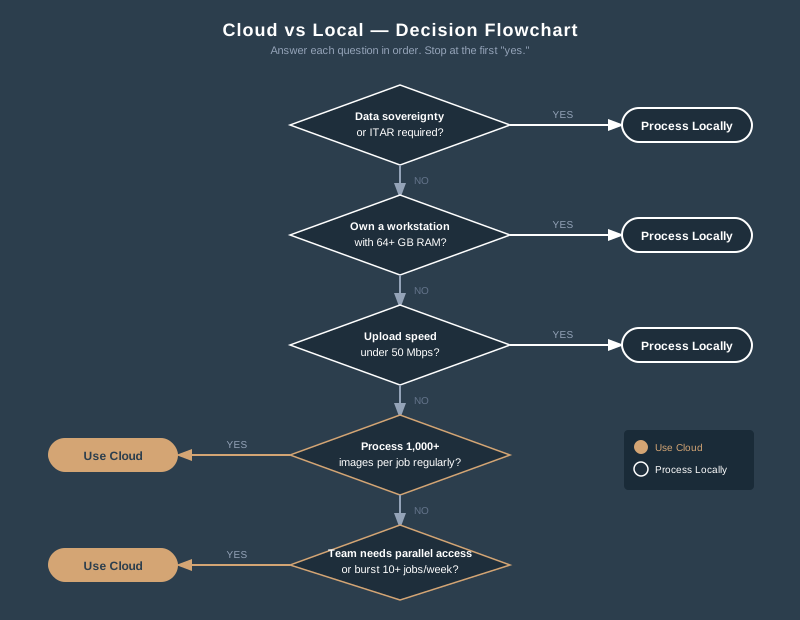
The Decision Framework
Run through these questions in order. The first “yes” gives you your answer.
- Is your data subject to sovereignty or ITAR restrictions? Process locally.
- Do you already own a workstation with 64+ GB RAM? Process locally unless you need parallel capacity.
- Is your upload speed under 50 Mbps? Process locally — transfer overhead kills the cloud advantage.
- Do you process more than 1,000 images per job regularly? Cloud wins on cost per job.
- Do multiple team members need simultaneous processing? Cloud wins on parallelism.
- Do you have burst periods with 10+ jobs in a week? Cloud wins on elasticity.
- None of the above? Either works. Local is simpler. Cloud scales better.
Cloud processing on AWS costs $3 to $5 per job for typical 1,000-image datasets when you use spot instances. Most of that cost is egress — downloading your own results — not compute. A $3,000 workstation breaks even against cloud at roughly 600 to 1,000 jobs, depending on dataset size.
The cloud wins for large infrequent jobs, team access, and burst capacity. Local wins for small frequent jobs, slow internet, and data sovereignty. Both produce identical outputs — it’s the same OpenDroneMap engine either way.
The guides that tell you cloud is always cheaper are wrong. The guides that tell you local is always better are also wrong. The answer depends on your dataset size, your processing frequency, your upload speed, and your tolerance for managing AWS infrastructure.
Run the numbers for your operation. The math is straightforward. The answer is yours.