


ODM Cloud Series — Crawl / Walk / Run · Article 1 of 10
From zero to a self-hosted cloud processing pipeline
This series builds a production WebODM setup from scratch — starting with the ecosystem fundamentals, moving through AWS spot instance setup and cost control, and finishing with auto-scaling, security, and a head-to-head comparison with commercial platforms. Each article stands alone; read in order to build the full stack.
Pricing note: AWS pricing, spot instance rates, and third-party software costs change frequently. All figures reflect rates as of April 2026 and should be verified against current pricing pages before making infrastructure decisions.
Someone tells you to “use ODM” for processing your drone imagery. You Google it. You find OpenDroneMap. Then WebODM. Then NodeODX. Then ClusterODX. Then — if you dig further — ODX, CloudODX, PyODX, NodeODM, ClusterODM, PyODM. Two parallel sets of names, multiple GitHub organizations, and almost no documentation explaining how any of it fits together.
You’re not confused because you’re uninformed. You’re confused because of an April 2026 organizational split that left two forks of the same codebase — one keeping the “ODM” name under the OpenDroneMap nonprofit, the other rebranding everything to “ODX” under the new WebODM organization.
Here’s what’s actually going on: OpenDroneMap is not a single application. It’s a four-layer ecosystem (engine, API, load balancer, UI) and after the split, each layer has two implementations. Most people — including experienced operators — conflate them. That conflation leads to wrong installation choices, mismatched Docker image tags, and frustration when the “free Pix4D alternative” doesn’t behave the way they expected.
This article untangles the layers, explains what changed in the split, and tells you which components you actually need.
In short: OpenDroneMap is free, open-source photogrammetry software that turns drone images into orthomosaics, point clouds, and 3D models. WebODM is its web interface — the part most operators actually use. Together they are the leading open-source alternative to Pix4D and Metashape, and you can self-host the whole stack for free or run it in the cloud.
The Engine: ODM (OpenDroneMap) and ODX (WebODM Fork)
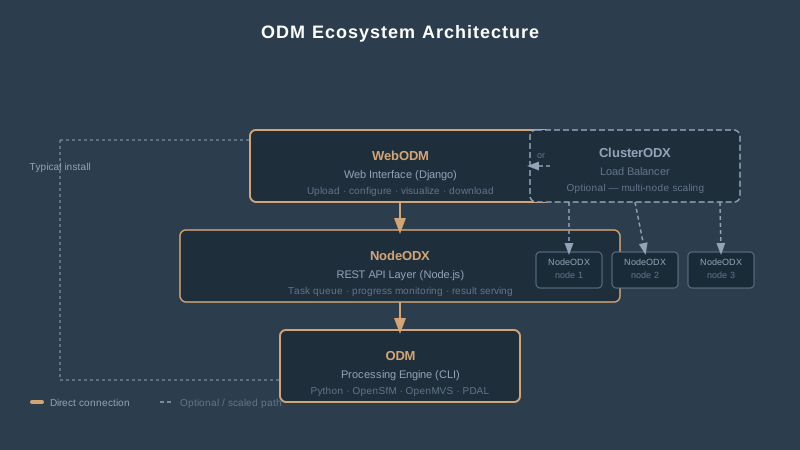
The processing engine is a command-line toolkit written in Python. It takes aerial images as input and produces orthomosaics, point clouds, 3D textured models, and digital elevation models as output. That’s it. No interface. No buttons. Just a CLI that reads images from a directory and writes outputs to another directory.
The engine exists in two forks: ODM at github.com/OpenDroneMap/ODM (the original OpenDroneMap project, ~6,100 stars, AGPL-3.0) and ODX at github.com/WebODM/ODX (the WebODM fork created during the April 2026 split). The codebases share an origin and remain functionally equivalent today; they will diverge over time as the two projects develop independently.
Under the hood, the engine chains together a sequence of open-source libraries: OpenSfM for structure-from-motion, OpenMVS for dense reconstruction, PDAL for point cloud manipulation, and GRASS GIS for raster processing. The pipeline is sequential — feature extraction, matching, sparse reconstruction, dense point cloud, mesh generation, texturing, orthophoto, DEM. Each step feeds the next.
If you’re comfortable with Docker and terminal commands, you can run either engine directly. Most people aren’t, and that’s fine — both are designed to be wrapped by other tools. Think of it as the engine block inside a car. Essential, but you don’t interact with it by hand unless you’re a mechanic.
Which one you end up using is determined by which API layer (NodeODM vs NodeODX) you install — the upstream WebODM UI and the standard Docker Compose recipes default to NodeODX + ODX in the WebODM organization’s distribution.
NodeODX (and NodeODM): The API Layer
The API layer is a lightweight REST service written in Node.js that wraps the engine. It turns the command-line engine into a network-accessible processing service.
After the April 2026 split, this layer exists as NodeODX at github.com/WebODM/NodeODX (the WebODM fork, paired with ODX) and NodeODM at github.com/OpenDroneMap/NodeODM (the OpenDroneMap nonprofit’s continuation, paired with ODM). The two implement the same API surface, but their Docker images and release cadences are independent. The rest of this article uses NodeODX as the default name since it’s what ships with the upstream WebODM installer.
You send images and processing parameters to NodeODX over HTTP. It queues the task, hands the images to the engine, monitors progress, and returns results when processing completes. That’s the entire job — accept tasks, manage the queue, expose status, serve outputs.
Why does this exist? Because WebODM needs something to talk to. WebODM doesn’t process images itself. It’s a web interface that sends tasks to one or more NodeODX instances running somewhere on your network. NodeODX is the translation layer between “user clicks a button” and “the engine crunches 2,000 photos into an orthomosaic.”
You can also hit the API directly with Python (via the PyODX library at github.com/WebODM/PyODX, or PyODM at github.com/OpenDroneMap/PyODM for the OpenDroneMap stack), with curl, or with any HTTP client. If you’re building automated processing pipelines — a drone lands, uploads images to a server, processing kicks off without human intervention — this layer is the integration point.
One NodeODX (or NodeODM) instance equals one processing node. One task at a time per node, unless you configure it otherwise. Multiple simultaneous projects require multiple instances — which brings us to ClusterODX.
ClusterODX: The Load Balancer
ClusterODX — the WebODM fork at github.com/WebODM/ClusterODX, sibling to the still-active OpenDroneMap/ClusterODM that targets NodeODM — solves a specific problem: you have more tasks than a single NodeODX instance can handle.
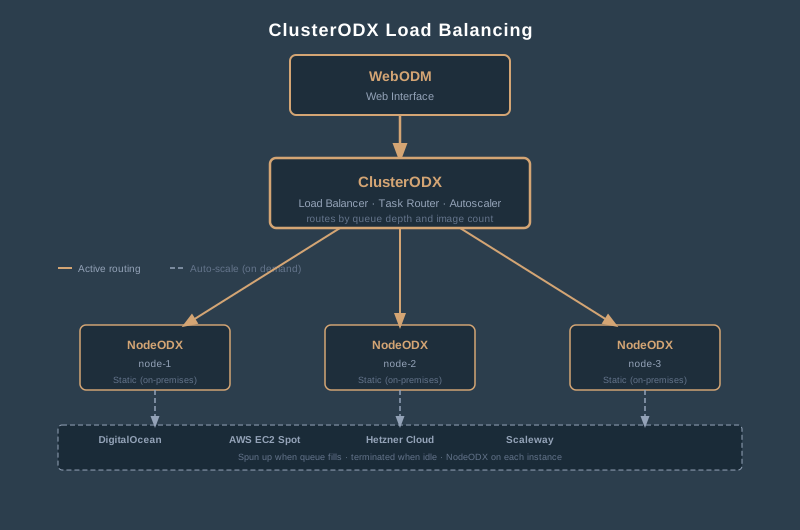
It’s a reverse proxy and load balancer that sits in front of multiple NodeODX nodes. Submit a task to ClusterODX, and it routes that task to whichever node has available capacity — factoring in queue size, image count limits, and slot availability.
For a solo operator processing one dataset at a time on a single machine, ClusterODX is irrelevant. For a firm processing dozens of datasets per week, or a university research lab with multiple students submitting jobs, ClusterODX is what turns a single-machine tool into a scalable processing service.
The autoscaling is the interesting part. ClusterODX can automatically spin up cloud nodes on DigitalOcean, AWS, Hetzner, or Scaleway when the queue fills up, and tear them down when processing finishes. You submit 15 datasets on Monday morning. ClusterODX spins up 10 cloud instances, distributes the work, and shuts them down when the queue empties. You pay for compute time, not idle servers.
It can also split large datasets across multiple nodes using ODM’s split-merge strategy — a single 5,000-image project gets divided into submodels, each submodel processes on a different node, and the results merge back together. That’s how WebODM Lightning (the paid cloud service) handles large datasets behind the scenes.
One constraint worth noting: ClusterODX always needs at least one static NodeODX node attached as a reference. You can’t rely entirely on autoscaled cloud nodes.
WebODM: The Interface Most People Actually Use
WebODM is the web-based graphical interface for the ecosystem. It’s what most people mean when they say “I use ODM.” Behind the scenes, WebODM talks to NodeODX, which talks to ODM. But from the user’s perspective, you upload images, set processing parameters, click “Start,” and wait.
The interface handles project management, task configuration, map visualization (with a built-in Leaflet viewer), 3D model viewing, measurement tools, and result downloads. It supports GCP files for georeferencing, lets you set processing options through dropdown menus instead of CLI flags, and provides progress monitoring during processing.
WebODM comes in two flavors:
Self-hosted (free). You install it on your own hardware via Docker. You manage the machine, the storage, the RAM, the processing power. The software is free. The hardware is your problem. This is the version with roughly 3,800 GitHub stars and an active open-source community.
WebODM Lightning (paid cloud service). You upload images to cloud servers managed by the WebODM team. Processing happens on their infrastructure — specifically on the ODX engine with ClusterODX distributing load across nodes. Plans range from pay-as-you-go to $99/month for the Business tier (unlimited maps, up to 3,000 images per map, 1,000 GB storage). The Starter plan runs $29/month ($24 billed annually) for 12 maps per 30 days. The Pro plan — the most popular — runs $42/month ($35 billed annually) for unlimited maps, up to 1,500 images per map, and 100 GB storage.
Lightning runs the WebODM-fork stack end to end. Same algorithms as a self-hosted install, same outputs. The difference is you’re not managing hardware, Docker, or Linux administration.
Why “X”? The April 2026 Naming Split
If you’ve made it this far and you’re still wondering what the X stands for: it’s the marker the WebODM organization adopted to distinguish its fork after the April 2026 split from the OpenDroneMap nonprofit. ODM → ODX, NodeODM → NodeODX, ClusterODM → ClusterODX, PyODM → PyODX. Same architecture, new namespace.
The split is covered in detail in the WebODM splits from OpenDroneMap article. The short version: governance and roadmap disagreements between Piero Toffanin (WebODM maintainer) and the OpenDroneMap nonprofit board led to a clean fork. The OpenDroneMap nonprofit retains the ODM/NodeODM/ClusterODM/PyODM trademark and continues development at github.com/OpenDroneMap. The WebODM organization at github.com/WebODM forked the entire stack under new names — and added one net-new component, CloudODX, a command-line tool for running ODX jobs against remote cloud nodes without the WebODM UI in the middle.
One consequence catches people out: the WebODM UI itself moved to the WebODM org, so the OpenDroneMap nonprofit spun up its own web interface — OpenDroneMap Desktop, a rebranded fork of WebODM distributed as a paid installer through opendronemap.org (the source stays free on GitHub). So post-split, each side ships its own UI: WebODM under the WebODM org, OpenDroneMap Desktop under the nonprofit. They are not the same application, and their installers are not interchangeable.
The two stacks today:
| Layer | WebODM fork (github.com/WebODM) | OpenDroneMap (github.com/OpenDroneMap) |
|---|---|---|
| UI | WebODM | OpenDroneMap Desktop (rebranded WebODM fork) |
| Cloud CLI | CloudODX | — |
| Load Balancer | ClusterODX | ClusterODM |
| Python SDK | PyODX | PyODM |
| API | NodeODX | NodeODM |
| Engine | ODX | ODM |
Practical guidance: if you install with the upstream WebODM webodm.sh script (or pull the official Docker images), you’re getting the WebODM-fork stack — ODX/NodeODX/ClusterODX. If you specifically pull opendronemap/* Docker images or build from github.com/OpenDroneMap/*, you’re on the OpenDroneMap stack. Don’t mix images across forks; Docker tag compatibility is no longer guaranteed.
How the Pieces Fit Together
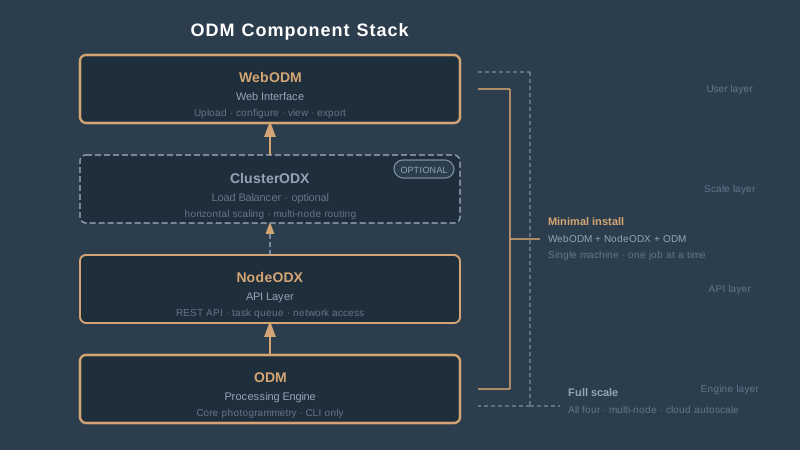
The architecture is a stack. The minimal install (WebODM + NodeODX + ODX) gets you processing in 10 minutes; ClusterODX and CloudODX only enter the picture for specific use cases.
| Layer | Component | Role |
|---|---|---|
| User Interface | WebODM | Web app for uploading images, setting parameters, viewing results |
| Cloud CLI (optional) | CloudODX | Command-line tool for submitting jobs to remote ODX nodes without the WebODM UI |
| Load Balancer (optional) | ClusterODX | Distributes tasks across multiple processing nodes; needed only for horizontal scaling |
| API / Task Manager | NodeODX | REST API that queues and manages processing tasks |
| Processing Engine | ODX | Command-line toolkit that does the actual photogrammetry |
(For the OpenDroneMap fork, substitute ODM/NodeODM/ClusterODM — the layers and roles are identical; only the project names differ.)
A minimal installation is WebODM + NodeODX + ODX on a single machine. That’s what Docker Compose deploys when you follow the standard install instructions. ClusterODX only enters the picture when you need horizontal scaling. CloudODX is for headless integrations — drone lands, uploads to S3, CloudODX kicks off processing on a remote ODX node, results push back without ever opening a web UI.
For programmatic access without the web interface, you can hit NodeODX’s API directly using PyODX or raw HTTP requests. For maximum scale, you point WebODM at ClusterODX instead of a single NodeODX instance, and ClusterODX handles distribution across multiple ODX nodes — including auto-scaled cloud nodes spun up on demand.
The License: AGPL-3.0 and What It Means for You
Both forks — every component in both the OpenDroneMap stack and the WebODM stack — are released under the GNU Affero General Public License v3.0 (AGPL-3.0). This matters more than most users realize.
If you’re processing your own drone data and delivering orthomosaics to clients: No issue. You’re using the software as a tool. AGPL doesn’t restrict the outputs — your maps, point clouds, and models are yours.
If you’re building a SaaS product that wraps ODM: Pay attention. AGPL requires that if you modify the software and make it available to users over a network, you must release your source code under the same license. This is the “network copyleft” clause — it closes the SaaS loophole that standard GPL leaves open. Google bans AGPL software internally for this reason.
If you’re running WebODM Lightning: The WebODM team (UAV4GEO, Piero Toffanin) holds copyright on the WebODM-fork code. They can dual-license it — offering it as AGPL for open-source use and under a commercial license for their own cloud service. That’s a standard open-core business model. The OpenDroneMap nonprofit holds copyright on its fork independently under the same dual-licensing prerogative.
To put it plainly: use the engine to process your own imagery, no strings attached. Build a competing cloud service on top of it, and you’re sharing your code with the world. For 95 percent of drone operators, the license is a non-issue.
Hardware Requirements: The Real Numbers
ODM’s official minimum is a 64-bit CPU, 4 GB RAM, and 20 GB disk space. That processes maybe 100 images before the machine runs out of memory.
Here’s what you actually need:
| Dataset Size | RAM Required | Notes |
|---|---|---|
| 40 images | 4 GB | Test datasets only |
| 250 images | 16 GB | Small site, single flight |
| 500 images | 32 GB | Typical commercial project |
| 1,500 images | 64 GB | Large site or multi-flight |
| 5,000 images | 256 GB | Enterprise-scale, consider ClusterODX |
CPU cores matter — ODM parallelizes aggressively. A 20-core machine processes a 1,000-image dataset significantly faster than a 4-core laptop. The relationship isn’t linear, but more cores reliably means faster processing up to about 20 cores.
GPU acceleration? In both ODM 3.6.0 and the equivalent ODX release, GPU feature extraction is functional via the :gpu Docker image tag and delivers roughly a 2x speedup on the feature extraction stage specifically. That said, GPU acceleration is limited to feature extraction — bundle adjustment, dense reconstruction, mesh generation, and orthophoto production remain CPU-bound. The pipeline as a whole is still much slower than Metashape or RealityCapture, which leverage CUDA across more stages. GPU is worth enabling if you have compatible hardware, but don’t expect end-to-end processing times to halve.
Storage needs scale with image count and resolution. A 500-image DJI Mavic 3E dataset at 20 MP per image requires roughly 50-80 GB of working space during processing. Use NVMe SSDs. Processing on spinning hard drives is painful.
ODM vs. the Commercial Alternatives
The question everyone asks: how does ODM compare to Pix4D, Metashape, and the other photogrammetry platforms?
Accuracy. Published peer-reviewed comparisons — Pell et al. (2022) in Drones, Mora-Felix et al. (2024) in Physica Scripta — show ODM producing competitive results when properly configured with GCPs. The accuracy gap between ODM and commercial platforms is smaller than the gap between a well-executed flight and a poorly executed one. Software choice matters less than GCP placement, overlap settings, and flight altitude — see drone survey accuracy fundamentals for the RMSE and checkpoint validation framework behind those numbers.
Processing speed. ODM is slower. It’s CPU-only. Metashape and RealityCapture leverage GPU acceleration and process the same datasets in a fraction of the time, especially at scale. For a 500-image project, the difference might be 2 hours versus 45 minutes. For 5,000 images, the gap widens considerably.
Quality reporting. This is where ODM falls short for professional survey work. Pix4D generates a detailed quality report with checkpoint RMSE, reprojection error, overlap maps, and camera calibration statistics — the paper trail clients and regulators demand. ODM gives you the outputs but not the audit documentation. You’ll generate your own accuracy report if your client requires one.
GCP workflow. Functional in WebODM, but less polished than Pix4D or Metashape. You can import GCP files in standard formats and mark points on images. The workflow works — it just lacks the refinement and diagnostic feedback of commercial tools.
Price. ODM is free (self-hosted) or $24-99/month (Lightning, billed annually). Pix4Dmapper runs $332.50/month or $3,990/year annual subscription (as of 2026-04-22); perpetual licensing is no longer advertised. Metashape Professional is a $3,499 perpetual license. DroneDeploy starts at $349/month (Individual tier, billed annually). The cost difference is significant, especially for small operations or academic users.
| Feature | ODM (Self-Hosted) | Pix4Dmapper | Metashape Pro | DroneDeploy |
|---|---|---|---|---|
| Cost | Free | $332.50/mo | $3,499 perpetual | $349/mo |
| Accuracy | Competitive with GCPs | Industry standard | Industry standard | Cloud-dependent |
| Speed | CPU-only, slower | Moderate, GPU-assisted | Moderate, GPU-assisted | Cloud-processed |
| Quality Report | Manual | Comprehensive | Comprehensive | Automated |
| GCP Workflow | Functional | Polished | Polished | Simplified |
| Self-Hosted | Yes | Desktop only | Desktop only | No |
| API Access | Full REST API | Limited | Python scripting | API available |
Who Should Use ODM — and Who Shouldn’t
ODM makes sense for:
- Budget-constrained operators. Startup drone companies, academic researchers, and international NGOs where software licensing is a real barrier.
- Pipeline builders. If you’re automating processing — drone lands, images upload, processing starts, outputs push to a GIS server — NodeODX’s REST API is purpose-built for this. No other platform makes programmatic integration this straightforward.
- Learning the craft. Processing your first few hundred datasets? Use the free tool. Understand what every parameter does. Graduate to commercial software when you need the quality reporting.
- Linux-native environments. ODM runs natively on Linux via Docker. If your processing infrastructure is server-based, ODM fits without the Windows licensing overhead.
ODM is the wrong choice for:
- Regulated deliverables requiring audit documentation. If your client needs a signed quality report with checkpoint RMSE by axis, overlap diagnostics, and camera calibration metrics — Pix4D or Metashape. ODM produces accurate outputs, but not the documentation that defends them.
- Time-sensitive high-volume production. If you’re processing 20 datasets per week and turnaround matters, ODM’s CPU-only pipeline is a bottleneck. Commercial tools with GPU acceleration will outpace it.
- Operators who don’t want to manage infrastructure. Self-hosted WebODM means Docker, Linux administration, storage management, and troubleshooting. If that sounds like overhead you don’t want, WebODM Lightning or a fully managed platform like DroneDeploy is more appropriate.
Getting Started: The Practical Path
If you’re new to ODM, here’s the shortest path to a working installation:
- Install Docker Desktop on your machine (Windows, macOS, or Linux).
- Clone the WebODM repository from GitHub.
- Run
./webodm.sh start(Linux/macOS) orwebodm.bat start(Windows). - Open a browser to
localhost:8000. WebODM is running.
That command deploys WebODM, NodeODX, and ODM together in Docker containers. You’re processing images within 10 minutes of starting the install.
For your first test, use a small dataset — 40 to 100 images. Default processing settings. See what the outputs look like. Then start adjusting parameters: resolution, feature quality, mesh settings. The documentation at docs.webodm.org covers every parameter.
If self-hosting isn’t your thing, WebODM Lightning lets you start processing immediately with 150 free credits — no installation required.
OpenDroneMap is not one thing — and after the April 2026 split, the components come in two parallel flavors. Whichever fork you land on, the architecture is the same four-layer stack: the engine (ODX or ODM) processes images, the API layer (NodeODX or NodeODM) manages tasks, the load balancer (ClusterODX or ClusterODM) distributes load across nodes, and WebODM provides the interface most users interact with. The WebODM stack also adds CloudODX for headless cloud workflows.
The ecosystem is free, open-source, and genuinely capable. Either fork produces accurate orthomosaics, point clouds, and elevation models when fed well-executed flights with proper ground control. Neither will replace Pix4D’s quality reporting or RealityCapture’s processing speed — those are real gaps. But for operators who need a capable processing pipeline without a $400/month subscription, this is the most credible open-source option available.
Know the components. Pick the fork that matches your install method (webodm.sh → WebODM stack; opendronemap/* Docker images → OpenDroneMap stack). And stop calling everything “WebODM” — now you know the difference.