


ODM Cloud Series — Crawl / Walk / Run · Article 3 of 10
From zero to a self-hosted cloud processing pipeline
This series builds a production WebODM setup from scratch — starting with the ecosystem fundamentals, moving through AWS spot instance setup and cost control, and finishing with auto-scaling, security, and a head-to-head comparison with commercial platforms. Each article stands alone; read in order to build the full stack.
Pricing note: AWS pricing, spot instance rates, and third-party software costs change frequently. All figures reflect rates as of April 2026 and should be verified against current pricing pages before making infrastructure decisions.
Your first AWS bill arrives. The subject line says “$47.23 due.” You remember spinning up one instance for two hours, processing 500 images, downloading the results, and shutting it down. You expected $2.50 in compute, maybe $3.50 with storage and transfer. You opened the bill expecting $5. Instead, it’s $47.
Something broke. You left an instance running. You created resources and forgot. Or AWS is scamming you.
None of those are true.
AWS billing has three separate cost buckets — compute, storage, and data transfer — and they don’t behave the way you’d expect. Most guides cover compute and ignore the other two. That’s where the surprises live. Once you understand the breakdown, the $47 makes sense. And you won’t repeat the mistake.
The Three Cost Buckets
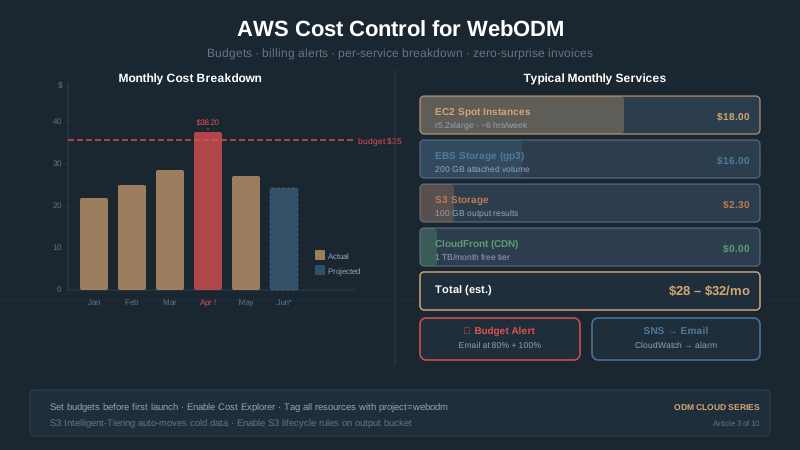
AWS charges for three things that matter to WebODM users: EC2 instances (compute), EBS volumes (storage), and data transfer (egress). Each scales independently and appears as a separate line item on your bill.
Compute (EC2). Pay by the second per running instance. r5.2xlarge spot is $0.153/hr. Run 1 hour: charged $0.153. Run 2 hours: charged $0.306. Terminate: billing stops. Intuitive — you know the duration.
Storage (EBS volumes). Pay by GB per month, regardless if instance runs. 200 GB gp3 costs $0.08/GB/month = $16/month. Create April 1, delete April 15: charged $8. Create April 1, forget until May 15: charged $32. Volumes persist after instance stops. This surprises people.
Data transfer (egress). AWS charges $0.09/GB for data leaving the network. Download results (orthomosaic, point cloud, etc.) and pay. Upload is free. AWS wants your data in, charges to get it out. 30 GB orthomosaic: $2.70. 50 GB archive: $4.50. Process 10 jobs/month, download all: $27–$45/month in egress. Dominates per-job costs but isn’t obvious.
The #1 Mistake: Leaving an Instance Running
Launch r5.2xlarge, start processing, close your laptop and forget.
On-demand r5.2xlarge: $0.504/hr (vs $0.15 spot). Run a week: 7 × 24 × $0.50 = $84. Run a month: $360.
Nightmare scenario. But entirely preventable — terminate instances immediately after use. Don’t stop “just in case.” Don’t “leave until end of day.” Delete it when you’re done downloading.
Even better: set up a CloudWatch alarm to auto-terminate instances older than 4 hours. That’s a more advanced move. For now, just manually terminate every time.
Discipline: After downloading, before closing your laptop, right-click instance → “Terminate Instance.” Watch it vanish. State changes to “terminated.” Only then are you done.
Storage Costs: The Persistent Surprise
Create a 200 GB EBS volume for your dataset. Processing finishes. Download results. You’re done.
But you don’t delete the volume. It persists. End of month: AWS charges $16 — even though you used the instance 2 hours.
Why: “Delete on termination” is unchecked by default. EBS survives instance shutdown — useful if data matters. But most WebODM users don’t need it. You’ve downloaded everything. Volume is waste.
Fix: When launching, check “Delete on Termination” for all EBS volumes. Volumes vanish when instance terminates. No orphaned storage. No surprise charges.
Already created volumes? Check EC2 console: Elastic Block Store → Volumes. Find unattached volumes — these are orphaned. Delete immediately. Each 200 GB orphan costs $0.13/day.
Data Transfer Costs: The Biggest Per-Job Expense
This is where AWS bills blow up.
AWS charges $0.09/GB for egress (data leaving the network). Uploading is free. Downloading costs.
A typical 500-image dataset produces:
- Orthomosaic (GeoTIFF): 10–15 GB
- Point cloud: 5–10 GB
- DSM (Digital Surface Model): 3–5 GB
- Textured 3D mesh: 5–10 GB
- Processing logs and metadata: 1–2 GB
Total output: 25–40 GB per job. At $0.09/GB: $2.25–$3.60 per job in transfer costs alone.
Most guides lead with compute ($0.30 for 2 hours spot) and ignore egress. Egress is 6–10x more expensive than processing.
Cost optimization: AWS gives 100 GB free egress per month across all services. Process 2–3 jobs/month: no egress cost. Process 10 jobs (300 GB): pay $0.09 × (300 – 100) = $18 egress. Cheap but visible.
Process 50 jobs/month? You’re at $0.09 × (1,500 – 100) = $126/month in egress. At that scale, consider:
CloudFront CDN. Cache and deliver with CloudFront. First delivery: $0.085/GB (slightly cheaper). Subsequent downloads of same file: $0.01/GB (90% savings). Client downloads three times, CloudFront saves money.
S3 Transfer Acceleration. Speeds uploads/downloads but increases egress cost. Not recommended for WebODM.
Presigned URLs + client S3 downloads. Generate presigned URL for temporary S3 access. Client downloads directly. AWS doesn’t charge you egress. Technically free but requires AWS SDK or S3 browser. Not practical for most.
For now: assume $0.09/GB egress. Budget $2.70 for typical 30 GB job.
The Real Per-Job Cost Calculation
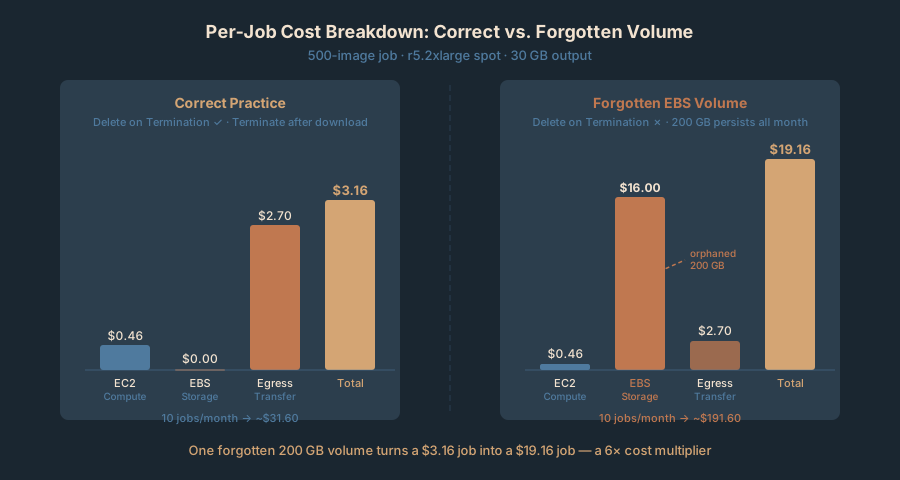
Here’s what a 500-image job actually costs on AWS:
| Cost component | Amount |
|---|---|
| EC2 spot (r5.2xlarge, 3 hours × $0.153/hr) | $0.46 |
| EBS volume (200 GB, temporary, deleted after) | $0.00 |
| Data transfer (30 GB output × $0.09/GB) | $2.70 |
| Total per job | $3.16 |
10 jobs/month: $31.60. 20 jobs/month: $63.20. Costs stay manageable even at volume.
But if you forget to delete the EBS volume:
| Cost component | Amount |
|---|---|
| EC2 spot (3 hours) | $0.46 |
| EBS volume (200 GB, persisting all month) | $16.00 |
| Data transfer (30 GB) | $2.70 |
| Total per job (with storage mistake) | $19.16 |
One forgotten volume turns $3 into $19. A month of forgotten volumes runs $150+ instead of $30. This is your $47 bill.
Setting Up AWS Budgets and Billing Alerts
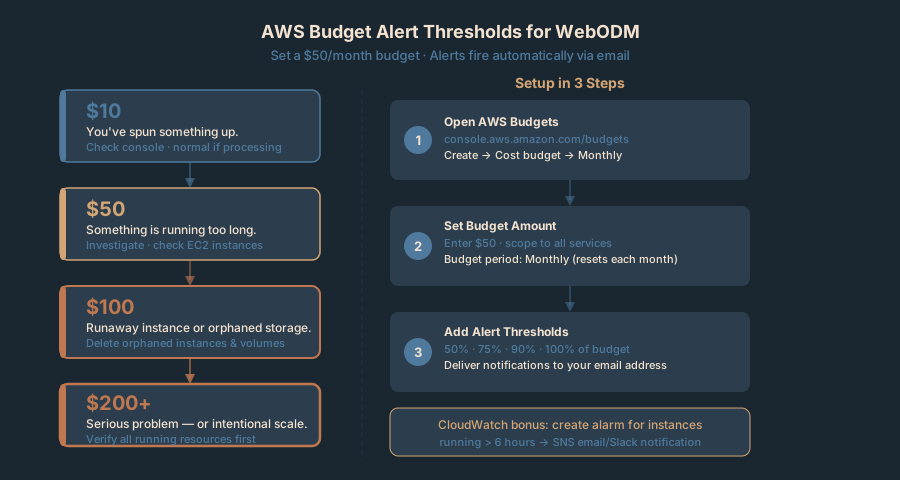
Set these up before your first real job. AWS Budgets and CloudWatch alarms catch problems before they get expensive.
Navigate to AWS Budgets. Search “Budgets” in console or go to console.aws.amazon.com/budgets.
Create a monthly budget:
- Set $50/month (or whatever feels safe).
- AWS alerts at 50%, 75%, 90%, and 100%.
- Email notifications at each threshold.
Recommended alert thresholds for WebODM work:
| Budget | Action |
|---|---|
| $10 | You’ve spun something up. Sanity check the console. |
| $50 | Something is definitely running longer than expected. Investigate immediately. |
| $100 | Something is very wrong. Potential runaway instance or forgotten storage. |
| $200+ | You have a serious problem or you’ve scaled to production. Verify intentionally. |
Process 5 jobs/month (expected ~$15)? Set budget to $50. Above $25 signals something unexpected.
Add CloudWatch alarm for instance age. Optional but powerful.
Go to CloudWatch → Alarms → Create Alarm. Trigger if instance running more than 6 hours. Catches forgotten instances before they burn money. Pair with SNS notification for email or Slack alert.
Comparison: Self-Hosted AWS vs. DroneDeploy vs. Pix4D
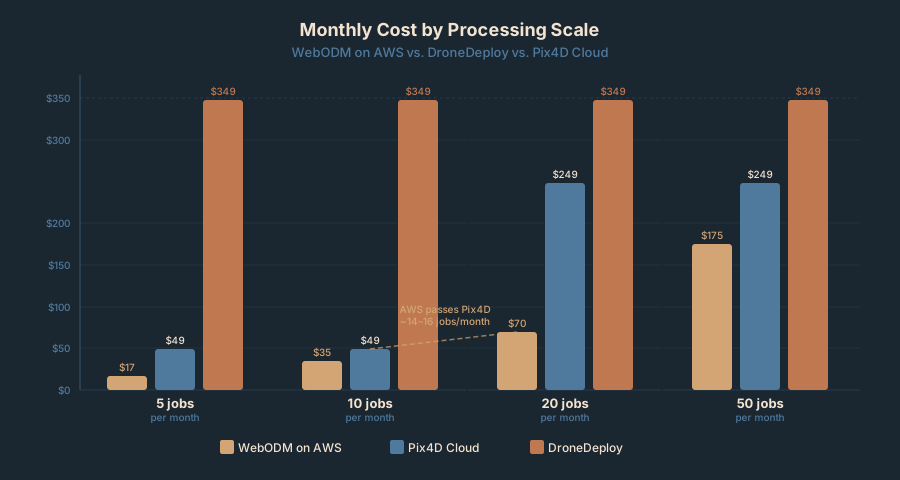
Here’s the real cost picture when you process at scale:
| Scenario | WebODM AWS | DroneDeploy | Pix4D Cloud |
|---|---|---|---|
| 5 jobs/month | $15–$20 | $349 | $49 |
| 10 jobs/month | $30–$40 | $349 | $49 |
| 20 jobs/month | $60–$80 | $349 | $249 |
| 50 jobs/month | $150–$200 | $349 | $249 |
Occasional jobs (under 10/month)? Pix4D Cloud at $49/month is competitive. Regular work (20+ jobs/month)? AWS wins.
The trade-off is obvious: DroneDeploy and Pix4D handle infrastructure for you. WebODM on AWS means you manage security groups, IAM, EBS, and billing yourself. If the AWS console makes you uncomfortable, DroneDeploy’s simplicity is worth the premium. If you’re technical and processing regularly, AWS pays for itself in a month or two.
Bottom Line
Your $47 bill came from one of three: instance left running, forgotten EBS volume, or egress catching you off-guard.
Three practices prevent it:
-
Terminate instances immediately. Download results, terminate. Don’t stop. Delete. Billing stops.
-
Check “Delete on Termination” for all volumes. When instance vanishes, storage goes with it. No orphaned volumes.
-
Budget $2.70 per 30 GB output. Egress dominates. 10 jobs/month = 300 GB = $18 egress. That’s your per-job cost.
Set AWS Budgets threshold to $50. Alerts at 50%, 75%, 90%. Alert arrives, log in, verify. Unrecognized instances or volumes? Delete. Takes 30 seconds, saves your month.
The cost structure isn’t punitive — just different from what you’re used to. Learn the three buckets and AWS becomes predictable.