PIX4Dmapper End of Sale: Alternatives and 3-Year Costs
PIX4Dmapper is discontinued: sales end Jan 1, 2027 and support ends Dec 1, 2027. What you keep, how to move .p4d projects, and 3-year alternative costs.


- Library Software & Processing
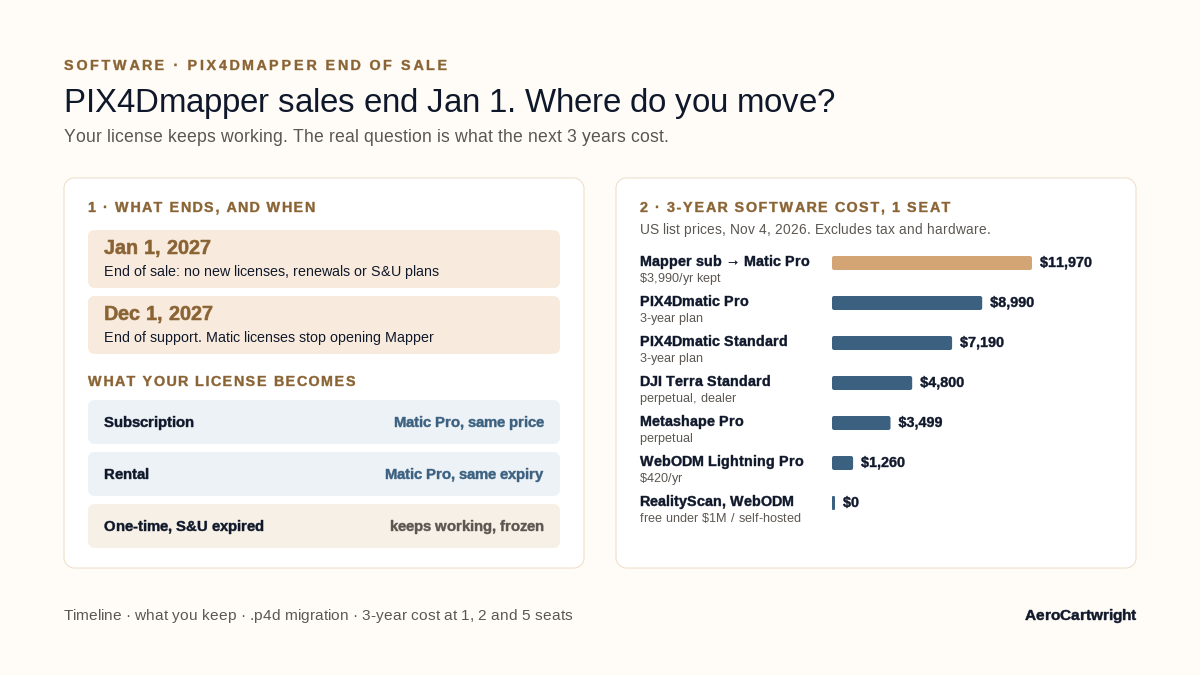
PIX4Dmapper is being discontinued. Pix4D announced in October 2026 that PIX4Dmapper “will no longer be sold or renewed as of January 1, 2027.” That is the end of sale. Technical support “will permanently cease on December 1, 2027.” If you need a PIX4Dmapper alternative, you have about a year to pick one.
If you hold a Mapper subscription today, nothing breaks on January 1. Pix4D turns your license into a PIX4Dmatic Pro license at the same price. That license keeps opening Mapper until December 1, 2027. Your choice is to stay on Pix4D’s path or leave.
This article covers what each license type keeps, how to move your .p4d projects, 3-year costs at 1, 2 and 5 seats, and a feature check on six tools.
What happens at the PIX4Dmapper end of sale on January 1, 2027?
Two things stop on January 1: new sales and renewals. Pix4D’s pricing page says you “can purchase PIX4Dmapper until 1st January 2027.” After that, nobody can buy or renew Mapper, including the Support and Upgrades (S&U) maintenance plan on a one-time license.
The rest of the timeline, from Pix4D’s end-of-support timeline and FAQ (last updated November 12, 2026):
| Date | What happens |
|---|---|
| No date given (“in the near future”) | Subscription and rental licenses get a PIX4Dmatic Pro license in the account |
| January 1, 2027 | End of sale. No new Mapper licenses, renewals or S&U plans |
| December 1, 2027 | End of support. No tickets, bug fixes or security patches. Matic licenses stop opening Mapper |
| After December 1, 2027 | Pixie (the chatbot), documentation, tutorials and the forum stay up “until further notice” |
S&U can’t be renewed from January 1, 2027, and Pix4D’s FAQ says “all maintenance plans for PIX4Dmapper will cease on December 1, 2027.” An earlier version of the FAQ also gave December 1, 2026 as the S&U cutoff; the November 5 update removed it. If you mean to renew S&U, do it before January 1, 2027, and expect it to end on December 1, 2027 either way.
What do existing PIX4Dmapper license holders keep?
Subscribers and renters get PIX4Dmatic Pro. One-time license holders either keep a frozen Mapper or hear from Pix4D, depending on their S&U plan. The FAQ splits license holders into four groups:
| License type | What Pix4D does | Mapper access after Dec 1, 2027 |
|---|---|---|
| Subscription | Converts it to PIX4Dmatic Pro. “Your subscription will remain the exact same price as it is today.” | No |
| Rental | Converts it to PIX4Dmatic Pro with the same expiry date. “After that time, you will need to purchase a new license.” | No |
| One-time charge (OTC), S&U still valid | ”A PIX4D representative will contact you with your migration path options.” | Yes, frozen, unsupported: “PIX4D will not disable existing OTC licenses” |
| OTC, S&U expired | ”No action will be taken with your license. You will continue to have access to PIX4Dmapper.” | Yes, frozen, unsupported |
Pix4D says you “can continue working on PIX4Dmapper projects without interruption.” One limit: with a single seat, “you cannot log into PIX4Dmatic and PIX4Dmapper simultaneously.” Log out of one to use the other.
The subscription deal is better than it looks. Matic Pro lists at $4,990 a year. A Mapper yearly subscriber keeps paying $3,990 and gets every Pro feature. Pix4D answers “Does this mean I can use all the features of PIX4Dmatic?” with one word: “Yes.”
Don’t lean on a frozen OTC license. Pix4D’s risks page says OS and driver updates “will eventually break compatibility,” and “users may find the software stops working after a routine OS upgrade.” It also says “New Coordinate Reference Systems will not be added or corrected.” That matters if you will deliver in the new NGS 2022 datums. If you keep an old machine for reprocessing old jobs, turn off automatic Windows updates. Don’t make it your production tool.
From December 1, 2027, PIX4Dcatch exports need “a PIX4Dcatch, PIX4Dmatic, or PIX4Dcloud license.” A Mapper-only license won’t be enough.
Can PIX4Dmatic open my .p4d projects?
Yes, partly: it imports camera calibration and the dense point cloud, not your outputs. Pix4D’s import article says “Only the results from Step 1 and the dense point cloud from Step 2 in PIX4Dmapper are imported.” Step 1 is the camera calibration. Your orthomosaic and DSM don’t come across; you regenerate them in Matic.
Projects that won’t import:
- Output CRS that combines “an arbitrary vertical and a well-known horizontal CRS”
- Projects “with a specified non-zero geoid height over the ellipsoid”
- “Rig and multi-spectral cameras”
The import also needs two processing options set in Mapper before you ran the project: Step 1 “Export Camera Internals and Externals, AAT, BBA” and Step 2 “Export LAS (default) or LAZ.” If they weren’t set, the files Matic looks for won’t exist, and you’ll need to rerun those steps in Mapper while you still have access.
Pix4D’s import article doesn’t say whether your GCPs and their image marks come across. Don’t count on it. Export them separately.
What should I do with each Mapper project before December 1, 2027?
Export and archive five things while Mapper still opens:
- Keep the folder structure intact. Matic looks for the
.p4d, the original images,1_initial\params\project_name_calibrated_camera_parameters.txt,project_name_offset.xyz, and the point cloud in2_densification\point_cloud\. - Export GCP marks. In Mapper: Project > GCP / MTP Manager > Export Marks. Pick “PIX4D marks files (*.txt, *.csv)”, uncheck Marks’ Zoom Level, check Image Directory, and set the delimiter to comma. Those are the settings Pix4D’s marks export article gives “for a seamless import into PIX4Dmatic.”
- Keep your GCP coordinate file. Matic imports GCPs and checkpoints from .txt or .csv.
- Save the quality report PDF for every delivered job. It’s your accuracy record if a client asks in 2029.
- Archive the outputs you delivered (ortho, DSM, LAS) as they are. Reprocessing in another tool won’t give you the same pixels.
If you’re leaving Pix4D, steps 3 to 5 still apply. Every tool in the next section reads GCP coordinates from a plain text file.
What does each migration path cost over 3 years?
One seat costs $0 to $11,970 over 3 years in software, depending on the path. The table uses US list prices as of November 4, 2026, before tax. It leaves out hardware, training and your time. The formula is cost = seats × (one-time price + 3 × yearly price + 3-year plan price).
| Path (3 years, list price) | 1 seat | 2 seats | 5 seats |
|---|---|---|---|
| Mapper yearly sub, auto-converted to Matic Pro ($3,990/yr) | $11,970 | $23,940 | $59,850 |
| PIX4Dmatic Standard, yearly ($3,990/yr) | $11,970 | $23,940 | $59,850 |
| PIX4Dmatic Standard, 3-year plan ($7,190) | $7,190 | $14,380 | $35,950 |
| PIX4Dmatic Pro, 3-year plan ($8,990) | $8,990 | $17,980 | $44,950 |
| DJI Terra Standard, perpetual (dealer, $4,800) | $4,800 | $9,600 | $24,000 |
| RealityScan, revenue over $1M ($1,250/seat/yr) | $3,750 | $7,500 | $18,750 |
| Metashape Professional, perpetual ($3,499) | $3,499 | $6,998 | $17,495 |
| WebODM Lightning Pro, one account per seat ($420/yr) | $1,260 | $2,520 | $6,300 |
| RealityScan, revenue under $1M | $0 | $0 | $0 |
| WebODM self-hosted | $0 | $0 | $0 |
Sources: PIX4Dmatic pricing, Agisoft store, RealityScan licensing, WebODM Lightning pricing, webodm.org download. DJI sells Terra only through dealers and posts no list price, so the Terra row uses Advexure’s price. Terra’s 1-year license is $1,850, or $5,550 over three years, so the perpetual license is the cheaper Terra path.
What the table says:
- Converted subscribers tie Matic Standard yearly for the most expensive Pix4D path. The 3-year plan beats it. $8,990 for 3 years of Matic Pro against $11,970 at $3,990 a year. That’s $2,980 per seat. Pix4D’s FAQ doesn’t say whether a converted subscription can switch to the 3-year term, so ask sales before your renewal date.
- Metashape Pro costs less than one year of yearly Pix4D billing ($3,499 once against $3,990 a year), and less than half of a 3-year Matic plan. The Pro EULA covers “any updates of the PROGRAM versions 2.x.x … free of charge,” but not “versions 3.x.x or later.” Budget for an upgrade if a 3.0 ships inside your 3 years.
- RealityScan’s price hinges on one number. Under $1M in gross revenue over the past 12 months, it’s free. Over it, $1,250 per seat per year. Epic’s EULA counts the whole corporate group, including money raised, not just mapping income.
- Lightning is priced per plan, not per seat. The table assumes one Pro account per person, which is the expensive way to read it. If one account covers your whole team, the 3-year cost is $1,260 total.
Skip two cheap tiers that look like matches. PIX4Dmatic Analyst ($2,290 a year) lists terrain, DTM and CAD tools but no orthomosaic or DSM. Metashape Standard ($179) has no GCP support, no georeferenced DSM and no orthomosaic, per Agisoft’s comparison page. Neither replaces Mapper.
Do the alternatives match PIX4Dmapper’s features?
For the Mapper features a small shop uses every week, mostly yes. The gaps are in operating systems and reporting.
| Feature | PIX4Dmapper | PIX4Dmatic Standard/Pro | Metashape Pro | RealityScan | WebODM / Lightning | DJI Terra Standard |
|---|---|---|---|---|---|---|
| GCPs | Yes | Yes | Yes | Yes | Yes | Yes |
| Checkpoints | Yes | Yes | Yes | Yes (“Ground Test” points) | Yes (since October 2025) | Yes |
| Quality report | Yes | Yes | Yes | Alignment report | Yes | Aerotriangulation report |
| Orthomosaic | Yes | Yes (GeoTIFF) | Yes | Yes | Yes (GeoTIFF) | Yes (GeoTIFF) |
| DSM | Yes | Yes (GeoTIFF) | Yes | Yes | Yes (GeoTIFF) | Yes (GeoTIFF) |
| LAS point cloud | Yes | Yes (LAS 1.4, 1.2, LAZ) | Yes | Yes (LAS) | Yes (LAS, LAZ) | Yes (LAS, LAZ) |
| Windows | Yes | Windows 11 only | Yes | Yes | Yes | Yes (NVIDIA GPU only) |
| macOS | No | Apple silicon | Yes | No | Yes | No |
| Linux | No | No | Yes (Debian/Ubuntu) | Experimental CLI only | Yes | No |
| Opens .p4d | Yes | Step 1 + dense cloud | No | No | No | No |
| License | Subscription (ends) | Subscription | Perpetual | Free under $1M, or yearly | Free / yearly plan | Perpetual or yearly |
Notes on the rows that need them:
- RealityScan checkpoints are “Ground Test” control points, which Epic describes as points “not involved in the scene optimization … used for reporting deviations.” The deviations show in the alignment report, not a Pix4D-style PDF. Epic’s 2.1.1 release notes confirm LAS export with ASPRS classification, but no current Epic page lists the orthomosaic formats, so test GeoTIFF export on the trial before you commit.
- WebODM checkpoints arrived in October 2025. Checkpoints are left out of the solve and highlighted in the PDF quality report. Check that your report prints a checkpoint RMS; if it doesn’t, compute it from the per-point errors. The quality report guide shows what to read in each tool.
- PIX4Dmatic requires Windows 11 (“Windows 10 is not supported”) or an M1-or-newer Mac. GPU acceleration is NVIDIA only. If your Mapper box still runs Windows 10, the move to Matic includes an OS upgrade.
- DJI Terra runs only on Windows with an NVIDIA card. DJI’s FAQ says it is “not compatible with non-NVIDIA graphics cards.”
- Metashape and WebODM are the only options on this list with full Linux support. Metashape ships Debian/Ubuntu builds, and WebODM calls Linux its “best supported platform.” RealityScan’s Linux build is an experimental, CLI-only release.
Which PIX4Dmapper alternative should I pick?
Pick by the license you hold and the computer you run, not by the feature list. They all do GCPs, an orthomosaic and a DSM.
| You are | Move to | Why |
|---|---|---|
| A Mapper yearly subscriber who likes Pix4D | PIX4Dmatic Pro, then ask about the 3-year plan | Same price, all Pro features, and .p4d import |
| A Mapper OTC holder with expired S&U | Metashape Professional | $3,499 once, perpetual like what you have now, updates through 2.x |
| A one-person shop under $1M revenue on Windows | RealityScan or WebODM | $0 software. Both do GCPs and checkpoints. WebODM also runs on Mac and Linux |
| On a Mac or Linux | Metashape Pro or WebODM | The only two with Linux builds. Matic covers Apple silicon but not Linux |
| Flying only DJI enterprise drones, on Windows/NVIDIA | DJI Terra Standard | One vendor for drone and software. Check the dealer quote first |
Whatever you pick, run one finished Mapper job with checkpoints through it before you renew anything. Compare its checkpoint RMSE against your Mapper quality report. Ignore the GCP residuals. They only show how well the software fit the control you gave it. The checkpoints vs control points guide covers that distinction. The Pix4D vs Metashape vs WebODM vs RealityScan comparison and the PIX4Dmatic 2.0 deep dive go deeper on each tool.
Bottom Line
January 1 ends sales, not your license. Subscribers become PIX4Dmatic Pro users at the price they pay now and keep Mapper until December 1, 2027. Expired-S&U one-time licenses keep running, frozen.
If you’re staying with Pix4D, ask about the 3-year Pro plan: $8,990 against $11,970. If you’re leaving, Metashape Pro at $3,499 once is the closest like-for-like, and RealityScan and WebODM cost nothing in software for a small shop.
Before December 1, 2027, export your GCP marks, save every quality report, and archive what you delivered. Prices in this article are as of November 4, 2026.