


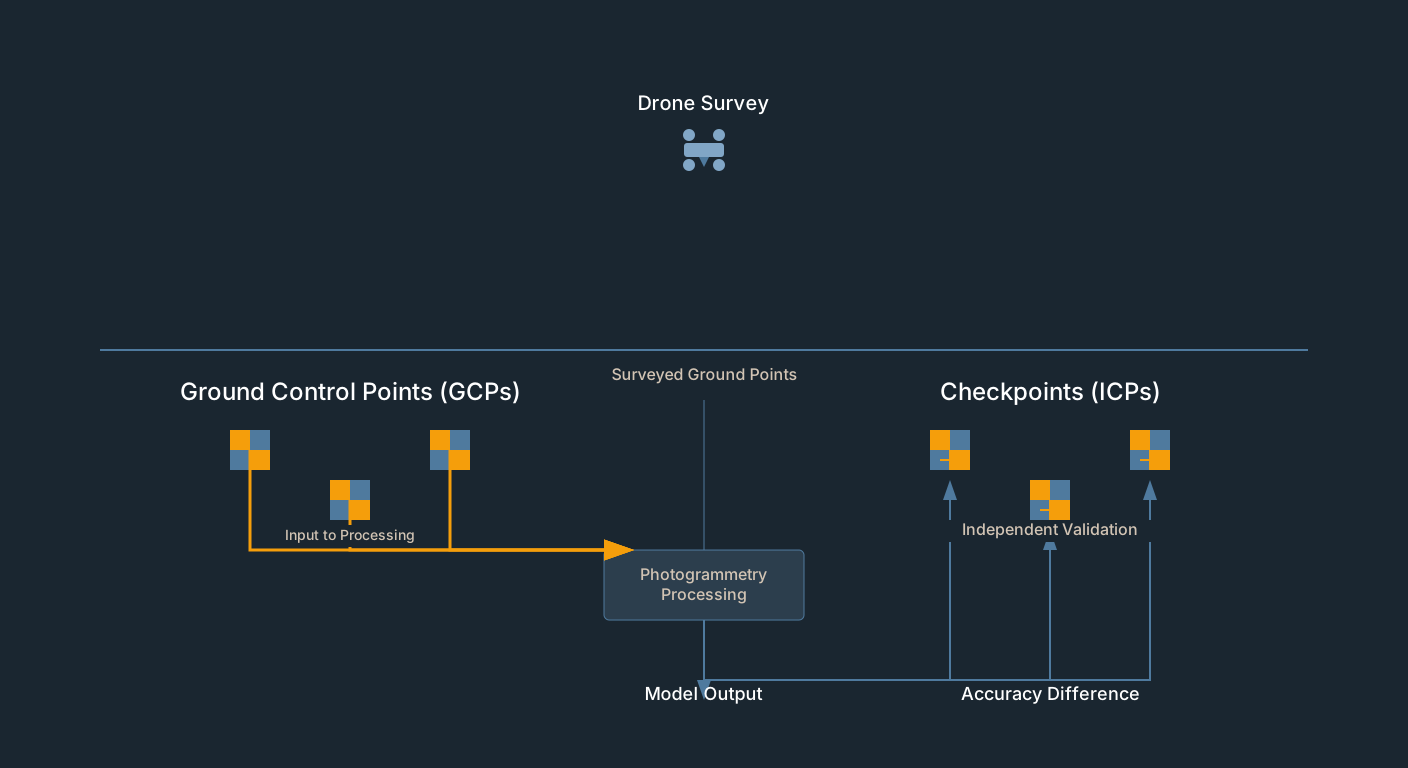
Here is a scenario that plays out more often than it should. Eight Real-Time Kinematic (RTK)-measured points, all entered as Ground Control Point (GCP) markers, GCP Root Mean Square Error (RMSE) of 0.6 inches in the quality report. Looks airtight. Two weeks later, the contractor’s grade-check survey disagrees by four inches vertically across the site.
The report wasn’t wrong. It just wasn’t saying what most people think it says. GCP residuals measure how well the model fits the points you gave it — not how accurate the model is in the real world. Those are different numbers, and confusing them is one of the most common mistakes in commercial drone mapping.
Drone survey checkpoints are the fix. Below: what they are, how many you need, how to set them up in Pix4D, Metashape, and WebODM, and how to read the results.
The Fundamental Distinction: Inputs vs. the Test
Every measured coordinate you bring to a drone job does one of two things: it either goes into processing, or it stays out of it.
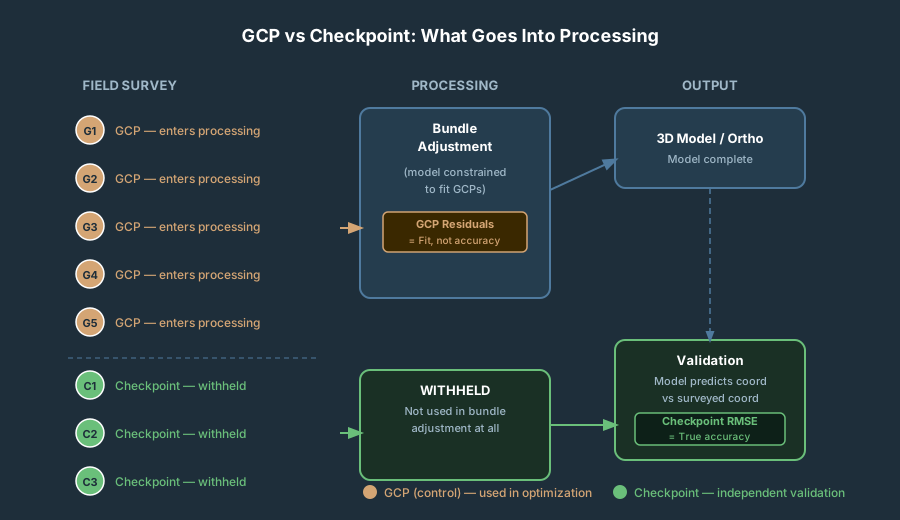
GCPs go in. The photogrammetry engine uses them during bundle adjustment — the mathematical operation that constrains the floating 3D model to known ground coordinates. GCP RMSE in the quality report shows how well the solver closed the loop on data it was specifically trying to fit.
Checkpoints (also called Independent Check Points, or ICPs) stay out. You measure them in the field with the same care as your GCPs, then deliberately withhold them from processing. The software never sees these coordinates during bundle adjustment. After processing, compare the model’s computed position at each checkpoint against the surveyed coordinate. That difference is a real-world, independent accuracy measurement. It is the number that anchors any honest claim about drone survey accuracy — everything else in the report is a measure of internal fit.
The distinction sounds minor. It isn’t. A point that participates in bundle adjustment has the optimization algorithm actively working to minimize its residual. GCP residuals are therefore correlated with the optimization — they are outputs of a process that was specifically minimizing them. They cannot serve as an unbiased test of accuracy. Same reason you can’t grade your own exam with your own answer key.
DroneDeploy’s documentation makes the same point plainly: the true accuracy of a map cannot be extrapolated from GCP error because the GCPs are forced to a particular spot by the optimization.
The American Society for Photogrammetry and Remote Sensing (ASPRS) Edition 2 is equally direct: “The surveyed checkpoints used in accuracy assessment should be independent of the surveyed control points used in the data calibration process.”
For more on RMSE interpretation and accuracy classes, see Understanding RMSE in Drone Mapping.
What the Standards Actually Require
The ASPRS Positional Accuracy Standards for Digital Geospatial Data, Edition 2 (first published August 2023, revised June 2024) set the framework most professional deliverables reference.
The full certification number: 30 independent checkpoints minimum, with a 120 maximum for large projects. Edition 1 (2014) used a project-area-scaled count without a flat 20-point floor — Edition 2’s 30-point minimum is a tighter, more defensible requirement.
The small-project provision: ASPRS explicitly acknowledges that many UAV projects cannot physically accommodate 30 spread-out checkpoints. The standard provides reporting templates for fewer than 30, but they require disclosure — you must state how many checkpoints you used and note that the result does not meet the 30-point minimum for full certification.
| Checkpoint Count | Accuracy Claim |
|---|---|
| 30+ | “Meets ASPRS [X cm] accuracy class” |
| 10–20 | ”Validated with [N] independent checkpoints” — disclose count |
| 5–8 | ”Validated with [N] independent checkpoints; does not meet ASPRS 30-point minimum” |
| 0 | No accuracy claim beyond GCP fit |
Bias detection: If the mean error at your checkpoints exceeds 25% of the RMSE, Edition 2 flags it as systematic bias — not random noise. Systematic bias must be investigated before delivering the product.
Checkpoint survey accuracy: Checkpoints themselves must be measured at least twice as accurately as the product you’re testing. Testing for 0.2 ft vertical accuracy? Your checkpoint survey needs to be accurate to 0.1 ft or better.
How Many Checkpoints and Where to Put Them
The series-wide layout rule: 5 GCPs minimum for any site (4 corners plus 1 center) regardless of size, plus 1 additional GCP per 25 acres beyond the first 25, plus at least 3 independent checkpoints distributed across the site. A 50-acre job lands at 6 GCPs and 3+ checkpoints; a 100-acre job lands at 8 GCPs and 4+ checkpoints. An 80/20 split — 80% of measured points as GCPs, 20% as checkpoints — is the widely cited industry norm for the overall measured set.
Placement for maximum diagnostic value:
- Corners and edges of the project area — detects boundary doming and warping.
- Topographic highs and lows — detects Z-axis scaling issues and systematic vertical bias.
- Project interior, away from any GCP — tests underconstrained zones.
- At least one location far from any GCP — identifies areas with little geometric control.
Never cluster checkpoints next to GCPs. A checkpoint adjacent to a GCP is partially correlated with that GCP’s influence on the model and won’t provide independent validation.
For more on GCP placement principles, see DIY Ground Control Points for Drone Mapping.
Setting Up Drone Survey Checkpoints in Pix4D, Metashape, and WebODM
PIX4Dmapper
Import all your measured coordinates through the GCP Manager — both intended GCPs and intended checkpoints. Each point has a Type column with a dropdown; set it to 3D GCP for points that constrain the model and Check Point for points that should be withheld.
The gotcha: you must still mark checkpoints in the imagery — locate the target in overlapping images exactly as you would for a GCP. The software needs those image projections to compute where the checkpoint lands in the 3D model. Skip that step and the checkpoint won’t appear in the quality report.
After processing, the quality report has separate GCP and Checkpoint sections. GCP section = fit. Checkpoint section = accuracy. Checkpoint RMSE should fall in the 1–2× GSD horizontal, 2–3× GSD vertical range — so knowing your GSD tells you what checkpoint RMSE to expect before you ever fly.
PIX4Dmatic
PIX4Dmatic handles this differently from PIX4Dmapper. Both GCPs and checkpoints are imported as tie points via the Tie Points interface (drag-and-drop .txt or .csv). The GCP-vs-checkpoint distinction is set at import time, via the structure of the tie-point file rather than through an in-app dropdown — define the columns including the type flag in the import dialog and the points carry that designation through processing.
As with PIX4Dmapper, checkpoints must still be marked in the imagery. The quality report separates GCP fit from checkpoint accuracy the same way.
Agisoft Metashape (Professional Edition)
Import your coordinate file through the Reference pane. Each marker appears with a checkbox next to it.
Checkbox enabled = control point (participates in bundle adjustment). Checkbox disabled = check point (withheld, used only for validation).
That checkbox toggle is the entire mechanism. Toggle it for each checkpoint, then click Update in the Reference pane toolbar. The gotcha: forget to click Update and the change doesn’t take effect. Metashape 2.2.1 and newer display control points and check points with different icons so you can visually confirm the state before processing.
Checkpoint markers must still be placed in images — Metashape needs the image projections to calculate where the point lands in the model.
WebODM / OpenDroneMap (ODM)
WebODM Lightning (cloud): As of late 2025, Lightning has a dedicated checkpoint UI. Click a GCP marker and toggle the Checkpoint checkbox in the popup. Checkpoints display in green and are excluded from the georeferencing computation.
Self-hosted WebODM and command-line ODM: no native checkpoint distinction exists in the file format. Workaround: process with all your GCPs, then validate manually. Extract XYZ values from the orthomosaic or Digital Surface Model (DSM) at your checkpoint pixel locations using QGIS point sampling, then compare against your surveyed coordinates in a spreadsheet.
Reading Checkpoint Residuals: What the Patterns Tell You
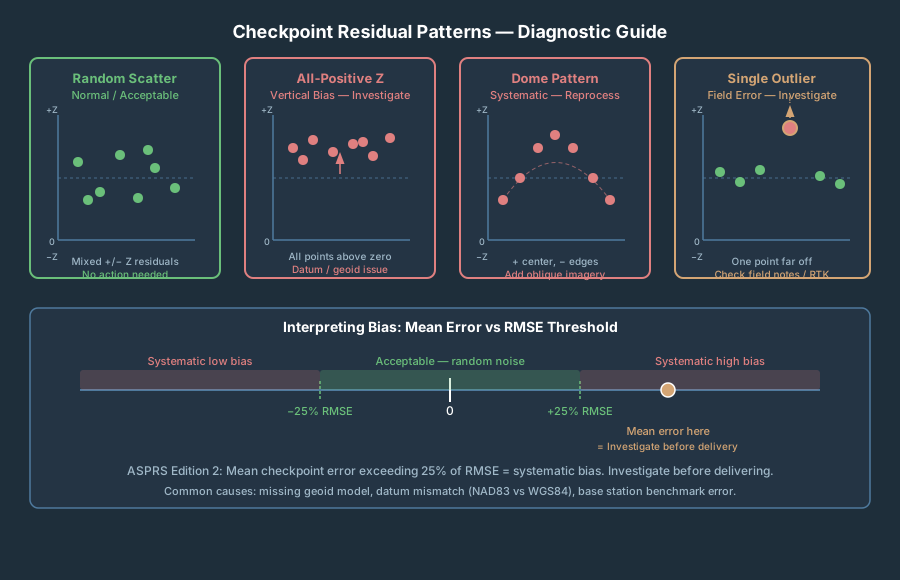
Random scatter — mixed positive and negative residuals, no clear pattern — is normal. Everything else warrants investigation:
All Z residuals same sign: systematic vertical bias. Common causes: geoid model not applied, datum mismatch (NAVD88 vs. ellipsoid heights), base station error.
Z residuals positive at center, negative at edges (or vice versa): classic doming. Primary cause: nadir-only flight geometry combined with lens distortion that calibration didn’t fully resolve.
X or Y residuals consistently same sign: horizontal systematic shift. Check for datum confusion — NAD83 vs. WGS84 is a common culprit.
High residual at one checkpoint, all others fine: likely a field measurement error. Check the field notes — bad RTK occupation (Float instead of Fixed), antenna height entered wrong, or the target moved between measurement and flight.
When a single checkpoint residual exceeds 3× your project accuracy requirement, investigate before reporting. Do not simply drop it to improve the RMSE number.
What a PLS Needs to Sign Off
A Professional Land Surveyor (PLS) review expects the following minimum documentation package:
- Survey control report — base station description, benchmark used, RTK Fixed confirmation, antenna height log, equipment model.
- GCP report — point ID, measured coordinates, image marking count, software and version.
- Checkpoint report — point ID, measured coordinates, model-computed coordinates, residuals per axis (dX, dY, dZ), RMSE summary table.
- Processing summary — software, version, image count, overlap statistics, reprojection error.
- ASPRS accuracy statement or disclosure.
- Bias check — statement that mean checkpoint error does not exceed 25% of RMSE.
What triggers rejection: no checkpoints; GCP RMSE presented as the accuracy metric; checkpoints clustered near GCPs; or systematic bias that wasn’t investigated.
Frequently Asked Questions
Can I use RTK/PPK drone data without any GCPs and skip checkpoints entirely?
RTK or Post-Processed Kinematic (PPK) without GCPs can produce good horizontal accuracy, but vertical accuracy is typically weaker — you’re relying entirely on GNSS solution quality and geoid model application. Without checkpoints, you have no independent validation at all. For any deliverable where accuracy matters, measure at least a few checkpoints even on RTK or PPK flights.
What if my project area is too small to place 30 checkpoints without clustering them?
Use as many as the site allows, place them well, disclose the count, and note that the result does not meet the ASPRS 30-point minimum. Five well-distributed checkpoints across a 3-acre site are more meaningful than 30 crowded ones. ASPRS Edition 2 provides reporting language for exactly this scenario.
My GCP RMSE is 0.5 inches. Does that mean my map is accurate to 0.5 inches?
No. That means the model fits the control points you gave it to within 0.5 inches. Those residuals came from an optimization that was actively minimizing them. They don’t prove anything about areas between GCPs, about elevation accuracy across the full project, or about how the model compares to independent ground truth. Run checkpoints to get the real number.
Can I use the same points as both GCPs and checkpoints on different projects?
Not on the same project — a point is either in the optimization or it isn’t. On separate projects where a point is used only as a checkpoint (never as a GCP), it retains independence for that project.
How do I know if my checkpoints are accurate enough to be trusted?
Your checkpoint survey needs to be at least twice as accurate as the product you’re testing. Use RTK Fixed (not Float), tie to a verified benchmark, and log antenna heights carefully. If you’re testing for 0.2 ft vertical accuracy, your checkpoint coordinates need to be accurate to 0.1 ft or better.
What’s the difference between GCP RMSE and checkpoint RMSE in the Pix4D quality report?
The GCP section shows how well the bundle adjustment fit the control you gave it — correlated, optimization-dependent numbers. The Checkpoint section shows how well the model predicts coordinates that the software never saw — independent residuals. Only the checkpoint section supports an accuracy claim.