


You need to process drone imagery on a Linux server. Maybe you’re running an AWS instance for batch processing — the 24-hour grind where Windows licenses eat into margins. Maybe your workstation runs Ubuntu and you want native performance. Maybe you’re building an automated pipeline that watches an S3 bucket and churns out 3D models on demand. Whatever the case: Windows photogrammetry tools don’t help. Here are the four real options — and which one fits your workflow.
Why Linux for Photogrammetry?
Before comparing tools, ask yourself why you’re looking at Linux. The answer shapes which tool wins.
Cloud processing. AWS, Google Cloud, and Azure default to Linux. A Windows instance costs more — you’re paying for the license on top of compute, storage, and transfer fees. For batch jobs processing hundreds of datasets monthly, that overhead compounds fast.
Headless batch automation. No GUI overhead. No monitor, no keyboard, no display server bottleneck. Start a photogrammetry processing job overnight and wake up with results in S3. Windows Remote Desktop works — but it burns resources compared to a command-line tool running in the background.
Docker containers. The entire photogrammetry stack — dependencies, libraries, environment variables — bakes into a single image. Spin up identical processing pipelines across 50 instances. Scale up in minutes, shut down when done. Linux containers dominate production infrastructure; Windows containers exist but require different operational thinking.
Cost savings. A t3.2xlarge on AWS costs $0.33/hour. The Windows license adds $0.06/hour. Over 1,000 hours of annual processing, that’s $60 extra you’ll never recover.
GIS toolchain integration. GDAL, PDAL, PostGIS, QGIS — the entire geospatial stack is native Linux. Pipe photogrammetry output directly into georeferencing, classification, and analysis workflows without format conversion or expensive licensing overhead.
The Four Contenders
Here’s the state of photogrammetry on Linux — production-ready tools only:
| Tool | Linux Support | Cost | Primary Strength | Orthomosaic | CLI/Headless | Best For |
|---|---|---|---|---|---|---|
| OpenDroneMap (ODM) | Native, production-ready | Free | Survey-grade mapping | Yes | Yes | Drone mapping operators |
| RealityScan 2.1.1 | CLI via Wine (experimental) | Free <$1M; $1,250/yr above | 3D model quality | Yes | Partial | Asset creation, VFX |
| Meshroom | Native, stable | Free | 3D reconstruction | Limited | Yes | 3D assets without RealityScan |
| COLMAP | Native, mature | Free | Research-grade SfM | No | GUI + CLI | Accuracy validation, research |
The choice isn’t obvious. RealityScan produces the sharpest 3D models. OpenDroneMap handles everything from raw images to survey deliverables. Meshroom offers node-based control without RealityScan’s setup complexity. COLMAP is the mathematical foundation — the tool other projects build on.
OpenDroneMap: The Production Workhorse
OpenDroneMap (ODM) is the Linux photogrammetry story that actually works at scale. It’s native, battle-tested, and does everything a drone operator needs in a single pipeline.
What it does. Feed it a folder of images. OpenDroneMap outputs: orthomosaic (georeferenced composite image), point cloud (LAS format), digital surface model (GeoTIFF), 3D mesh (OBJ/PLY), and camera positions. Everything is georeferenced — no manual coordinate assignment required if your CRS is set correctly.
How to run it. Three interfaces:
- WebODM — web GUI, project management, batch processing. Best for humans. Runs on your laptop or server.
- NodeODM — REST API. Spin up processing jobs from scripts, CI/CD pipelines, custom applications.
- ODM CLI — headless command line. Direct control, minimal overhead, perfect for Docker containers.
Example headless command:
docker run -ti --rm -v /data:/datasets opendronemap/odm \
  --project-path /datasets project \
  --resize-to 2000 \
  --mesh-octree-depth 12 \
  --dsm --dtm
This runs on a $2/hour EC2 instance and finishes a 500-image dataset in 4–6 hours.
Georeferencing and GCP handling. ODM processes Ground Control Points, RTK/PPK corrections, and radiometric calibration for multispectral sensors. Feed it surveyed control points in a simple CSV, and OpenDroneMap folds them into the bundle adjustment automatically. No tedious manual marking in the UI.
Distributed processing. ClusterODM orchestrates parallel processing across multiple machines. Split a large survey into geographic chunks, process simultaneously, then mosaic the results. Essential for 5,000+ image projects that would take 24+ hours on a single machine.
Cost reality. Free, open source. No per-image charge. No subscription. Run as many jobs as your hardware allows. The only cost is compute.
Limitations. OpenDroneMap’s 3D model quality trails RealityScan. For visual reference and approximate geometry, it’s fine. For hero assets, game models, or film-quality meshes — you’ll see the difference.
RealityScan CLI on Linux: Powerful but Experimental
RealityScan is the rebranded version of RealityCapture (Epic Games acquired Capturing Reality in 2021; the product was renamed in June 2025). The RealityScan CLI on Linux is powerful in theory — in practice, it’s still experimental.
What changed. RealityCapture → RealityScan 2.0 (June 2025). The Linux CLI arrived in RealityScan 2.1. Licensing switched from per-image to company-wide annual seat licensing (free for companies with under $1M annual revenue; $1,250/year per seat for companies at or above that threshold).
Linux support specifics. The RealityScan CLI uses Wine (Windows Compatibility Layer) bundled with the application. Not a native binary — but the Wine layer is transparent at the command-line level.
Supported environments (with Epic’s recommended minimum kernel versions):
- Ubuntu 24.04 LTS (requires kernel 6.14+ — default ships with 6.8, upgrade via HWE stack)
- Fedora 39 (requires kernel 6.10+ — default ships with 6.5, manual upgrade needed)
NVIDIA GPU is mandatory. 8 GB VRAM minimum. RealityScan uses CUDA for reconstruction — CPU-only processing isn’t an option.
Headless challenges. This is where experimental becomes painful. Even with the -headless flag, RealityScan may attempt to open UI windows during authentication or licensing checks. These dialogs hang in a true headless environment (no display server, no X11 forwarding). Workaround: use the Remote Command Plugin instead — a gRPC/REST API that bypasses the GUI entirely.
Output quality. RealityScan produces the sharpest 3D meshes of any tool tested here. Texture detail, geometry precision, even overhanging geometry — it outperforms the competition. If your end-use is game assets, VFX, or architecture visualization, the quality gap justifies the setup complexity. On Windows, where both run natively, the premium-quality call usually comes down to RealityCapture vs Agisoft Metashape — that comparison breaks down their speed, mesh quality, and GCP workflow head-to-head.
Cost consideration. Free if your company’s annual revenue stays under $1M. Above that: $1,250 per seat per year. The old pay-per-image model (10¢–30¢/image depending on volume) is gone. For high-volume processing, annual licensing may cost less than the legacy PPI model — but you pay upfront regardless of usage.
Production reality. Linux RealityScan support is functional but premature for mission-critical pipelines. If ODM crashes, you retry. If RealityScan on Linux crashes, debugging takes hours because the community is small and the Wine layer complicates troubleshooting.
Meshroom (AliceVision): The Middle Ground
Meshroom is a node-based photogrammetry platform developed by AliceVision (funded by EU Horizon 2020 grants; Epic Games is the current Gold sponsor). It’s native Linux, visually intuitive, and free. It sits between hobbyist and professional — useful for 3D asset creation without RealityScan’s learning curve or setup burden.
How it works. Meshroom presents photogrammetry as a node graph. Images feed into structure-from-motion, which outputs camera positions, which feeds into mesh generation. You see every step. Change parameters in any node, re-run downstream nodes, and compare results. Transparency and control — the opposite of black-box software.
GUI or headless. Qt-based interface runs on any Linux desktop. Or run headless with command-line parameters. Useful for scripting iterative workflows — adjust parameters, save the project, commit to Git.
3D quality. Good, not great. Noticeably behind RealityScan. Comparable to older Metashape builds. For simple subjects (single object, clean background), the quality is adequate. Complex scenes or fine detail show artifacts.
Limitations that matter. No native orthomosaic generation. No DSM/DTM. No GCP integration. Meshroom is a 3D reconstruction tool, not a mapping tool. If you need survey deliverables, Meshroom alone won’t get you there.
GPU support isn’t mandatory but is strongly recommended. NVIDIA is preferred; AMD is possible but unsupported. CPU-only processing on large datasets takes days.
COLMAP: Research-Grade Precision
COLMAP is the gold standard for structure-from-motion accuracy. Used as a backend by academics, computer vision researchers, and increasingly by commercial tools. On its own, it’s powerful and unforgiving.
Why it matters. COLMAP’s bundle adjustment is mathematically meticulous — every camera parameter, every 3D point, iteratively optimized until convergence. If accuracy is the goal, COLMAP is your validation tool.
How to use it. GUI and CLI — both embedded in the same executable. The GUI (colmap gui) runs on Linux via Qt, but most production workflows use the CLI. Steep learning curve either way. Example workflow:
colmap feature_extractor --database_path mydata.db --image_path images/
colmap exhaustive_matcher --database_path mydata.db
colmap mapper --database_path mydata.db --image_path images/ --output_path sparse/
colmap image_undistorter --database_path mydata.db --image_path images/ --output_path dense/
colmap dense_stereo --workspace_path dense/
colmap dense_fuser --workspace_path dense/
Each step is a separate command. You need to understand what each produces and the order matters.
Community integration. RealityScan 2.1.1 added COLMAP export format support. DJI Terra (V5.0+) outputs COLMAP-compatible point clouds. If you’re building a custom COLMAP tutorial pipeline, COLMAP is the connective tissue.
Output limitations. COLMAP produces sparse and dense point clouds. No orthomosaic. No DSM. No 3D mesh (unless you export the dense cloud to Meshroom or another tool). It’s one component in a larger system.
When to use. Researchers validating reconstruction accuracy. Teams feeding point clouds into downstream tools (Meshroom, MVS-Texturing, custom pipelines). Academic applications where “this is what COLMAP produces” is the acceptance criterion.
Head-to-Head: Quality, Speed, and Workflow
The practical comparison when you actually need to deliver something:
3D model quality ranking:
- RealityScan (sharp geometry, excellent textures)
- COLMAP ≈ Meshroom (comparable, COLMAP slightly more precise)
- OpenDroneMap (serviceable, visible 3D artifacts at close inspection)
Speed (500-image dataset, NVIDIA GPU):
- RealityScan: 2–3 hours
- OpenDroneMap: 4–6 hours
- Meshroom: 6–10 hours
- COLMAP: 8–12 hours (CPU: 24+ hours)
Ease of initial setup:
- OpenDroneMap (Docker one-liner, or WebODM download)
- Meshroom (download, run, go)
- COLMAP (compile from source or package manager, read papers to understand)
- RealityScan (Wine dependencies, CUDA setup, licensing authentication)
Headless reliability (zero manual intervention expected):
- OpenDroneMap (bulletproof)
- COLMAP (stable, requires precise CLI flags)
- Meshroom (mostly stable; occasional graph issues)
- RealityScan (authentication and dialog boxes can block processing)
Production readiness:
- OpenDroneMap: Ready now. 10+ years of field testing.
- Meshroom: Ready now. Stable, no surprises.
- COLMAP: Ready now. Use as a validation layer or research tool, not customer-facing alone.
- RealityScan: Ready in 12–24 months. Wait for Linux maturity if mission-critical.
Docker Deployments
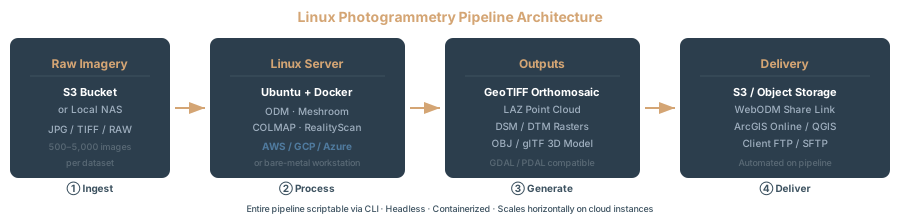
If you’re running Linux, Docker is the right packaging model for headless photogrammetry processing.
OpenDroneMap:
docker run -ti --rm \
  -v /path/to/data:/datasets \
  opendronemap/odm \
  --project-path /datasets survey_2026_04
Official image. Updated frequently. Production-grade.
Meshroom:
Official Docker images exist (alicevision/meshroom), maintained by the AliceVision team. Latest tag: 2025.1.0-av3.3.0-ubuntu22.04-cuda12.1.1.
COLMAP:
Community images available. Build your own for consistency.
RealityScan:
No official Docker image. The Wine dependency complicates containerization — you’d need to bundle Wine + CUDA + RealityScan CLI into a custom image. Possible, but maintenance burden is high. Most production setups run RealityScan directly on the host machine.
Which Tool for Which Job?
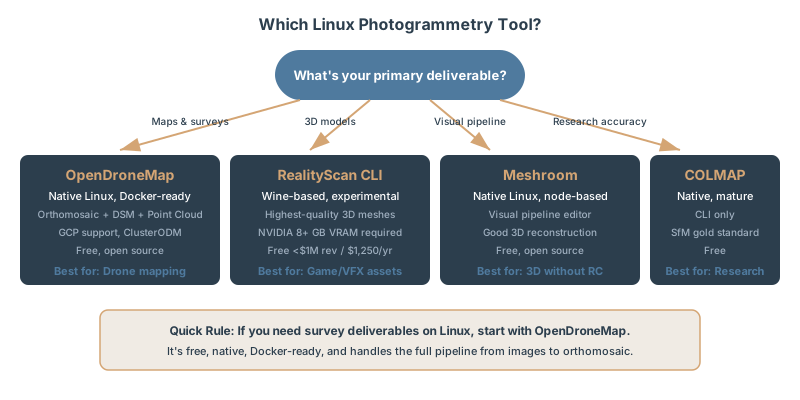
You need survey deliverables. Use OpenDroneMap. Every time. ODM handles the full pipeline and integrates GCP/RTK automatically. It’s battle-tested with surveyors and GIS professionals.
You’re creating game or VFX assets. Use RealityScan (if Linux stability is acceptable) or Meshroom (if you want simpler setup). RealityScan’s output quality justifies the setup complexity. Meshroom is the fallback if you want to skip Wine entirely.
You’re validating reconstruction accuracy. Use COLMAP. Benchmark other tools against it. Export the point cloud to Meshroom or another tool for mesh generation. COLMAP is your scientific instrument.
You’re 3D modeling without mapping deliverables. Use Meshroom. Node-based control, good quality, no licensing headaches, native Linux.
You’re processing hundreds of datasets monthly on AWS. Use OpenDroneMap with ClusterODM. Cost-effective, scales linearly, runs 24/7 without licensing friction.
You need something simple, free, and proven. Use OpenDroneMap. It does so much that the other tools become special-purpose tools for specific cases.
FAQ
Can I run RealityScan headless on Linux?
Technically yes — the CLI supports a -headless flag. But RealityScan still attempts UI initialization during licensing checks and authentication. These dialogs hang in a true headless environment. Workaround: use the Remote Command Plugin instead, which exposes RealityScan as a gRPC/REST API. Then call it from any process — no GUI involved.
Which tool makes the best orthomosaics?
OpenDroneMap. Built specifically for mapping — radiometric calibration, GCP handling, multi-band sensor support. RealityScan can generate orthophotos, but that’s secondary to its 3D modeling focus. Meshroom can’t generate orthomosaics natively. COLMAP doesn’t either.
Do I need an NVIDIA GPU?
RealityScan: mandatory. No CPU path. Meshroom: strongly recommended. CPU processing is viable but slow. OpenDroneMap: helpful but not required. CPU-only datasets process successfully, just slowly. COLMAP: helpful but not required. CPU-only reconstruction is standard in research.
Can I process ground control points on Linux?
OpenDroneMap: full support. CSV input, automatic marker detection, bundle adjustment with control constraints. RealityScan: full support via CLI parameters. Meshroom photogrammetry: limited. You can’t import GCP lists directly; manual marking required in the sparse cloud. COLMAP: no native GCP workflow. Manual workaround (export camera positions, transform coordinates, re-import).
What about Pix4D on Linux?
Pix4D is Windows-only. Native Linux version does not exist. If you’re committed to Linux, use OpenDroneMap or RealityScan CLI instead.
How do I choose between OpenDroneMap and RealityScan?
Three questions: (1) Do you need survey deliverables or 3D assets? ODM for surveys, RealityScan for assets. (2) Is Linux stability mission-critical? OpenDroneMap is mature; RealityScan is experimental. (3) Is cost a constraint? Both are free (ODM always; RealityScan under $1M revenue), but ODM scales cheaper on the cloud.
For drone mapping on Linux, OpenDroneMap is the clear choice — native, stable, full pipeline from images to survey deliverables. If your end-use is 3D assets, RealityScan on Linux is powerful but experimental. Meshroom fills the niche where you want node-based control without RealityScan’s complexity. COLMAP is the researcher’s tool.
Pick based on your deliverable, not the brand name. The right tool delivers value; the wrong one becomes a time sink.
Related Articles
- Drone Mapping Software Comparison: Pix4D vs Metashape vs WebODM
- WebODM Local Installation and First Project
- Why Move WebODM to the Cloud: Benefits and Architecture
- WebODM on AWS: Cloud Processing for Pennies
- Auto-Scaling ODM Cluster with ClusterODM
- What is an Orthomosaic?
- 3D Gaussian Splatting for Drone Operators
- GSD Calculator: Flight Altitude and Image Resolution