


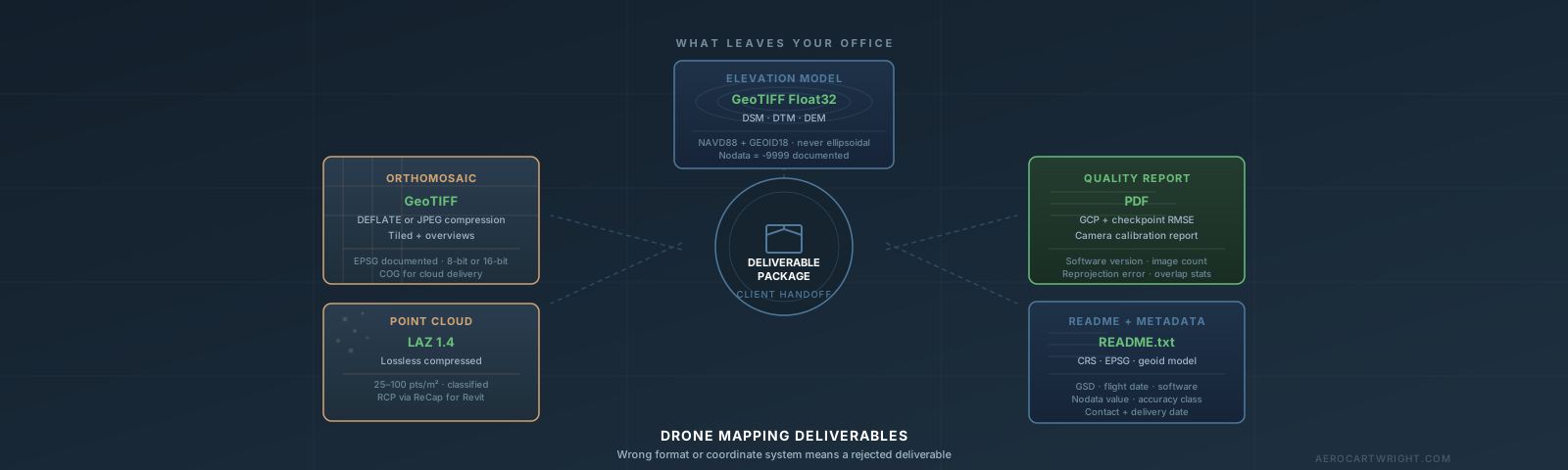
A common rejection looks like this. A civil engineer emails the operator: “Elevations don’t match our benchmark.” The orthomosaic looks perfect. The point cloud is clean. But the DEM has ellipsoidal heights — GPS-native values that the processing software exported by default — instead of NAVD88 orthometric elevations. The whole site is off by tens of feet. The data is technically accurate. It is also completely unusable.
Drone mapping deliverables fail for predictable reasons. Wrong vertical datum is the most common. Wrong coordinate system, missing overviews, over-compressed multispectral data, and a missing README follow closely behind. This guide covers every major drone mapping file format decision — what to export, what settings to use, and why — so you stop getting those emails.
What Does the Client Actually Do With This?
Before touching export settings, ask one question: what is the client going to do with this data?
A civil engineer needs NAVD88 elevations in their project’s State Plane coordinate system. A real estate developer wants an orthomosaic they can open in Google Earth. A GIS analyst at a utility company needs a Cloud-Optimized GeoTIFF they can stream from their S3 bucket. A structural engineer wants a point cloud they can load into their BIM software. These are four different deliverables from the same flight.
Get the answer before you process. It takes 30 seconds to ask and saves hours of reprocessing.
Orthomosaics: Export Settings That Actually Matter
GeoTIFF Is the Standard — Compression Is the Decision
GeoTIFF is the baseline. Every GIS platform reads it. The format embeds coordinate system metadata directly in the file header — no companion .prj file required, no guessing about what projection was used.
LZW is lossless, roughly 2:1 compression on aerial RGB imagery. Safe default for any deliverable.
DEFLATE is also lossless, slightly better compression than LZW (roughly 2.5:1 on aerial RGB). For a 50-acre site at 1 in/pixel GSD, uncompressed runs around 940 MB. DEFLATE brings that down to roughly 375 MB with zero data loss.
JPEG-in-TIFF is lossy — 10:1 compression or better. For a 50-acre visual orthomosaic, JPEG compression produces a roughly 94 MB file. JPEG should never be used for multispectral data, DEMs/DSMs, or any raster that will be used in NDVI calculations or volumetric analysis. JPEG compression alters numerical values — that breaks NDVI.
Practical rule: Lossless (LZW or DEFLATE) for any analytical deliverable. JPEG for visual-only RGB orthos going to clients who just need to see the site.
Tiling and Overviews Are Non-Negotiable
An orthomosaic without internal tiling and overview pyramids is a professional liability. Internal tiles should be 512x512 pixels — this is the current standard. Overviews (pre-computed lower-resolution versions at factors 2, 4, 8, 16, 32) allow the software to render a zoomed-out view instantly. Both Metashape and Pix4D add overviews during export by default. Verify they’re enabled before exporting.
Cloud-Optimized GeoTIFF (COG): When It Matters
COG is a GeoTIFF with a specific internal structure optimized for HTTP range requests — cloud storage (S3, Google Cloud, Azure Blob) can serve only the tiles currently being viewed. When COG matters: the client loads your deliverable from cloud storage into ArcGIS Online or a web GIS platform. When COG does not matter: the client copies the file to their local drive.
Pix4Dmatic has native COG export. OpenDroneMap/WebODM uses the --cog flag. Metashape does not have single-click COG export — convert with GDAL:
gdal_translate -of COG -co COMPRESS=JPEG -co QUALITY=85 input.tif output_cog.tif
Point Clouds: Default to LAZ, Explain Why
LAS vs. LAZ
LAS (ASPRS LASer format) is the geospatial standard for point cloud data. LAS 1.4 is the current spec (ASPRS 1.4-R15, 2019) with full classification code support.
LAZ is lossless compressed LAS. Compression ratio is typically 5:1 to 10:1 — a 450 MB LAS becomes 45–90 MB LAZ. Decompression produces a bit-exact replica of the original. Zero data loss.
Every professional GIS and survey tool handles LAZ: ArcGIS Pro natively, QGIS via PDAL, Global Mapper, CloudCompare, LAStools. Default to LAZ for all deliverables.
E57: When Clients Are Combining Drone and Terrestrial Scans
E57 (ASTM E2807) was designed for terrestrial laser scanner data. Drone photogrammetric point clouds are unstructured — E57’s strengths don’t apply. If a client requests E57 for a drone survey, ask whether they’re integrating with terrestrial scans. If so, export LAS and convert using CloudCompare or PDAL.
Point Cloud Density: Match the Deliverable, Not the Maximum
- Topographic survey and contour generation: 25–50 pts/m²
- Feature extraction for BIM: 50–100 pts/m²
- Full archive: 100–500 pts/m² — only when the client needs it for downstream processing
Delivering 400 pts/m² when a client needs 0.5 ft contours creates a file that takes 10 minutes to open. Export at medium density for standard topographic deliverables, and note that full-density archive is available on request.
DEM and DSM Export
Float32 vs. Int16
Float32 stores elevation as a decimal number — full sub-millimeter precision. Four bytes per pixel. Use Float32 for any elevation deliverable that will feed calculations: volumes, grading design, hydrology, contour generation.
Int16 stores elevation as a whole number. Two bytes per pixel — half the storage of Float32. Use Int16 for visualization deliverables or web mapping platforms where centimeter precision is sufficient and smaller files are needed.
Default to Float32 unless the client has a specific reason for Int16.
Resolution: Match the Deliverable Requirement
| Use Case | Target Resolution |
|---|---|
| Stockpile volumes | 1x GSD |
| Site grading plan | 1–2x GSD |
| 0.5 ft contours | 5–10 cm |
| 1 ft contours | 10–15 cm |
| Large area topo (500+ acres) | 15–30 cm |
A 2 cm DEM for a job that needs 1 ft contours is 25x larger than necessary.
Nodata Value
Set nodata to -9999 or -32768. Document it in the README. A client who doesn’t know your nodata convention will see nonsensical elevations at the edge of your survey area and assume the data is corrupt.
3D Meshes: Most Clients Don’t Need One
Orthomosaic plus DEM covers 90% of drone mapping use cases. Meshes are warranted for structural inspection, as-built documentation on complex architecture, heritage documentation, and visualization work.
OBJ + MTL is the most widely supported mesh format — Blender, SketchUp, Rhino, ArcGIS Pro, CloudCompare. No native CRS support — document the coordinate system in the delivery notes.
FBX is Autodesk-native. Use it when the client pipeline is 3ds Max, Maya, Unreal Engine, Unity, or Revit.
SLPK is Esri’s Scene Layer Package — a tiled, LOD-streamed 3D mesh for ArcGIS Pro and ArcGIS Online. If the client is an Esri shop and wants the mesh in their Portal, SLPK is better than OBJ. ArcGIS Drone2Map exports SLPK natively; Metashape and Pix4D can as well.
Coordinate Systems: The Silent Killer of Survey Deliverables
Horizontal CRS
State Plane Coordinate System (SPCS) is designed for high-accuracy work in the US. Scale factor error stays under 1 part in 10,000 within a zone. This is what licensed surveyors, engineers, and contractors expect. Ask the client which State Plane zone — do not guess based on project location, especially near zone boundaries.
UTM has scale factor error up to 1 part in 2,500. Use for multi-state projects, international workflows, or when the client explicitly works metric.
WGS84 Geographic (lat/lon) is not a projected system. Never deliver a survey-grade orthomosaic or DEM in geographic coordinates.
Vertical Datum: The #1 Rejection Cause
GPS and RTK receivers measure ellipsoidal height — height above the mathematical reference ellipsoid. The difference between ellipsoidal height and orthometric elevation varies across the CONUS from roughly -72 ft in the Northeast to about -174 ft in parts of the Southwest and Pacific Northwest.
NAVD88 is orthometric height — height above mean sea level as defined by a geoid model. This is what engineers and surveyors use. When your DEM has ellipsoidal heights by default, the client’s engineer sees a consistent large offset against any benchmark. That’s a re-deliver.
To get NAVD88 output:
- Metashape: Reference panel, set vertical CRS to NAVD88 (EPSG:6360 for US Survey Feet) with GEOID18
- Pix4D: Processing options, Calibration, set vertical output datum to NAVD88 with GEOID18
- If your software doesn’t support it: Export ellipsoidal, convert using NOAA’s free VDatum tool
GEOID18 is the current geoid model as of 2025. Always specify which geoid model you used in the quality report.
EPSG Codes to Have Ready
| CRS | EPSG |
|---|---|
| WGS84 Geographic | 4326 |
| Web Mercator (tiles only) | 3857 |
| NAD83 Geographic | 4269 |
| NAVD88 height (meters) | 5703 |
| NAVD88 height (US Survey Feet) | 6360 |
| State Plane zones | 26xxx–32xxx |
See also: Drone Data in ArcGIS Pro and Drone Mapping and Surveying Legality.
The Quality Report
Every precision deliverable gets a quality report. Both Metashape (File > Export > Generate Report) and Pix4D generate PDF reports automatically.
What engineers actually read: the GCP and checkpoint error table. GCP reprojection RMS should be less than 2x your GSD. Independent checkpoints — points held out of the bundle adjustment — should be less than 3x GSD. Format is always PDF.
Packaging and Delivery
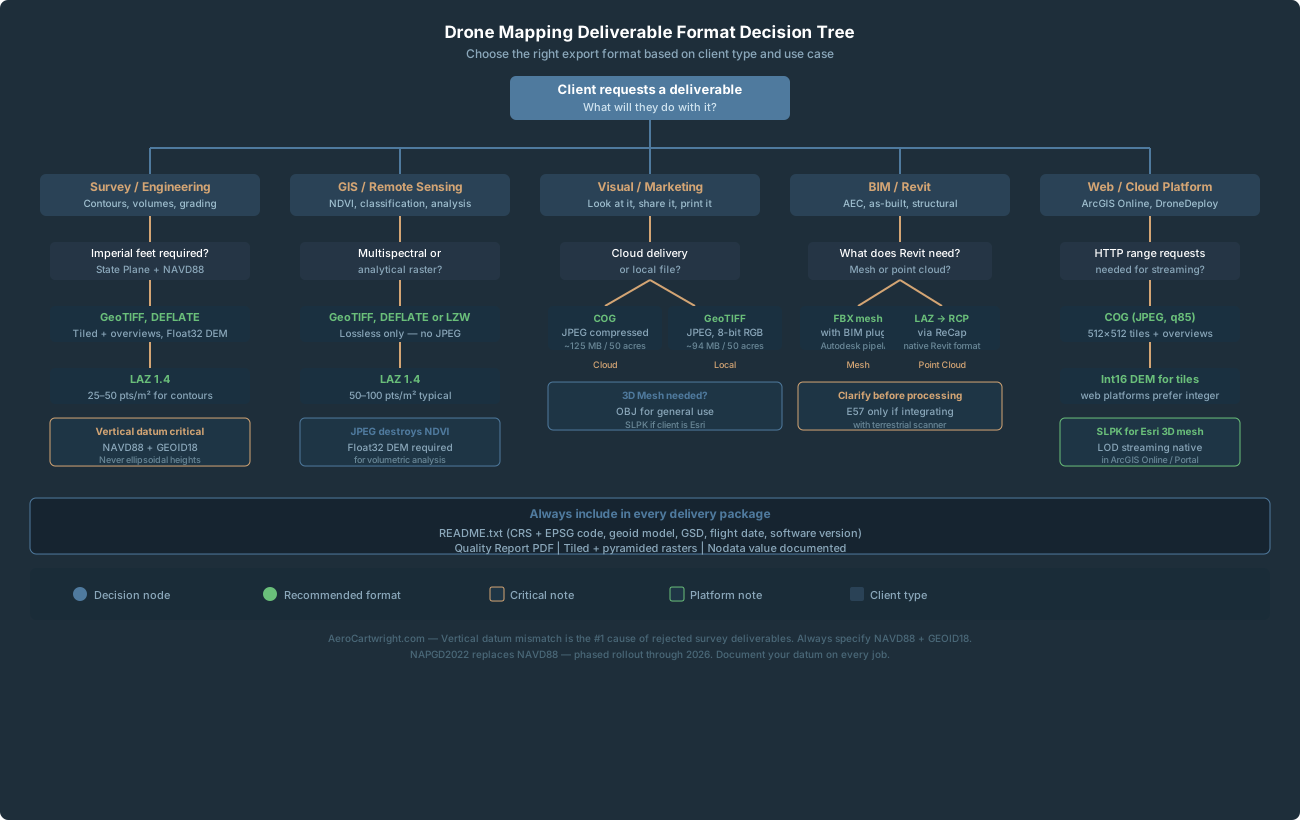
A typical deliverable package for a 50–100 acre site: orthomosaic at 400–800 MB (DEFLATE GeoTIFF), point cloud at 200–600 MB (LAZ), DEM/DSM at 50–200 MB (DEFLATE GeoTIFF), quality report at 2–10 MB PDF.
Folder structure:
ProjectName_YYYY-MM-DD/
├── Orthomosaic/
│   └── ProjectName_Ortho_StatePlane_NAVD88.tif
├── Elevation/
│   ├── ProjectName_DSM_StatePlane_NAVD88.tif
│   └── ProjectName_DTM_StatePlane_NAVD88.tif
├── PointCloud/
│   └── ProjectName_PointCloud_StatePlane_NAVD88.laz
├── QualityReport/
│   └── ProjectName_QualityReport.pdf
└── README.txt
The README.txt should include: coordinate system with EPSG code, geoid model used, GSD, flight date, processing software and version, and any known data gaps.
Transfer methods by file size:
- Under 2 GB: WeTransfer free tier, Google Drive shared link, or Dropbox
- 2–15 GB: Dropbox Transfer, Google Drive, OneDrive
- Over 15 GB: AWS S3 presigned URL, Google Cloud Storage, Azure Blob, or physical USB-C SSD
Quick-Reference Format Decision Matrix
| Deliverable | Default Format | When to Change |
|---|---|---|
| Orthomosaic (analytical) | GeoTIFF, DEFLATE, Float32 | — |
| Orthomosaic (visual only) | GeoTIFF, JPEG, 8-bit | Web portals, visual review |
| Orthomosaic (cloud streaming) | COG (JPEG compressed) | Client uses cloud GIS |
| Point cloud | LAZ 1.4 | LAS if client explicitly can’t handle LAZ |
| DEM/DSM (analytical) | GeoTIFF Float32, DEFLATE | — |
| DEM/DSM (web tiles) | GeoTIFF Int16, DEFLATE | Visualization-only, web platforms |
| 3D mesh (general) | OBJ + MTL | FBX for Autodesk; SLPK for Esri |
| Legacy format request | Offer COG first | ECW/MrSID only if enterprise system requires |
Frequently Asked Questions
My client says their software won’t open the LAZ file. What do I do?
Tell them to download laszip (free, open source). It converts LAZ to LAS in seconds. Alternatively, convert to LAS on your end and note that LAZ archives are available for future deliveries once they upgrade their toolchain. LAZ is lossless — there is no technical reason to default to LAS for deliverables.
How do I know whether my DEM has ellipsoidal or NAVD88 heights?
Open the file in ArcGIS Pro or QGIS and click on a point where you have a known benchmark elevation. Compare the raster value to the benchmark. If it’s off by a consistent 50–100 ft, you have ellipsoidal heights. If it matches within your expected accuracy margin, you have orthometric. Set this up as a spot-check on every job before delivery.
What’s the difference between a DSM and a DTM, and which should I deliver?
DSM (Digital Surface Model) includes the tops of all features — buildings, trees, vehicles. DTM (Digital Terrain Model or bare-earth DEM) represents the ground surface with above-ground features removed. Photogrammetry software generates a DSM by default. A DTM requires ground classification of the point cloud followed by interpolation from ground-classified points. For construction and engineering deliverables, you typically need both. Confirm with the client which they need before processing.
Should I include the raw orthomosaic tiles or just the merged output?
Deliver the merged output. Raw tiled imagery from photogrammetry software is an intermediate processing artifact, not a deliverable. The client cannot use raw tiles without stitching them. The only exception is if a client is running their own photogrammetric processing pipeline and has explicitly requested the source imagery.
What does the NAPGD2022 transition mean for my deliverables right now?
For current deliverables, nothing changes. Deliver NAVD88 with GEOID18 — that remains the correct standard. The NGS NSRS modernization is rolling out in phases through 2026. Always document your datum and geoid model in every quality report and README, so future conversions are traceable.
A client asked for ECW but I don’t have the Hexagon SDK. What do I do?
Ask what software they’re opening it in. If it’s ArcGIS, offer COG with JPEG compression — same visual quality, no license required. If they have an enterprise system that specifically requires ECW and won’t accept alternatives, you’ll need to acquire the SDK or find a GIS service bureau that can convert. This is rare in 2025.