


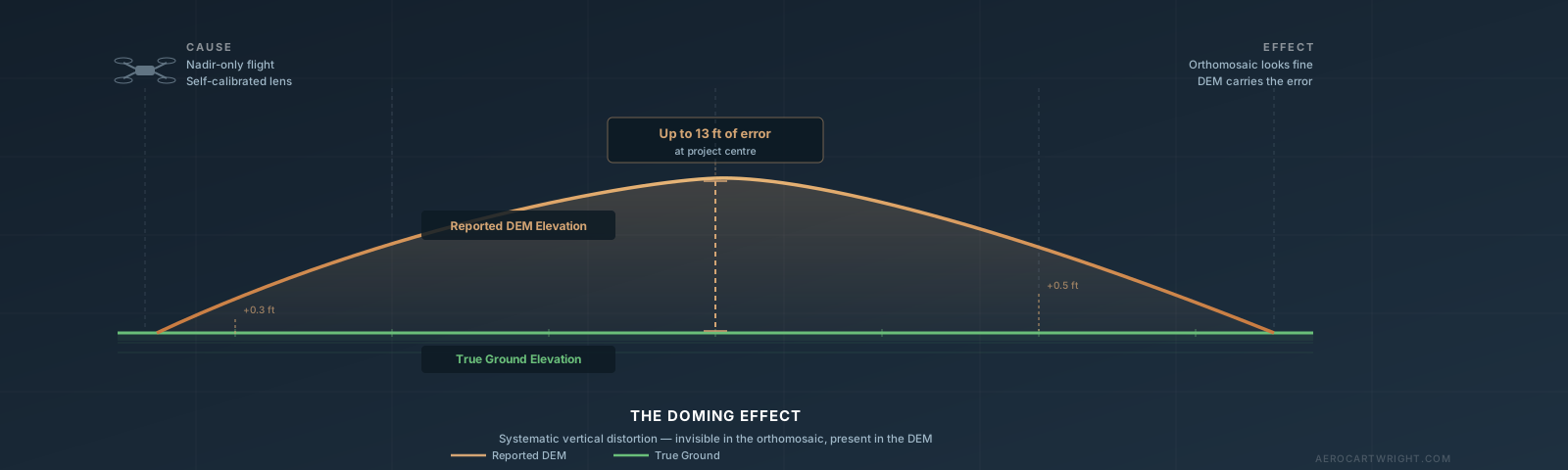
The orthomosaic looks sharp. Your client is satisfied with the preview. Then a field engineer walks the site with an RTK rover and checks a benchmark near the center of your project. The elevation is off by eight inches. You check the corner benchmarks. They’re within 0.05 ft. You pull the DEM and look at a profile across the site. The surface is not flat. It bows upward in the middle by nearly a foot.
Your drone map has the drone map doming effect, and nothing in the deliverable you nearly sent hinted at it.
This is the failure mode that catches pilots off guard: doming is invisible in the orthomosaic, the residuals at your GCP corners can look clean, and you can fly a technically correct mission and still produce a DEM that is systematically wrong. It happens on every photogrammetry platform — Pix4D, Metashape, WebODM — and it happens most often on exactly the flight type most pilots default to: a flat nadir grid over open terrain.
What the Doming Effect Actually Is
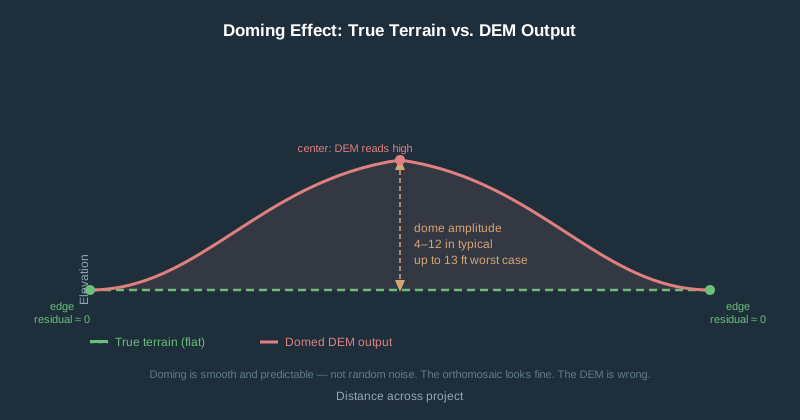
Doming (sometimes called the bowl effect or bowing artifact) is a systematic, large-scale vertical distortion across the entire DEM. The surface appears artificially curved — either the edges sag below the center (bowl) or they rise above it (dome). It is not random noise. It is a smooth, predictable warp that looks like someone inflated or deflated the model from underneath.
The distortion lives almost entirely in the Z axis. Your horizontal positions can be accurate to within a couple of inches while your elevations are off by a foot or more. This drone survey elevation error is invisible in plan view — your orthomosaic can look perfect while your DEM is lying.
Magnitude figures below come from simulations in James & Robson (Earth Surface Processes and Landforms, 2014) — the only peer-reviewed source that quantifies dome amplitude directly. Their simulations were run at a nominal 50 m (~164 ft) flying height; the dome effect itself is driven by flight-line geometry, not altitude.
| Flight Scenario | Typical Dome Amplitude |
|---|---|
| Nadir-only, self-calibrated, realistic flight variability | ~8 in (0.2 m) — the paper’s own representative figure |
| Nadir-only, self-calibrated, idealized worst case (zero flight variability, flat terrain) | Up to ~4.3 ft (1.3 m) — severe |
| Nadir + oblique imagery added, practical flight plan | ~1 in (2 cm) — one to two orders of magnitude better |
| Nadir-only, pre-calibrated camera | Substantially reduced — magnitude is project-dependent, not a fixed figure in this paper |
| Optimized design + RTK or GCPs | Further reduced — sub-inch residuals achievable on well-controlled projects |
A 1-ft dome across a 10-acre construction site looks like survey accuracy in plan view. Your volumes will be wrong by hundreds of cubic yards. The orthomosaic will look fine. The DEM will not.
Why It Happens: The Four Contributors
1. Radial Lens Distortion Misestimation — The Primary Cause
Every camera lens bends light slightly. The Brown-Conrady distortion model uses coefficients (k1, k2, k3) to characterize how much straight lines bow inward or outward near the image edges. Photogrammetry software estimates these coefficients as part of bundle adjustment — the mathematical process that simultaneously solves for camera positions, orientations, and 3D point locations.
Here is where things go wrong on a standard nadir grid: when all your photos are taken nearly straight down, every camera is pointed in roughly the same direction. The bundle adjustment’s Jacobian matrix becomes ill-conditioned — technically, there is no longer enough geometric diversity in the image network to separate true radial distortion from a systematic warp in the surface. The optimizer finds a distortion curve that minimizes reprojection error but is physically wrong, and that incorrect distortion propagates directly into a domed or bowled surface in the output.
This is not a bug in any particular software. It is a geometry problem. The math cannot solve what the image network does not constrain.
2. EXIF GPS Elevation Garbage
The altitude value in your DJI drone’s image metadata is not GPS elevation. It is barometric altitude, poorly converted using a standard atmospheric model. Temperature changes, pressure fluctuations, and flight duration all shift this reading. Errors of 30–60+ ft relative to true ellipsoidal height are routine on consumer drones.
What makes this worse: the barometric reading drifts consistently across a flight, so your image geolocations show a false elevation gradient along the flight path. Bundle adjustment treats these as real positions and can produce a systematically warped output in response. This is a separate problem from lens distortion doming, but the two compound each other.
Never trust vertical positioning from EXIF metadata alone, regardless of what the map preview looks like.
3. Rolling Shutter Distortion
Rolling shutter sensors expose the sensor one row at a time rather than all at once. During the readout period, the drone has moved. The top and bottom of the same image were captured from slightly different positions in space.
Measured readout times on common DJI consumer drones:
| Drone | Rolling Shutter Readout | Photogrammetry Impact |
|---|---|---|
| DJI Mavic 2 Pro | ~51 ms | Significant at mapping speeds |
| DJI Phantom 4 Pro | ~41 ms | Moderate |
| DJI Mini 4 Pro | Est. 16–25 ms | Moderate-high risk (no official figure) |
| DJI Air 3 / Air 3S | ~16 ms (12 MP mode) | Low-moderate |
| DJI Mavic 3 (consumer) | ~16 ms | Low at normal mapping speeds |
| DJI Mavic 3E (enterprise) | Mechanical shutter | Effectively zero |
| DJI Phantom 4 RTK | Mechanical shutter | Effectively zero |
At 51 ms readout and typical mapping speeds, the first and last sensor rows represent roughly 3 ft of ground distance apart. Pix4D testing showed rolling shutter correction improved vertical RMSE from 1.6 ft to 4.2 in in one test scenario.
4. Bundle Adjustment Convergence Failures
Even with good inputs, bundle adjustment can converge to a local minimum that introduces systematic doming. This is more likely when:
- Tie point quality is low (featureless terrain, motion blur, inadequate overlap)
- Front overlap is under 75% or side overlap under 60%
- All photos are nearly parallel — the same geometry problem as nadir-only flights
Reducing tie point observation accuracy from 0.5 to 1.0 pixels standard deviation more than doubles expected dome amplitude.
Why Your Nadir Grid Is Especially at Risk
A standard lawnmower grid is excellent at producing horizontal overlap. It is geometrically degenerate for self-calibration.
Think of it this way: imagine trying to measure the curvature of a lens by only looking through its center. You need edge angles to see the distortion. That is exactly what oblique images provide — viewing geometry that makes radial distortion mathematically separable from surface shape. When every photo points straight down, the optimizer cannot tell the difference between “the lens is distorted” and “the terrain is curved.”
The numbers from ISPRS Archives 2023 put this concretely: nadir-only DEMs averaged 11.6 in of elevation error against GNSS checkpoints; oblique (~45°) DEMs averaged 5.7 in on the same site — about 50% better. James & Robson (2014) found that adding oblique images to a nadir block can reduce systematic dome error by up to two orders of magnitude.
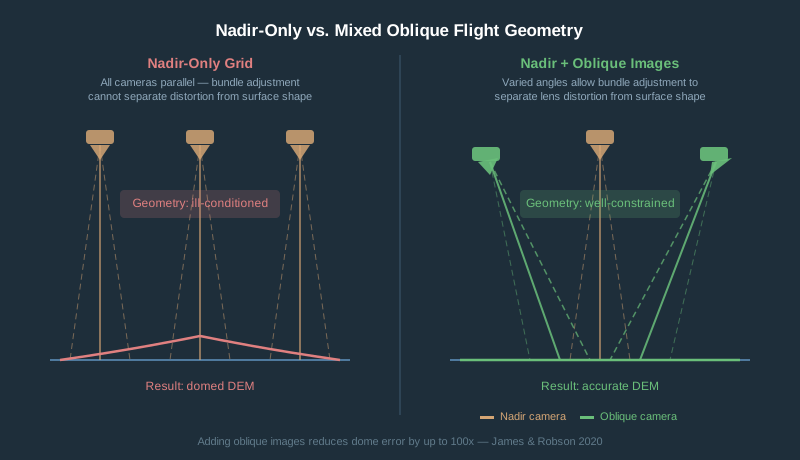
Flat, open terrain is worst. Featureless surfaces like grass fields, agricultural ground, or gravel pads provide weak tie points, so the bundle adjustment has even less geometric information to work with. Complex topography partially self-corrects through stronger image network geometry.
GCPs: Why They Actually Fix the Problem
Ground control points do not just “anchor” the map to real-world coordinates. They break the mathematical degeneracy that causes doming.
The collinearity equation in bundle adjustment ties together three things: camera interior orientation (focal length, principal point, distortion coefficients), camera exterior orientation (position and rotation), and the 3D coordinates of ground points. Without GCPs, all three float freely — and a radial distortion error is geometrically indistinguishable from a domed surface. The optimizer will trade one for the other if it reduces reprojection error.
When you add GCPs, the object coordinates at those locations are fixed. The optimizer can no longer absorb distortion errors as surface errors at control points. It is forced to solve for more accurate distortion coefficients, and the dome flattens.
Minimum effective GCP layout:
- At least 5 GCPs, with one near the center of the block — not just corners
- GCPs at varying elevations when terrain allows (ridge lines, gully edges, low points)
- For larger sites, add one GCP per additional 25–30 acres of coverage
- Corner-only placement is the most common mistake — it anchors the perimeter while the center dome continues to grow
GCPs vs. checkpoints: GCPs constrain the adjustment. Checkpoints — surveyed points you withhold from processing — measure residual error independently. A project can show clean GCP residuals while still doming between control points. Always withhold at least 3 checkpoints and inspect for systematic spatial pattern, not just RMS values.
For step-by-step guidance on setting and surveying GCPs, see How to Set Your Own Ground Control Points for Drone Mapping.
Does a 90-Degree Cross-Flight Actually Help?
Yes — somewhat. Not enough on its own.
Flying a second grid at 90 degrees to the first diversifies camera viewing geometry. Tie points connect images from two different flight directions, giving bundle adjustment stronger geometric constraints. The radial distortion estimate stabilizes.
Peer-reviewed research confirms cross-flights reduce doming. The catch: both grids are still nadir. The fundamental geometry problem is moderated, not solved. James & Robson (2014) consistently show that oblique images are more effective than cross-nadir patterns because they directly address the viewing angle degeneracy that nadir-only grids cannot overcome.
Cross-flight is a useful mitigation, not a cure. For complex terrain, cross-flight plus 5 GCPs is a solid combination. For flat open terrain with a precision deliverable, you need GCPs regardless of flight pattern.
Practical note: cross-flights double your flight time and image count. DJI consumer apps that support double-grid missions: DJI Fly (with advanced mapping), DroneDeploy, Dronelink, DJI Pilot 2.
Camera Calibration and Software Settings
Pre-Calibration vs. Self-Calibration
Most software defaults to self-calibration — estimating distortion coefficients from your project’s own images during bundle adjustment. With good geometry, this works. With nadir-only imagery, it is the proximate cause of doming.
Pre-calibration uses camera parameters measured beforehand with a controlled target (checkerboard pattern, calibration wand) and loads them into the software before processing begins. The effect on doming is significant:
- Self-calibration, nadir-only, flat terrain: ~8 in (0.2 m) under realistic flight conditions, up to ~4.3 ft (1.3 m) in the idealized worst case (James & Robson 2014)
- Pre-calibration, nadir-only: substantially reduced dome, exact magnitude project-dependent
- Pre-calibration plus RTK or GCPs: further reduced; sub-inch residuals achievable on well-controlled projects
One practical note on consumer DJI cameras: lens distortion parameters shift with temperature. A camera cold at takeoff will have different distortion than at operating temperature. Give it 2–3 minutes of hover at altitude before starting the grid.
Pix4D
Pix4D maintains an internal camera database with pre-measured distortion parameters for common DJI and other consumer cameras. Rolling shutter correction is available under Processing Options > Initial Processing. Enable it when the built-in Vertical Pixel Displacement tool exceeds 2. If doming persists, you can manually lock individual distortion coefficients (k1, k2, k3) in the camera optimization settings and reprocess.
Agisoft Metashape
Run Tools > Optimize Cameras after adding and marking GCPs — not before. The order matters. If you optimize before adding control, you bake an unconstrained distortion estimate into the model.
Enable adaptive camera model fitting when using a camera not in Metashape’s database, or when working with a zoom lens at varied focal lengths.
For pre-calibration: Agisoft Lens (free standalone tool) generates parameters from a chessboard target. Import the resulting XML under Tools > Camera Calibration before alignment.
Rolling shutter correction is available as a checkbox in Alignment settings.
WebODM / OpenDroneMap
Enable rolling shutter correction via --rolling-shutter plus --rolling-shutter-readout [ms]. ODM maintains a community-sourced readout time database at opendronemap.github.io/RSCalibration.
Critical caveat: incorrect readout times make results worse, not just less accurate. One community analysis found that disabling the correction entirely outperformed using a mismatched readout time. Verify your camera’s actual readout before enabling this flag.
Without GCPs and with nadir-only imagery, ODM is susceptible to the same doming as any other SfM pipeline. GCPs are the primary mitigation.
DJI Drone Doming Risk Ranking
Highest consumer risk: DJI Mini 4 Pro — Rolling shutter (electronic only, no mechanical option), readout time not officially published (community estimates: 16–25 ms range), consumer EXIF GPS only, wide-FOV lens with significant radial distortion. Not recommended for vertical deliverables without ground control.
Moderate risk: DJI Air 3 / Air 3S — Rolling shutter with ~16 ms readout, no RTK option, consumer GPS. Better than the Mini 4 Pro due to faster readout. Still requires GCPs for accurate DEMs.
Best consumer option: DJI Mavic 3 (consumer / Mavic 3 Pro) — Hasselblad M4/3 20 MP sensor, ~16 ms rolling shutter readout — a 3x improvement over the Mavic 2 Pro’s 51 ms. Consumer GPS only, so vertical accuracy still depends on GCPs.
Lowest prosumer risk: DJI Mavic 3E (Enterprise) — Mechanical shutter eliminates rolling shutter distortion entirely. RTK-capable. Disable onboard dewarping when exporting images for photogrammetry — the in-camera correction interferes with software-side calibration.
How to Detect Doming Before Delivery
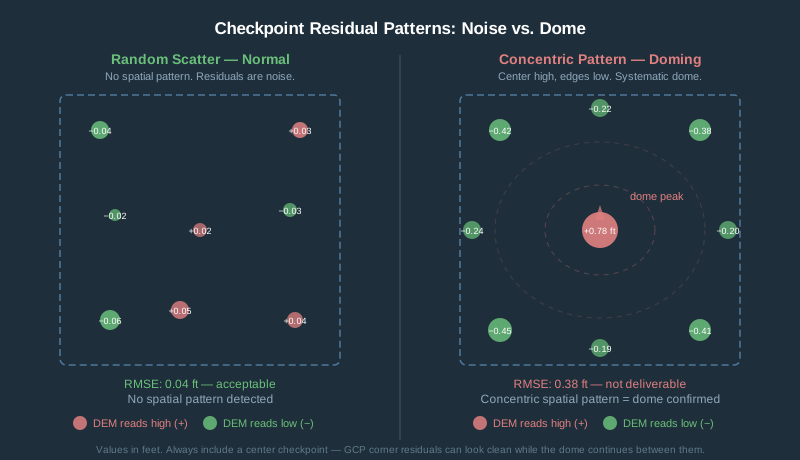
Checkpoint validation is the only reliable way to catch a dome before it becomes your problem.
The method:
- Survey 6–10 points distributed across the site — include center and corners, not just perimeter — using RTK GPS, a total station, or existing benchmarks.
- Withhold these from GCP processing entirely.
- Process your dataset normally.
- Extract DEM elevation at each checkpoint location.
- Calculate residuals: DEM elevation minus surveyed elevation.
- Look for a spatial pattern.
Random scatter is normal noise. A systematic gradient — center high, edges low, or the reverse — is a dome. The signature is smooth and concentric.
RMSE thresholds for vertical accuracy:
| Vertical RMSE | Interpretation |
|---|---|
| < 0.1 ft (3 cm) | Survey-grade — excellent |
| 0.1–0.3 ft (3–10 cm) | Acceptable for engineering topography |
| 0.3–1.0 ft (10–30 cm) | Marginal — inspect for systematic dome pattern |
| > 1.0 ft (30 cm) | Not deliverable for any survey use |
The trap to avoid: reporting only GCP residuals. GCP residuals tell you how well the model fits the control, not how accurate it is in the areas between control points. Always withhold checkpoints and report both.
For a complete workflow on reaching your first accurate orthomosaic, see Your First Drone Orthomosaic in 90 Minutes.
Tolerance by Job Type
| Job Type | Vertical Tolerance | Dome That Kills It |
|---|---|---|
| Legal boundary survey | ≤ 0.05 ft | Any visible dome |
| Construction volume calculation | ≤ 0.1 ft | > 0.3 ft (causes 5–15% cubic yard error) |
| Engineering topography, 1-ft contours | ≤ 0.1 ft | > 0.2 ft dome |
| Engineering topography, 2-ft contours | ≤ 0.2 ft | > 0.5 ft dome |
| GIS base mapping / planning | ≤ 1 ft | > 2 ft dome |
| Orthomosaic only, visual inspection | N/A | Doming rarely affects orthomosaic quality |
On volume calculations: a 0.5 ft dome at the center of a 500-ft diameter flat site produces roughly 5,000–8,000 cubic yards of phantom volume error.
Quick-Reference Action Checklist
Before you process:
- Pre-calibrate camera if delivering to survey tolerances or flying over featureless terrain
- Plan GCP layout with at least one point near the project center
- Withhold at least 3 points as checkpoints — do not use them in processing
- Enable rolling shutter correction if readout time > 20 ms and flying at 30+ mph
During flight:
- Allow 2–3 minutes hover at altitude before starting grid (camera thermal stabilization)
- Maintain minimum 75% front overlap, 65% side overlap
- Consider cross-flight pattern for flat, featureless terrain
- For oblique passes: add a perimeter flight at 30–45° gimbal angle
During processing:
- In Metashape: optimize cameras after marking GCPs, not before
- In Pix4D: check Vertical Pixel Displacement > 2 before enabling rolling shutter correction
- In ODM: verify camera readout time against RSCalibration database before enabling
--rolling-shutter - Inspect DEM profile before running contours or volumes
Before delivery:
- Calculate checkpoint residuals independently from GCP residuals
- Map residuals spatially — look for concentric pattern, not just RMS
- Apply the tolerance table for your job type
Frequently Asked Questions
What is the drone map doming effect?
The doming effect is a systematic vertical distortion in drone photogrammetry outputs where the DEM surface bows upward in the center or sags at the edges — or vice versa. It is caused primarily by incorrect radial lens distortion estimates produced during bundle adjustment when all flight photos are taken at near-vertical (nadir) angles. The orthomosaic typically looks fine; the elevation model carries the error.
How much elevation error does doming typically cause?
James & Robson (2014) modeled nadir-only, self-calibrated UAV surveys and found dome amplitudes of roughly 8 in (0.2 m) under realistic flight conditions (normal flight-line variability, no control points), rising to as much as 4+ ft (1.3 m) in their idealized worst case (zero flight variability, perfectly parallel passes, flat terrain — altitude itself is not the driver). Adding oblique imagery reduced that error by one to two orders of magnitude in their simulations. Pre-calibration and well-distributed GCPs reduce doming further, though the exact residual is site- and project-dependent rather than a fixed figure. Source: James & Robson 2014, Earth Surface Processes and Landforms.
How do I detect doming before delivering a project?
Survey 6–10 checkpoint locations across the site (including the center) using RTK GPS or a total station. Withhold these from your GCP processing. After generating the DEM, extract elevations at each checkpoint and compare to surveyed values. If center checkpoints are consistently high and edge checkpoints consistently low (or vice versa), you have a dome. Random scatter is normal noise; a concentric spatial pattern is a dome.
Do GCPs actually fix the doming effect, or just improve overall accuracy?
GCPs directly fix doming by breaking the mathematical degeneracy that causes it. Without GCPs, the bundle adjustment can compensate for lens distortion errors by warping the surface. When GCP coordinates are fixed, the optimizer can no longer trade a distortion error for a surface error at those locations, forcing the distortion coefficients toward their true values. Corner-only GCP placement is a common mistake — you need at least one near the center of the project block.
Does flying a cross-grid (double-grid) pattern eliminate doming?
It reduces doming but does not eliminate it. Cross-flights diversify the camera viewing geometry, giving bundle adjustment better geometric constraints for self-calibration. Research confirms the improvement is real but secondary to adding oblique images or GCPs. Both grids are still nadir, so the fundamental geometry degeneracy is moderated, not resolved. Cross-flight plus 5 well-distributed GCPs is a practical combination for most production mapping jobs.
Which DJI drones are most at risk for the doming effect?
From highest to lowest risk: DJI Mini 4 Pro (rolling shutter, no mechanical option, wide-FOV lens), DJI Air 3 (rolling shutter, no RTK), DJI Mavic 3 consumer (rolling shutter at 16 ms, no RTK), DJI Mavic 3E enterprise (mechanical shutter, RTK-capable — lowest risk). The Mavic 2 Pro sits above the Mavic 3 consumer in risk due to its 51 ms rolling shutter readout. None of the consumer rolling-shutter drones are recommended for vertical deliverables without GCPs.
What is the photogrammetry doming fix if I’ve already processed a dataset?
If you have surveyed GCPs you did not use in the original processing, add them and reprocess. In Metashape: import GCPs, mark them in images, then run Tools > Optimize Cameras followed by rebuilding the dense cloud and DEM. In Pix4D: add GCPs in Step 1 and reprocess the full pipeline. In ODM: add a GCPs file and reprocess from scratch. If you have no control points and cannot return to the site, there is no software-only fix — the geometry that caused the dome cannot be reconstructed after the fact.