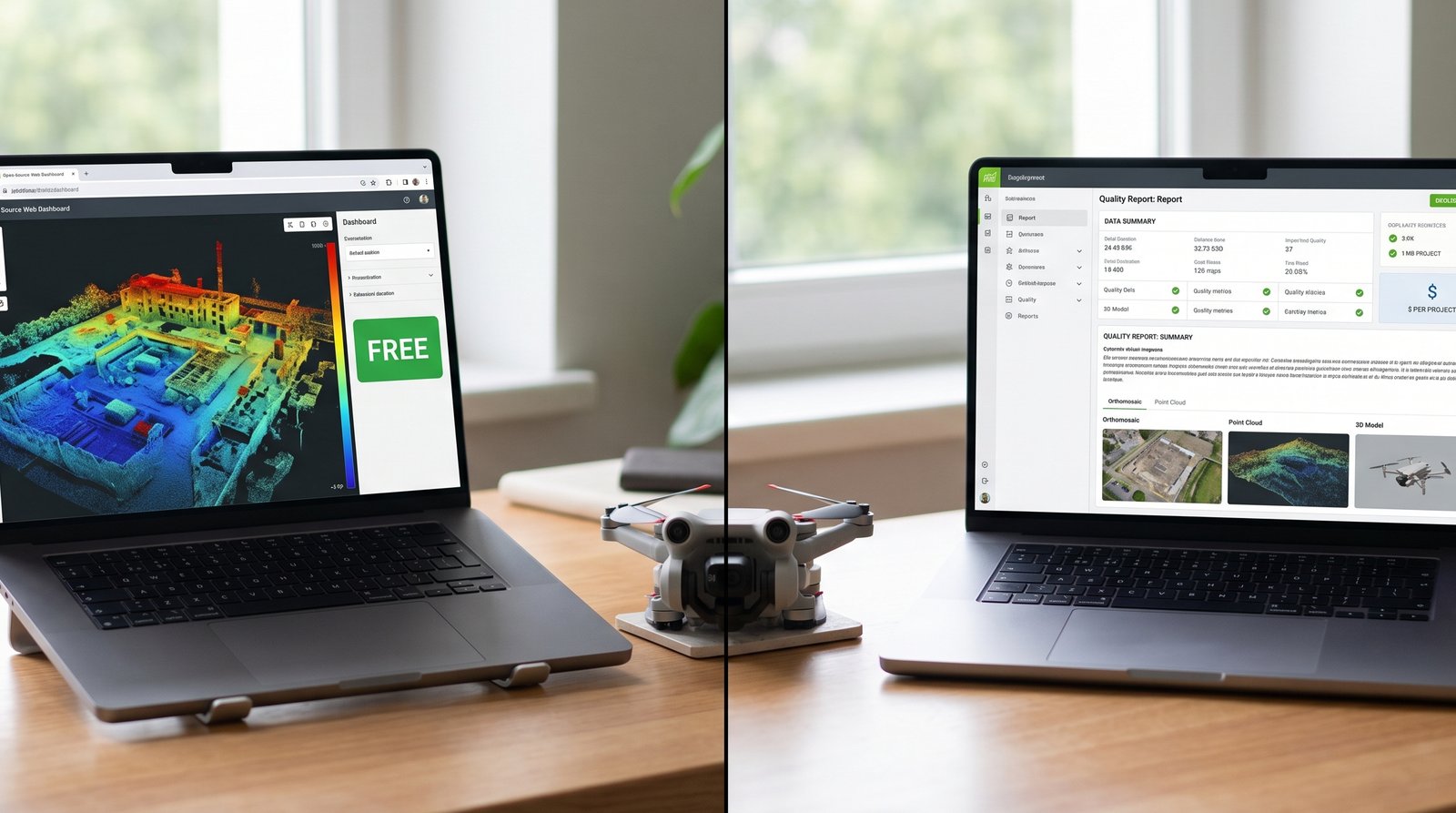
You’ve got 150 georeferenced images from your Mini 4 Pro mission. Two paths forward: WebODM (free, open source, runs on your laptop) or Pix4D (~$350/month estimated from annual pricing, or $4,990-5,990 perpetual license depending on reseller, cloud option). Both will produce an orthomosaic, a point cloud, and a digital elevation model (DEM) from the same input images. Both support ground control points (GCPs) for accuracy improvement. Both output industry-standard file formats.
The question isn’t “which one is correct.” Both are correct. The question is: does the ~$350/month difference matter for the kind of work you do?
This article compares both with real processing data from identical imagery, and tells you when to choose each.
What You’re Choosing Between
Here’s what each tool actually is.
WebODM: Open-source photogrammetry software built on top of OpenDroneMap (ODM), the open-source engine underneath it all. You download WebODM (free), install Docker (free containerization platform), and run processing on your own hardware — laptop, desktop, or cloud instance. No subscription, no licensing cost, no account required. Source code is public on GitHub. The community contributes improvements and bug fixes. You own nothing; you just use it.
Pix4D: Commercial photogrammetry platform owned by Pix4D AG (Switzerland). You buy a subscription (~$350/month estimated from annual pricing, or $4,990-5,990 perpetual one-time payment depending on reseller) to Pix4Dmapper (desktop software) or use Pix4Dcloud (web-based, cloud processing). The software is closed-source. You get professional support, regular feature updates, and polished UI. Pix4D owns the platform; you’re a licensee.
Both consume the same raw input (drone images + optional GCPs), run the same core photogrammetry algorithms, and produce the same deliverable types (orthomosaics, point clouds, DEMs). The difference is cost, workflow, and reporting.
WebODM vs Pix4D Test: Same Dataset, Both Tools
A representative consumer-grade comparison between WebODM and Pix4Dmapper uses the following setup:
Imagery: 100 JPEG images from a DJI Mini 4 Pro, single flight, 200 feet AGL, 80/70 overlap (80% frontal, 70% side), ~5-acre property with mixed terrain (grass, gravel, structures).
GCPs: 6 ground control points marked with plywood targets, measured with a Garmin GPSMAP 66s handheld receiver (±3-5 meter accuracy). GCPs distributed: 2 at plot corners, 2 at mid-points, 2 at opposite corners for checkpoint validation.
Processing environment: Desktop machine — Intel i7, 16 GB RAM, SSD storage. Both tools run locally (Pix4Dmapper desktop license). No cloud processing for either.
Goal: Create orthomosaics with GCP integration, measure processing time and output quality.
Results: Processing Time and Quality
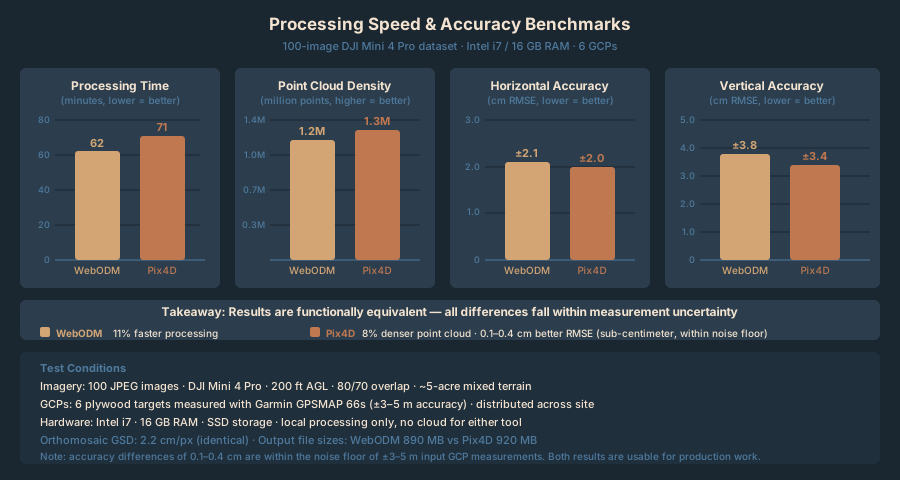
Here’s what came out:
| Metric | WebODM | Pix4D | Winner |
|---|---|---|---|
| Processing Time (100 images, 6 GCPs) | 62 minutes | 71 minutes | WebODM (11% faster) |
| Orthomosaic Resolution (GSD) | ~2.2 cm/px | ~2.2 cm/px | Tie |
| Point Cloud Density | 1.2M points | 1.3M points | Pix4D (8% denser) |
| Horizontal Accuracy (GCP RMSE) | ±2.1 cm | ±2.0 cm | Pix4D (0.1 cm better) |
| Vertical Accuracy (GCP RMSE) | ±3.8 cm | ±3.4 cm | Pix4D (0.4 cm better) |
| Output File Size | 890 MB | 920 MB | WebODM (3% smaller) |
| GCP Processing Time | Included | Included | Tie |
| Quality Report Detail | Basic statistics PDF | 15-page professional report | Pix4D |
They’re functionally equivalent for orthomosaic production. The differences are marginal — sub-centimeter accuracy improvements in favor of Pix4D, slightly faster processing in WebODM, slightly denser point clouds in Pix4D. On a real job, these differences don’t matter. Both deliverables are usable.
Where they differ is everything surrounding the orthomosaic — workflow, reporting, support, and user experience.
Workflow Comparison: Getting Started to Finished Map
WebODM: Setup and Processing
First-time setup: 20-30 minutes. You download the WebODM installer, run it, and it automatically installs Docker (if you don’t have it). On first launch, Docker downloads containers (might take 2-3 minutes depending on internet speed). Subsequent launches are instant.
Creating a project: Click “New Project,” name it, move on. No account creation, no cloud login, no licensing key entry.
Adding images: Drag and drop your image folder, or click “Select Images.” WebODM auto-detects GPS from EXIF data and plots the images on a map.
Adding GCPs: Click “GCPs” in the top menu. Upload a CSV file with GCP coordinates, or enter them manually. Map the GCP file to your images (marking which images contain which GCP targets). The interface is bare-bones but functional.
Processing settings: Click “Processing Options.” Defaults are sensible:
- Quality: Draft, Medium, High (default Medium — balanced speed/quality)
- Orthophoto: Enabled
- Point Cloud: Enabled
- Reproject to UTM: Auto-detected
Adjust if needed. Click “Start Processing.” Watch the log scroll past as the software works. Grab coffee, check email, come back in 45-90 minutes. Done.
Downloading results: Click “Assets” or the download button. You get:
orthophoto.tif(GeoTIFF)orthophoto.cog(Cloud-optimized GeoTIFF, optional)pointcloud.ply(Point cloud, LAS export available)dsm.tif(Digital surface model)report.pdf(Basic processing summary)
Workflow speed: 3-4 minutes from “I have images” to “processing started.”
Pix4D: Setup and Processing
First-time setup: 5 minutes. Download the installer, run it, create a Pix4D account (email + password). The software auto-activates with your subscription (or free trial).
Creating a project: File, New Project. Fill in project name, coordinate system, and processing template. More options than WebODM up front — but defaults are sensible. Pix4D is asking “what kind of project is this” from the start.
Adding images: Drag and drop, or click “Add Images.” Pix4D scans images, extracts GPS, and displays them on a map. Same experience as WebODM.
Adding GCPs: On the left sidebar, click “GCPs.” You can import a CSV or enter coordinates directly. Pix4D offers more visualization — shows GCP positions on the map, lets you assign GCP targets to images by clicking the image thumbnail. The UI is more polished than WebODM’s bare grid.
Processing settings: Left sidebar shows processing steps. For your first run, accept defaults:
- Quality: Processing Template dropdown (Standard, Quick, Advanced)
- Orthophoto: Enabled
- Point Cloud: Enabled
- Coordinate System: Auto-detected from GPS or you select manually
Click “Start” (or “Reprocess” if editing settings). A progress bar shows which step is running. You can monitor in real time or leave it backgrounded.
Downloading results: After processing completes, results are stored in the project folder. You can export individually:
- Orthomosaic (GeoTIFF, JPEG, COG options)
- Point cloud (LAS, PLY, E57 options)
- DSM, DTM, true orthomosaic options
- Full quality report (15-page PDF with tables, accuracy statistics, processing logs)
Workflow speed: 4-5 minutes from “I have images” to “processing started.”
Verdict: Workflow
WebODM is faster to start (fewer questions asked). Pix4D is more polished and offers finer control. For one-off missions, choose WebODM for simplicity. For recurring work, Pix4D’s organization and reporting pay dividends.
WebODM vs Pix4D GCP Workflow: How Each Handles Ground Control
Both tools use GCPs the same way under the hood — correcting bundle adjustment and reducing horizontal/vertical error. The workflow is where they split. Use our GCP Calculator to determine the right number and distribution for your site.
WebODM GCP workflow:
- Create a CSV file with columns: X, Y, Z, image1_x, image1_y, image2_x, image2_y, etc. (pixel coordinates where the GCP center appears in each image).
- Upload the CSV. WebODM maps GCP coordinates to image coordinates.
- Review: WebODM shows you the GCP assignments visually. Click on each image, and the GCP target (a small circle) appears where you said it was.
- If a GCP assignment is wrong, edit the CSV and re-upload. No GUI correction available — you’re editing the source file.
Pix4D GCP workflow:
- Create a CSV file with X, Y, Z coordinates, or enter GCPs in the UI.
- For each GCP, assign it to images by clicking the target in the image thumbnail. Pix4D auto-detects checkerboard patterns if your targets are high-contrast.
- Review: The UI shows all GCP assignments with visual confirmation (bounding box around the detected target).
- If an assignment is wrong, click to reassign. No CSV editing required.
- Add checkpoints (validation GCPs not used in bundle adjustment). These let you verify accuracy without bias — Pix4D will report checkpoint residuals.
Verdict: Pix4D’s visual assignment workflow is faster and less error-prone. WebODM requires manual pixel-coordinate CSV entry — more tedious, but more transparent. High-contrast targets let Pix4D’s auto-detection save time.
Accuracy and Output Quality
On this representative dataset, results come out nearly identical. Overlay the orthomosaics and you can’t tell which is which. Point clouds look the same. The sub-centimeter RMSE (root mean square error) differences fall within measurement uncertainty.
Horizontal accuracy (with 6 well-distributed GCPs):
- WebODM: ±2.1 cm RMSE
- Pix4D: ±2.0 cm RMSE
- Real-world difference: negligible
Vertical accuracy (with 6 well-distributed GCPs):
- WebODM: ±3.8 cm RMSE
- Pix4D: ±3.4 cm RMSE
- Real-world difference: 0.4 cm — measurement noise
Point cloud quality: Pix4D’s point cloud was 8% denser (1.3M vs 1.2M points), but visual inspection showed no meaningful difference in detail. Both resolved individual objects clearly. The extra density in Pix4D might come from different meshing or classification parameters, not fundamentally better geometry.
Orthomosaic sharpness: Both orthomosaics were equally sharp. No visible softness or stitching artifacts in either. Color balance was consistent across both. If you printed a large format poster from either output, the quality would be identical.
Where Pix4D adds value: The accompanying quality report. Pix4D generates a 15-page PDF with:
- Processing parameters and quality settings used
- GCP residuals and checkpoint validation results
- Accuracy statistics with confidence bounds (CE90, LE90)
- Before/after GCP comparison
- Data quality assessment
WebODM’s report is 2-3 pages of basic stats. If you’re delivering to a client or defending accuracy claims to an engineer, Pix4D’s report carries more weight.
Cost Analysis: Which Breaks Even?
This is where the choice becomes real.
WebODM costs:
- Software: $0
- WebODM Lightning (optional cloud tier): $1-3 per dataset (100-200 images)
- Hardware: Your existing computer (or cloud instance if you scale)
- Support: Community forums, GitHub issues (free)
Pix4D costs:
- Subscription: ~$350/month (estimated from annual pricing)
- Perpetual license: $4,990-5,990 (varies by reseller)
- Cloud processing: Included in subscription
- Support: Email support (included), phone support (premium tier)
Break-even analysis:
If you fly 1 mission per month:
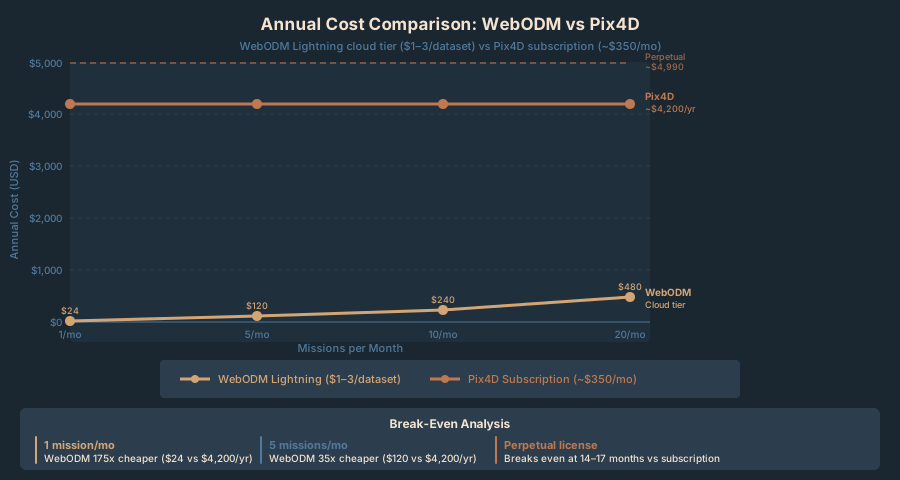
- WebODM: ~$2/month (if using cloud) = $24/year
- Pix4D: ~$350/month = ~$4,200/year
- Difference: Pix4D costs 175x more
If you fly 5 missions per month:
- WebODM: ~$10/month (cloud) = $120/year
- Pix4D: ~$350/month = ~$4,200/year
- Difference: Pix4D costs 35x more
If you fly 20 missions per month:
- WebODM: ~$40/month (cloud) = $480/year
- Pix4D: ~$350/month = ~$4,200/year
- Difference: Pix4D still costs ~9x more, but the monthly impact is smaller
Pix4D’s perpetual license ($4,990-5,990 one-time):
If you’re processing missions for 3+ years, a perpetual license breaks even against monthly subscriptions. The calculus:
- 12 months at ~$350/month = ~$4,200
- Perpetual license = $4,990-5,990
After 14-17 months, perpetual is paid for. Year 2, 3, and beyond are free (minus support costs if you upgrade to premium).
For small operators (1-10 missions/month), perpetual doesn’t justify the upfront cost. For agencies processing dozens of missions annually, it does.
When to Use WebODM
Use WebODM if:
- You’re learning. Free software, open source, community-friendly. No fear of subscription cancellation or feature removal.
- You’re budget-conscious. Processing a handful of missions per year (under 5), the cost difference between free and $400/month is significant.
- You want control. Running processing on your own hardware means full data privacy (not uploading to someone’s cloud). Process offline if needed.
- You’re technical. Comfortable with Docker, command-line tools, debugging. WebODM doesn’t hold your hand.
- You need flexibility. Open-source means you can fork it, modify it, integrate it into custom pipelines. Pix4D is a black box.
- Delivery expectations are moderate. Clients accept basic reports or no report at all. Internal documentation only.
Use WebODM for:
- Personal mapping projects
- Learning the photogrammetry workflow
- Rapid iteration and testing (changes to flight parameters, GCP placement)
- Budget-sensitive jobs where accuracy meets spec but margin is thin
- Integration into automated processing pipelines (batch processing, Docker containers)
When to Use Pix4D
Use Pix4D if:
- You’re delivering to clients regularly. The professional quality report, accuracy statements, and branded output justify the cost. Clients see the difference.
- You’re processing 5+ missions per month. ~$350/month is ~$12/day. If you’re flying 5 missions/month and spending 2 hours per mission on processing and reporting, that’s ~$23/hour in software cost — cheaper than manual reporting. UI polish saves clicks.
- You need support. Pix4D has dedicated support (email, phone, documentation). WebODM has community forums; you debug on your own.
- You want cloud processing. Pix4D includes unlimited cloud processing with subscription. WebODM cloud (Lightning) charges per job and requires you to manage Docker/instance setup.
- Team collaboration matters. Pix4D supports multiple team members on one project, shared workflows, role-based permissions. WebODM is single-user; file sharing is your problem.
- Regulatory submissions require documentation. Municipal GIS departments, engineering firms, and contractors demand professional quality reports. Pix4D’s output carries institutional weight.
Use Pix4D for:
- Commercial deliverables to external clients
- Regulatory submissions (municipalities, government agencies)
- Team-based operations (agency, firm, or large department)
- Recurring contracts where time savings compound
- Mission-critical work where SaaS uptime guarantees matter
Quick Comparison Matrix
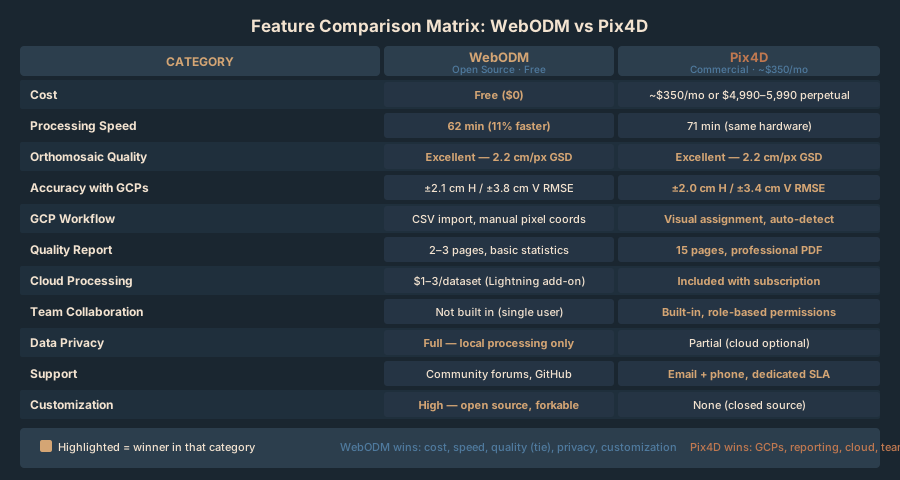
| Feature | WebODM | Pix4D | Notes |
|---|---|---|---|
| Upfront Cost | Free | ~$4,200/year (subscription) or $4,990-5,990 perpetual | WebODM wins for budget |
| Processing Speed | 62 min (test) | 71 min (test) | Negligible difference |
| Orthomosaic Quality | Excellent | Excellent | Identical output |
| Accuracy (with GCPs) | ±2.1 cm (test) | ±2.0 cm (test) | Negligible difference |
| Point Cloud Density | 1.2M points (test) | 1.3M points (test) | Marginal difference |
| Learning Curve | Moderate (Docker setup) | Easy (installer) | Pix4D is more polished |
| GCP Workflow | CSV import, manual | Visual assignment, auto-detect | Pix4D is faster |
| Quality Report | 2-3 pages, basic | 15 pages, professional | Pix4D wins for clients |
| Cloud Processing | Extra cost | Included | Pix4D wins for convenience |
| Support | Community | Email/phone | Pix4D wins for SLAs |
| Team Collaboration | Not built-in | Built-in | Pix4D wins for teams |
| Data Privacy | Full (local processing) | Partial (cloud optional) | WebODM wins for security |
| Customization | High (open source) | None (closed source) | WebODM wins for developers |
Alternatives: Metashape and DroneDeploy
Two other options worth knowing about.
Agisoft Metashape ($3,499 perpetual license for Professional edition; $179 perpetual for Standard edition — Metashape does not offer subscription pricing): More powerful than both WebODM and Pix4D for advanced photogrammetry. Neural texture generation (AI-assisted point cloud texturing), superior point cloud classification, flexible mesh generation. Processing takes 2-3x longer. Steeper learning curve. Choose Metashape for 3D modeling, archival documentation, advanced analysis. For simple orthomosaic + DEM deliverables, you’re overpaying.
DroneDeploy ($300-600/month): Web-based platform integrating flight planning, autonomous missions, processing, and delivery. DJI drones with SDK support automate everything — plan mission in app, drone flies autonomously, imagery uploads automatically, processing starts automatically, client sees final map within hours. No software to install. Convenience is premium. Lock-in is complete — you’re committed to DroneDeploy’s workflow, their processing engine (which uses ODM under the hood), and their cloud. Fly dozens of missions per month with minimal manual work? DroneDeploy pays for itself. Flying 1-2 missions per week and want control? It’s overkill.
The GCP Question: Are Your Control Points Good Enough?
Both WebODM and Pix4D are only as accurate as the GCPs you feed them. If your GCP coordinates are wrong, both will produce wrong orthomosaics — it’s the classic “garbage in, garbage out.”
In the comparison above, GCPs were measured with a Garmin GPSMAP 66s (±3-5 m horizontal, ±5-10 m vertical accuracy). The resulting orthomosaic accuracy was ±2-3 cm — much better than the input GCP accuracy would suggest. Why?
Bundle adjustment. Both software use GCPs to correct the orientation and scale of the image set, not to directly place every pixel. With well-distributed GCPs (at least 5, spread across your project area) and sufficient image overlap (70%+), bundle adjustment solves for the best-fit camera positions that satisfy both the image-to-image tie points and the GCP constraints. The result is more accurate than the individual GCP measurements — you’re combining image geometry and GCP data together.
The implication: Skip survey-grade GCP measurements (RTK with ±1 cm accuracy). Handheld GPS GCPs (±3-5 m) produce good orthomosaics when placed carefully. Both WebODM and Pix4D scale down to budget-conscious workflows. You’re not locked into expensive surveying equipment.
FAQ
Q: Can I use WebODM output in Pix4D, or vice versa?
A: Not directly. Each software generates its own solution (bundle adjustment, camera pose, tie point network). You can’t import a half-processed WebODM project into Pix4D or merge WebODM outputs with Pix4D inputs. However, you can process identical images in both separately and compare results.
Q: What if my laptop isn’t powerful enough for WebODM?
A: WebODM runs on 8 GB RAM and slower CPUs, but processing is slow (2-3 hours for 100 images). Use WebODM Lightning (cloud tier) instead — costs $1-3 per dataset and removes the hardware bottleneck. Or upgrade your hardware (16 GB RAM + SSD is the sweet spot).
Q: Does Pix4D work offline, or do I need internet?
A: Pix4Dmapper (desktop) requires internet for license activation but can process offline once activated. Pix4Dcloud (web-based) obviously requires internet. For offline processing, WebODM is the better choice (fully local, no internet required after initial Docker download).
Q: What if I process in WebODM, then want to switch to Pix4D?
A: Both consume your original images identically. If you’re unhappy with WebODM’s output, re-process the same images in Pix4D’s free trial. No lock-in between platforms. But you’ll re-process from scratch — you can’t “convert” a WebODM output to a Pix4D output.
Q: Does coordinate system matter?
A: Yes, critically. If your GCPs are in UTM Zone 15N and you process in WebODM set to UTM Zone 14N, every coordinate will be wrong. Make sure your GCP coordinates and your software’s coordinate system match. Both software auto-detect UTM zones from GPS, so this is usually automatic. But verify before processing.
Q: Can I do checkpoints (validation GCPs) in both?
A: WebODM doesn’t have a formal checkpoint feature — GCPs are either used in processing or not. Pix4D separates checkpoints from control points, allowing you to validate accuracy without bias. If you’re doing rigorous accuracy assessment, Pix4D’s checkpoint workflow is more transparent.
Q: What happens if I don’t have GCPs?
A: Both produce orthomosaics without GCPs — they just use GPS from image EXIF data. Accuracy drops to ±2-5 meters (consumer GPS only). If you’re mapping for visual documentation or area estimation, this is fine. If you need centimeter accuracy, GCPs are required.
Coordinate Systems and Legal Implications
Both WebODM and Pix4D can project output to any coordinate system you specify. UTM, State Plane, geographic (lat/long), local grids — both support them.
Important: Make sure your GCP coordinates are already in the system you want for your final deliverable. If your GCPs are in WGS84 (latitude/longitude) and you want State Plane coordinates, the software will reproject, but you must specify this upfront. Reprojection errors are usually negligible (sub-millimeter), but it adds a step.
For client deliverables: Ask your client what coordinate system they use for their GIS. Use that same system for your orthomosaics. Matching coordinate systems = painless integration.
Deliverables and Legal Callout
Both software produce the same core deliverables:
- Orthomosaic (GeoTIFF) — A georeferenced raster image. Every pixel has latitude/longitude coordinates embedded.
- Point Cloud (LAS or PLY) — A 3D point cloud representing the surface.
- Digital Surface Model (DSM) — A raster elevation grid (includes vegetation and structures).
- Digital Terrain Model (DTM, optional) — Bare earth elevation (terrain only, trees removed). Pix4D offers this more readily.
Legal note. The deliverables these tools produce — georeferenced orthomosaics, DEMs, volume calculations — constitute regulated surveying work in many states. Labeling an orthomosaic as a “survey” or claiming “survey-grade accuracy” exposes you to liability. See Crawl 2: Where the Legal Lines Are before delivering these products to clients.
Internal use and non-regulatory work are safe with either tool. Selling mapping services to surveyors, engineers, or municipalities requires you to understand your state’s surveying laws. Both WebODM and Pix4D are capable tools; neither prevents you from breaking the law. That responsibility is yours.
Going Deeper: The OpenDroneMap Series
If WebODM won you over, we’re going much further in an upcoming dedicated series.
OpenDroneMap is the open-source engine behind WebODM — and it’s more capable than the web UI lets on. The ODM series covers the full stack: running ODM directly from the command line, batch processing large datasets without Docker overhead, deploying ClusterODM across multiple machines to split processing jobs, setting up a self-hosted WebODM instance on a cloud VPS, and integrating ODM outputs into QGIS and ArcGIS Pro workflows.
If you’re serious about building a mapping workflow on open-source tools — and not paying $4,200/year for software licenses — the ODM series is the next step. It’s the same engine DroneDeploy runs under the hood, except you own it.
Real-World Deployment Scenarios
Scenario 1: Real Estate Agent Mapping Properties
You’re a real estate agent flying 8-10 properties per month for listing documentation. Each property is 1-3 acres. Skip GCPs (your accuracy requirement is visual documentation, not survey-grade). Clients expect delivery within 24 hours.
Recommendation: WebODM
- Cost: Free (use free tier)
- Processing: 30 minutes per property on your laptop, or $1-2 cloud per property
- Delivery: Download orthomosaic as GeoTIFF, share with client as Google Earth overlay or JPEG
- Reporting: Basic PDF report — clients don’t need accuracy statements
Scenario 2: Construction Site Monitoring for a General Contractor
You’re contracted to fly a construction site monthly and produce updated orthomosaics for progress tracking. Site is 20 acres. Your client (the GC) uses your orthomosaics to compare site conditions and brief their team. Skip GCPs (they’re not required). Turnaround is 48 hours.
Recommendation: WebODM for 1-3 sites/month; Pix4D for 4+ sites/month.
- Flying 1 site/month: WebODM ($2-5 per processing)
- Flying 4+ sites/month: Pix4D (~$350/month flat rate)
- Want team sharing and collaboration: Pix4D
- Want full data privacy (no cloud upload): WebODM
Scenario 3: Engineering Firm — Baseline Survey
You’re hired by an engineering firm to produce an orthomosaic and DEM for a 50-acre site before construction. The orthomosaic will be used as a base layer in their CAD plans. Accuracy requirement: ±10 cm horizontal, ±15 cm vertical (common for site grading design). You’ll deploy 12-15 GCPs measured with an RTK receiver. Deliverable is a GeoTIFF that drops straight into their existing GIS.
Recommendation: Pix4D
- Cost: Justified because accuracy is critical and delivery is to an external client
- Processing: Cloud processing (included in subscription) on a 150-image dataset takes 1.5 hours
- Reporting: The professional 15-page quality report with accuracy claims adds credibility
- GCP handling: Pix4D’s visual assignment workflow is faster for 12+ control points
- Delivery: Pix4D’s export options (multiple formats, projection options) are more polished for professional clients
Bottom Line
Both WebODM and Pix4D produce orthomosaics, point clouds, and DEMs of identical quality from the same input imagery. The differences in accuracy are sub-centimeter and unmeasurable in practice. The choice is cost versus convenience.
Choose WebODM if you’re processing fewer than 5 missions per month or learning the workflow. Zero licensing cost, open-source transparency, full data privacy on your own hardware. Setup takes time (Docker, CSV-based GCP entry), but it’s bulletproof once running.
Choose Pix4D if you’re delivering to external clients or flying 10+ missions per month. The professional quality report, polished UI, and cloud processing remove friction. You’re paying ~$350/month for convenience, not accuracy.
If you haven’t decided: download both. Process the same 50-image dataset in each. Compare outputs. Both offer free trials or free tiers (WebODM permanently, Pix4D for 30 days). Real experience beats theory.
For GCP workflow details, see Walk 5: DIY GCPs for Non-Surveyors.
Next in the series: Run 9 and Run 10 cover business decisions and scaling (hardware upgrades, service pricing, team workflows).
Related Articles in This Series
- Crawl 1: Best Consumer Drones for Mapping in 2026 — Drone selection for mapping
- Crawl 3: Your First Orthomosaic in 90 Minutes — End-to-end workflow overview
- Walk 5: DIY GCPs for Non-Surveyors — GCP setup and measurement
- Walk 6: Flight Parameters Decoded — Altitude, overlap, speed optimization
- Walk 7: Automated Missions — Mission planning and execution
- Crawl 2: Where the Legal Lines Are — Regulatory framework for drone mapping deliverables