
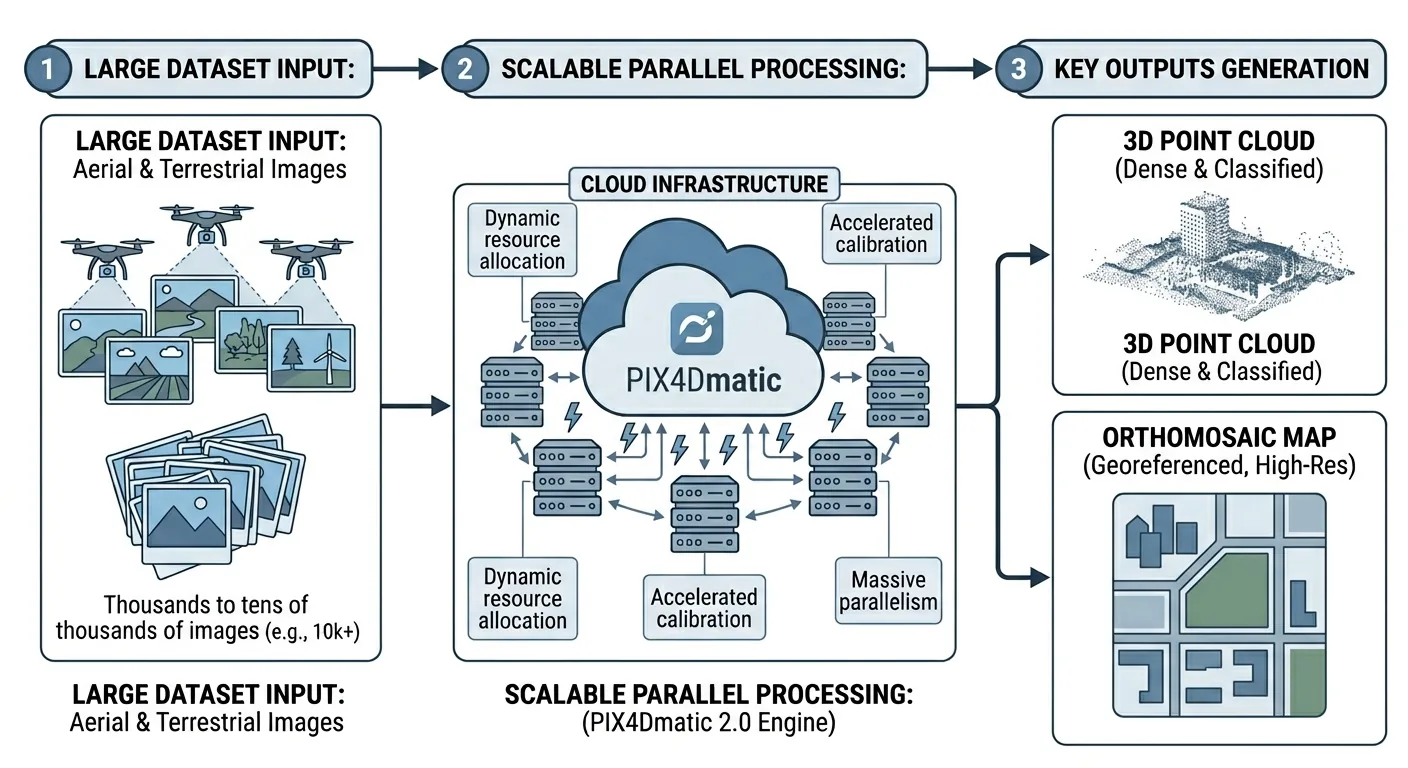
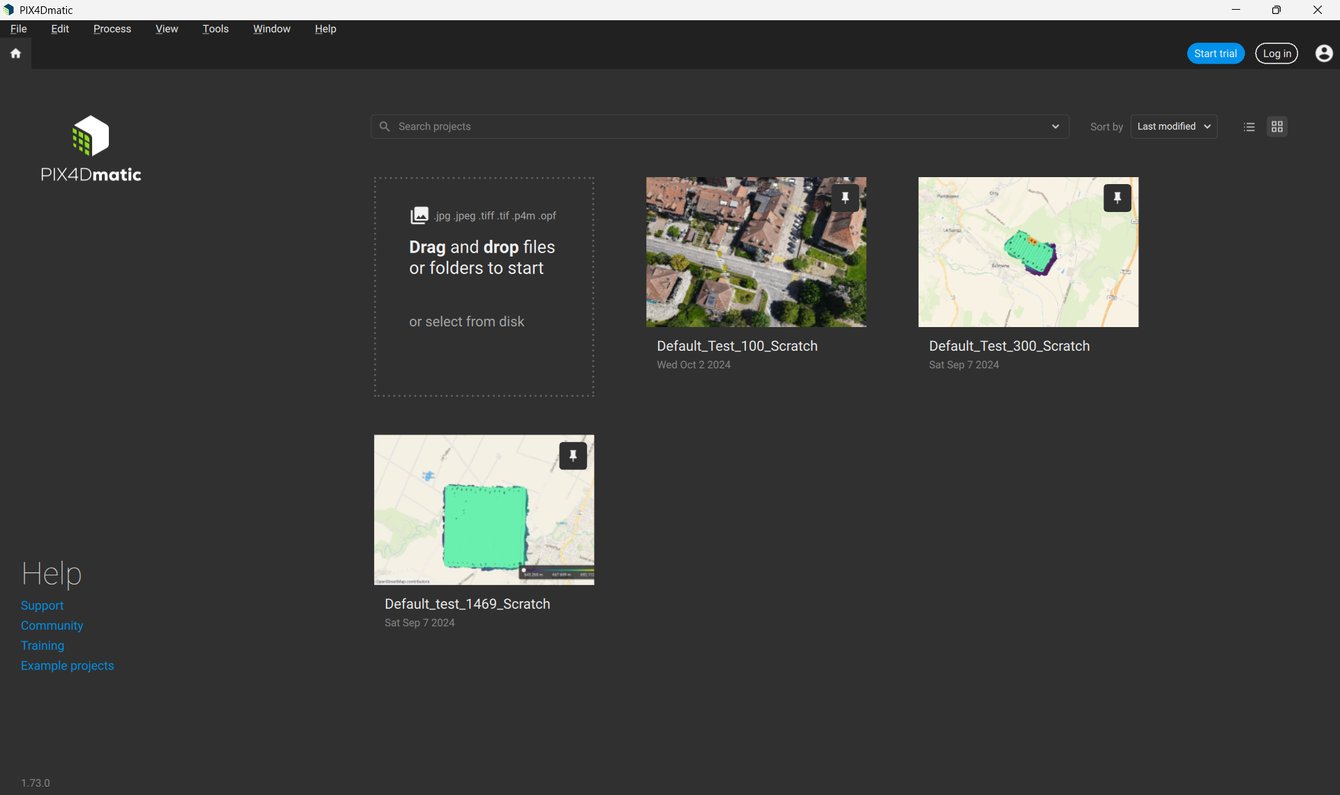
 Image credit: Pix4D. Source: Quick Start Guide — PIX4Dmatic. Used under editorial fair use for product review.
PIX4Dmatic 2.0 went stable on January 5, 2026. It is the biggest architectural change in the product’s history — not because of a single feature, but because Pix4D killed PIX4Dsurvey as a standalone product and folded everything into PIX4Dmatic.
If you were running PIX4Dsurvey for DTM generation, contour lines, or vectorization, that workflow now lives inside PIX4Dmatic 2.0. Your PIX4Dsurvey license? Sunsetted. Your purchasing decision just changed.
This article breaks down what shipped, what it costs, how it compares, and whether the new tier structure makes sense for a working survey operation.
1. What Actually Changed: The PIX4Dsurvey Merger
PIX4Dsurvey handled the post-processing survey pipeline — DTM generation, contour lines, vectorization, volume calculations. PIX4Dmatic handled photogrammetric reconstruction — point clouds, orthomosaics, DSMs. Two products, two licenses, two price tags.
PIX4Dmatic 2.0 absorbs the features of both into a single application. One install, one license, one project file. You open PIX4Dmapper .p4d files and PIX4Dsurvey .p4s files directly.
The merger is not optional. After January 15, 2026, older versions (1.43 and below) can’t log in. Hard deadline: June 2026. PIX4Dsurvey login shuts down entirely. If you’re on PIX4Dsurvey today, you migrate to PIX4Dmatic 2.0 or you find another platform.
New to PIX4Dmatic. Not new to Pix4D. The company consolidated PIX4Dfields into PIX4Dcatch a few years back. This is the same playbook — reduce product sprawl, push everyone onto one platform, simplify the licensing story.
The version trajectory tells the story: 1.0 launched in 2020, steady incremental releases through 1.86 (December 2, 2025), then the jump to 2.0.0 stable on January 5, 2026. A patch release (2.0.2) followed on February 16, and a 2.2.0 preview dropped March 2, 2026. Pix4D is shipping fast on this line.
2. The Three-Tier License Structure
PIX4Dmatic 2.0 ships with three tiers: Standard, Analyst, and Pro.
Standard
| Monthly | Annual | Perpetual | |
|---|---|---|---|
| Price | $399/mo | — | $14,990 (Dronefly reseller, March 2026) |
Standard gets you photogrammetric reconstruction: point clouds, orthomosaics, DSMs, mesh generation. No survey tools. No DTM. No contour lines. No vectorization.
Standard is a hobby tier. If you’re a survey firm, you skip it.
Analyst
| Monthly | Annual | Perpetual | |
|---|---|---|---|
| Price | Pricing not publicly listed — contact Pix4D for quotes | — | Contact Pix4D for quotes |
Analyst adds the PIX4Dsurvey toolset: DTM generation, contour lines, vectorization, volume calculations, LandXML base surface import. This is the tier that replaces a separate PIX4Dsurvey license.
For firms that were already paying for both PIX4Dmatic and PIX4Dsurvey, Analyst consolidates two line items into one. Whether that consolidation saves money depends on your existing contract — run the numbers with your Pix4D rep.
Pro
| Monthly | Annual | Perpetual | |
|---|---|---|---|
| Price | Pricing not publicly listed — contact Pix4D for quotes | — | Contact Pix4D for quotes |
Pro adds AI-assisted classification, advanced mesh editing, and priority processing on PIX4Dcloud. This is the tier Pix4D wants enterprise and high-volume shops on.
Perpetual pricing landed hard. The Standard tier perpetual at $14,990 (Dronefly listing) is steep for a product that doesn’t include survey tools. For Analyst and Pro perpetual pricing, Pix4D does not publish numbers publicly — you negotiate directly.
3. Feature Breakdown by Workflow Phase
Here’s what shipped in PIX4Dmatic 2.0 and the 2025 releases leading up to it, organized by where it hits your workflow.
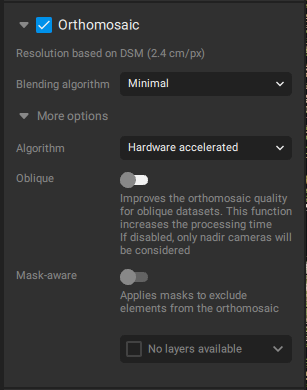 Image credit: Pix4D. Source: Orthomosaic — PIX4Dmatic Documentation. Used under editorial fair use for product review.
Reconstruction
- Point cloud generation from drone imagery — dense matching, automatic filtering
- Orthomosaic generation with the new Orthomosaic Editor (v1.83) — patch-based editing for fixing stitching artifacts, one of the most requested features in the product’s history
- DSM/DTM generation — DSM from the dense point cloud, DTM from ground-classified points (Analyst tier and above)
- Mesh generation with FBX export — useful for BIM handoff and 3D visualization pipelines
- LiDAR import — drag-and-drop LAS/LAZ files, generate mesh/DSM/ortho from LiDAR data directly
Survey Tools (Analyst and Pro)
- Contour lines — you generate contour lines from the DTM. Adjustable interval, exportable to DXF/SHP
- Vectorization — 3-point arcs, circles, breaklines, polylines drawn on the point cloud or orthomosaic
- Image-based vectorization — trace features directly on the source imagery, not just the derived products
- Volume calculations — cut/fill from a base surface, LandXML import for design surfaces
- Road extraction — the software extracts roads and other linear features through the vectorization toolkit. Breaklines snap to the point cloud for clean surface modeling
Export and Delivery
- COG (Cloud-Optimized GeoTIFF) export accelerated up to 300x for corridor projects (v1.84) — a massive improvement for linear infrastructure work where the output GeoTIFF can be tens of gigabytes
- PIX4Dcloud integration — upload and share via browser, embed in client portals
- Gaussian Splatting (Cloud-Only) — neural radiance field rendering through PIX4Dcloud. No local export. This is Pix4D playing catch-up on neural rendering. RealityCapture and Luma AI have been here for a while, but having it inside the Pix4D ecosystem saves a pipeline step for teams already on PIX4Dcloud.
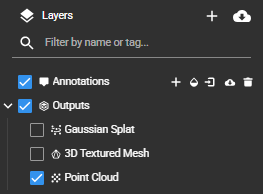 Image credit: Pix4D. Source: Working with Gaussian Splat Models in PIX4Dcloud. Used under editorial fair use for product review.
4. Processing Speed: The Real Numbers
Pix4D claims “up to 50% faster than Mapper.” That claim compares PIX4Dmatic 2.0 to Mapper — which Pix4D sunset years ago. It is technically accurate and practically useless as a benchmark. Nobody shopping for software in 2026 is comparing against a discontinued product.
What matters: PIX4Dmatic 2.0 handles large datasets — 5,000+ images — without the manual block-splitting that Mapper required. The processing pipeline streams data more efficiently, and GPU acceleration on NVIDIA cards (CUDA) makes a measurable difference on dense matching and mesh generation.
Against the actual competition, processing speed sits in the middle of the pack. RealityCapture runs 2-5x faster on equivalent hardware — a gap that widens on larger datasets. Metashape Pro processes at a similar pace to PIX4Dmatic on most workloads. DJI Terra is comparable on DJI-captured imagery but limited to that ecosystem. (For the full four-way breakdown, see Pix4D vs Metashape vs WebODM vs RealityCapture.)
The COG export acceleration from v1.84 is the sleeper improvement. Corridor projects that produced 20+ GB GeoTIFFs used to take hours just to export. The 300x acceleration on COG generation cuts that to minutes. That’s a 3-5x time savings on end-to-end delivery for corridor work. For production shops, this changes job scheduling.
5. Hardware Reality
PIX4Dmatic 2.0 leans hard on GPU compute. The minimum spec is an NVIDIA GPU with 4 GB VRAM. The practical spec for production work: NVIDIA RTX 3080 or better, 64 GB RAM, NVMe SSD.
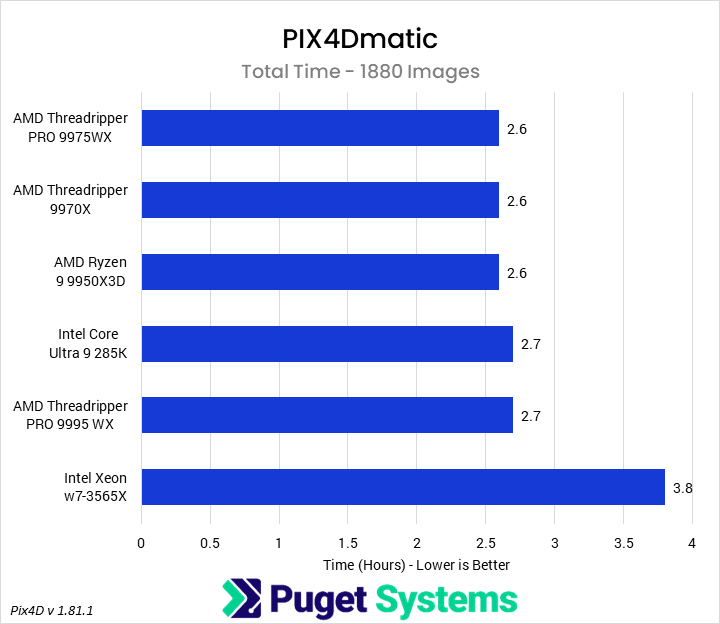 Image credit: Puget Systems. Source: Exploring PIX4Dmatic Hardware Performance. Used under editorial fair use for product review.
GPU Matters More Than CPU
Dense matching and mesh generation scale with CUDA cores. An RTX 4090 cuts processing time roughly in half compared to an RTX 3070 on a 2,000-image dataset. If you’re processing daily, the GPU upgrade pays for itself in weeks.
Intel Arc GPUs got limited support in 2025 builds, but performance is not competitive with NVIDIA. AMD GPUs remain unsupported — no OpenCL fallback, no ROCm path. If your workstation runs AMD graphics, PIX4Dmatic 2.0 falls back to CPU-only processing. That is painfully slow on large datasets.
Mac Performance
Mac users running Apple Silicon see significantly reduced performance. On an M3 Max, a 1,000-image dataset that processes in ~8 minutes on a Windows workstation with an RTX 4090 takes ~12 minutes — roughly 1.5x slower (Puget Systems, 2025). No CUDA, no Metal compute path for the dense matching pipeline. PIX4Dmatic runs on Mac. It does not run well on Mac for production workloads.
Pix4D partnered with Puget Systems as an Official Certified Hardware Provider. The Puget benchmarks are the closest thing to independent hardware testing for PIX4Dmatic — worth checking before speccing a new workstation.
Recommended Production Specs
| Component | Minimum | Recommended | Ideal |
|---|---|---|---|
| GPU | NVIDIA, 4 GB VRAM | RTX 3080, 10 GB | RTX 4090, 24 GB |
| RAM | 16 GB | 64 GB | 128 GB |
| Storage | SSD | NVMe, 1 TB | NVMe, 2+ TB |
| CPU | Intel i7 / Ryzen 7 | Intel i9 / Ryzen 9 | Threadripper / Xeon |
| OS | Windows 10/11 | Windows 11 | Windows 11 |
6. User Experience: What Works and What Doesn’t
What works
The UI is cleaner than Mapper. Project setup is faster — importing imagery, setting the coordinate reference system, and kicking off processing takes fewer clicks. For operators who spent years in Mapper’s dated interface, the difference is immediately noticeable.
The Orthomosaic Editor alone justifies the upgrade for many users. Stitching artifacts that required exporting to Photoshop or GIMP for manual patch work now get fixed inside PIX4Dmatic. Select the problem area, choose a source image, blend. The community forum feedback on this feature is overwhelmingly positive — it solves a problem every operator has dealt with on projects near water, moving objects, or variable lighting.
Opening legacy .p4d and .p4s project files works. Migration from existing Mapper and PIX4Dsurvey projects is functional — not seamless, but functional. Expect to verify your CRS settings and recheck GCP placement on imported projects.
Sensor support covers the major platforms: DJI Mavic 3 Pro/3E, Matrice 300 RTK with Zenmuse P1, Matrice 4/4T, Autel EVO II series, Skydio X2/X10, WingtraOne, and senseFly eBee X. If you fly mainstream commercial drones, your imagery processes without drama.
What doesn’t
The black box problem. PIX4Dmatic offers fewer processing parameter controls than Mapper or Metashape. You get quality presets — not granular control over matching parameters, filtering thresholds, or reconstruction density. Experienced users who tuned Mapper settings for specific terrain types or challenging conditions lose that control. One community forum user put it bluntly: “Too much of a black box with very few processing options.”
Quality reports lag behind Mapper. The processing report in PIX4Dmatic 2.0 does not match Mapper’s detail level. Reprojection error, GCP residuals by axis, checkpoint validation, camera optimization statistics — Mapper’s quality report PDF remains the industry standard for defensible accuracy documentation. PIX4Dmatic’s report is improving but not there yet. If your clients or agencies require a detailed quality report PDF, verify that PIX4Dmatic’s output meets their requirements before switching.
Export limitations. PIX4Dmatic’s export options are narrower than Mapper’s. No 3D PDF export, for one. If your deliverable workflow depends on specific export formats, check compatibility before committing.
Known bugs. Version 2.0 shipped with a sparse point cloud CRS mismatch bug — fixed in 2.2.0 (March 2026). A point cloud export misalignment issue remains open as of this writing. Random crashes on Windows 11 have been reported in connection with OneDrive sync, aggressive antivirus scanning, and outdated GPU drivers. Check the Pix4D community forum for current status before committing to a production workflow on 2.0.x.
Missing capabilities. No multispectral or thermal processing. No native PPK workflow. No batch geotag import from text files. RGB photogrammetry only. If your operation flies multispectral sensors for agriculture or environmental work, PIX4Dmatic 2.0 does not support that data type — you need PIX4Dfields or Metashape.
7. Competitive Positioning: Honest Comparison
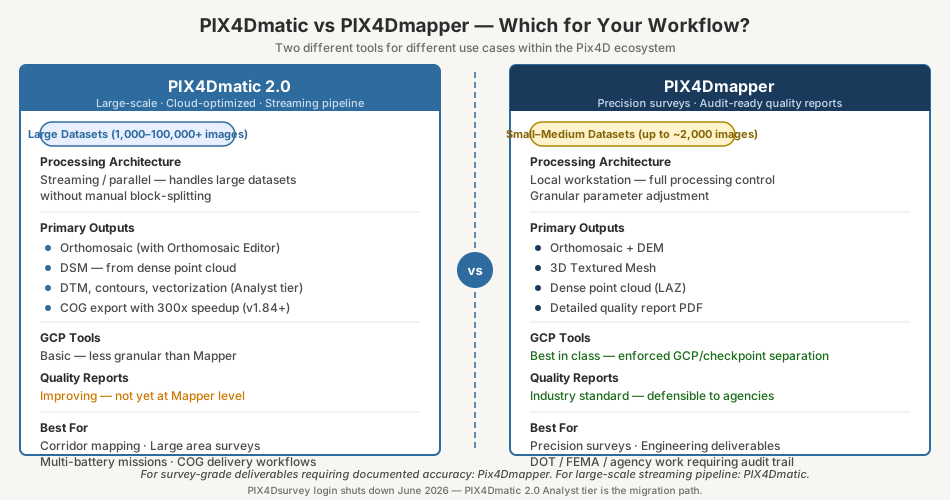
PIX4Dmatic 2.0 does not exist in a vacuum. The competitive landscape shifted significantly in 2024-2025, and the purchasing decision depends on what you fly, what you deliver, and how much you process.
 Image credit: Agisoft LLC. Source: Agisoft Metashape Professional Edition. Used under editorial fair use for product review.
| Software | Best For | Annual Cost (Solo Surveyor) | Survey-Grade Deliverables | Perpetual Option |
|---|---|---|---|---|
| PIX4Dmatic 2.0 | Large datasets, integrated survey pipeline | $4,788/yr (Standard monthly) | Yes (Analyst tier+) | $14,990+ (Standard) |
| Agisoft Metashape Pro | Maximum control, Python automation, long-term value | $3,499 one-time | Yes | $3,499 |
| DJI Terra Pro | DJI-only fleets, integrated LiDAR | ~$1,540/yr (DJI Store, March 2026) | Yes with RTK | No |
| RealityCapture | Speed, 3D scanning, VFX | Free (<$1M revenue) / $1,250/yr | Limited | No |
| WebODM | Budget, data sovereignty, pipeline automation | Free (self-hosted) | Possible with GCPs | N/A |
| 3Dsurvey | Multi-source survey workflows | ~$2,700/yr | Yes | Yes |
The Metashape math
Metashape Pro perpetual license: $3,499. PIX4Dmatic Standard perpetual: $14,990. Metashape breaks even against a PIX4Dmatic monthly subscription in under 9 months. Over five years, the total cost of ownership gap is enormous. Metashape also offers Python scripting that PIX4Dmatic lacks — a real differentiator for shops automating batch processing.
The tradeoff: Metashape’s quality report is good but not as structured as Pix4D’s. The checkpoint workflow requires more manual setup. And Agisoft is a Russian-owned company — increasingly problematic for US federal and DoD contracts.
The DJI Terra question
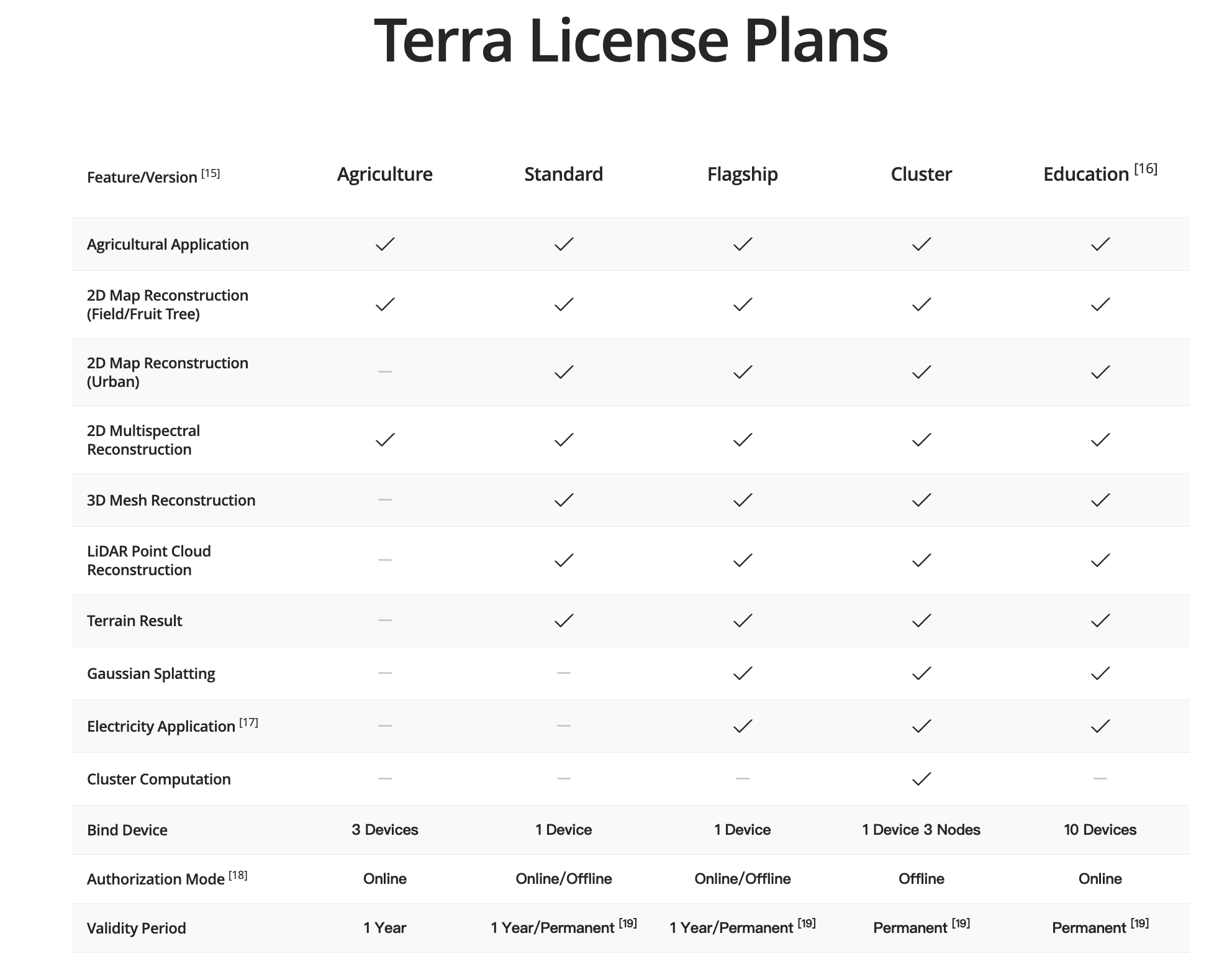 Image credit: DJI. Source: DJI Terra V5.1 Release. Used under editorial fair use for product review.
DJI Terra Pro runs ~$1,540/yr (DJI Store, March 2026) and integrates tightly with DJI hardware — Matrice 300/350 RTK, Zenmuse P1/L2, Mavic 3 Enterprise. For DJI-only fleets doing straightforward mapping, it is the lowest-friction option.
The catch: DJI is Chinese-owned. Terra is banned or restricted on many US federal projects. If you fly mixed fleets or work federal contracts, Terra is not an option regardless of price.
The RealityCapture disruption
Epic Games made RealityCapture free for operations under $1M annual revenue (April 2024). That blew open the entry-level market. Processing speed is 2-5x faster than PIX4Dmatic or Metashape on equivalent hardware. For 3D reconstruction — heritage, inspection, BIM — RealityCapture is hard to beat.
For survey-grade GIS deliverables with documented accuracy, RealityCapture’s GCP workflow and quality reporting trail Pix4D and Metashape. It can produce orthomosaics and point clouds, but the accuracy documentation you need for engineering clients requires manual assembly outside the software.
The WebODM factor
WebODM costs nothing to self-host and produces checkpoint RMSE competitive with commercial platforms on well-configured datasets with proper GCPs. Published research — including studies in ISPRS Annals — shows ODM within 0.06-0.1 feet of Pix4D and Metashape on controlled datasets. The gap: no structured quality report, no integrated checkpoint validation, more fragile on marginal data. For operators building automated pipelines on dedicated hardware, WebODM delivers real cost savings. For client-facing work requiring formal accuracy documentation, it adds manual overhead.
8. The Licensing Controversy
The biggest user complaint about PIX4Dmatic 2.0 is not technical. It is strategic.
Pix4D locked the former PIX4Dsurvey toolset — DTM, contour lines, vectorization — behind the Analyst tier. AI-assisted features sit behind Pro. Users who paid for PIX4Dsurvey as a standalone product now face an upgrade to Analyst just to keep capabilities they already had.
From the Pix4D community forum: “Very disappointed to see that Pix4D Survey features, along with AI enhancements are locked behind the Pix4D Matic ‘Pro’ tier.”
Pix4D’s pricing is competitive. The real question: do you need the integrated survey toolset, or can you get the same deliverables from Metashape Pro at a fraction of the cost?
If your workflow depends on the Pix4D quality report format, the .p4d project ecosystem, and PIX4Dcloud for client delivery — Analyst is defensible. The integration saves enough pipeline friction to justify the premium.
If you process orthomosaics and point clouds without needing Pix4D’s specific report format, Metashape Pro at $3,499 perpetual delivers comparable accuracy with more processing control and no annual renewal.
9. Ecosystem Play: Partnerships and Integrations
Pix4D made several ecosystem moves in 2025 that signal where the product is headed. The strategy is clear: build an end-to-end pipeline from flight planning through client delivery, all inside the Pix4D ecosystem.
-
Puget Systems — Official Certified Hardware Provider. Puget publishes PIX4Dmatic benchmarks on their workstation configurations. The partnership gives Pix4D a credible hardware recommendation channel and gives buyers validated performance data before purchasing. If you are building or buying a processing workstation, the Puget benchmark database is the best resource for real-world PIX4Dmatic performance numbers.
-
SPH Engineering (UgCS) — Pix4D partnered with SPH Engineering, the Latvia-based company behind UgCS flight planning software. The integration connects mission planning in UgCS directly to processing in PIX4Dmatic. For operators flying complex missions — corridor surveys, terrain-following, multi-battery operations — the tighter handoff between planning and processing reduces manual file management. Flight plans, camera trigger logs, and GPS data flow from UgCS into PIX4Dmatic without manual reformatting.
-
Esri ArcGIS — PIX4Dmatic outputs (orthomosaics, point clouds, DSMs) integrate with ArcGIS Pro and ArcGIS Online. COG export is particularly useful here — Cloud-Optimized GeoTIFFs load efficiently in ArcGIS Online without preprocessing. For GIS shops already in the Esri ecosystem, the PIX4Dmatic-to-ArcGIS pipeline is clean.
-
Drone Harmony — Flight planning integration for automated mission execution. Drone Harmony focuses on inspection and vertical-structure missions — facades, towers, infrastructure. The integration connects that specialized flight planning directly to PIX4Dmatic processing.
-
PIX4Dcloud — Pix4D’s own cloud platform handles sharing, collaboration, measurement, and Gaussian Splatting rendering. The cloud tier bundles with Pro licenses. For firms delivering to non-technical clients who need browser-based access to drone data, PIX4Dcloud is the built-in answer. Clients can measure distances, annotate maps, and share links without installing anything. Whether PIX4Dcloud is better than standalone platforms like DroneDeploy’s viewer or Nearmap depends on your client base and how deep into the Pix4D ecosystem you want to go.
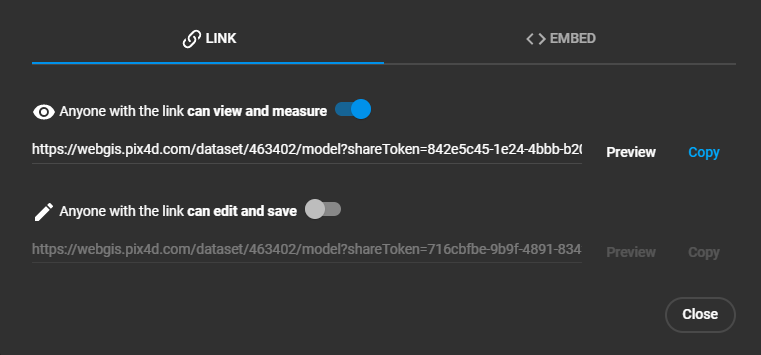 Image credit: Pix4D. Source: Share functionality — PIX4Dcloud. Used under editorial fair use for product review.
The ecosystem play matters because it creates switching costs. The more of your pipeline that runs through Pix4D — flight planning, processing, cloud delivery, client access — the harder it becomes to move to Metashape or another platform. That is by design. Evaluate the ecosystem value honestly: if you use three or more of these integrations, the lock-in may be worth the premium. If you only use PIX4Dmatic for desktop processing, the ecosystem adds nothing and the cost comparison favors alternatives.
10. Bottom Line: Who Should Buy, Who Should Wait, Who Should Look Elsewhere
Buy PIX4Dmatic 2.0 Analyst if:
- You were running both PIX4Dmatic and PIX4Dsurvey and need the consolidated workflow
- Your clients require Pix4D-format quality reports and you deliver through PIX4Dcloud
- You process large datasets (3,000+ images) regularly and need the streaming pipeline
- You fly DJI and non-DJI hardware on a Windows workstation with an NVIDIA GPU
- You already depend on the Pix4D ecosystem for client delivery
Wait if:
- You are on PIX4Dsurvey and the Analyst pricing (once published) exceeds your budget — you have until June 2026 before login shuts down
- You need multispectral or thermal processing — PIX4Dmatic 2.0 does not support it
- You need granular processing controls — the black box design may not suit your workflow
- You are evaluating perpetual options and want to see whether Pix4D adjusts pricing in response to Metashape competition
Look elsewhere if:
- You want perpetual licensing at a reasonable price — Metashape Pro at $3,499 is a fraction of PIX4Dmatic’s cost
- You need Python scripting and batch automation — Metashape’s API is far ahead
- You fly DJI-only and work non-federal projects — DJI Terra Pro at ~$1,540/yr does the job for less
- Your revenue is under $1M and speed is your bottleneck — RealityCapture is free and 2-5x faster
- You want full control over your processing pipeline — WebODM on dedicated hardware gives you that at zero software cost
To put it plainly: PIX4Dmatic 2.0 is a better product than PIX4Dmatic 1.x. The PIX4Dsurvey merger makes sense architecturally. The three-tier licensing makes sense for Pix4D’s business. Whether it makes sense for your business depends on how much of the Pix4D ecosystem you actually use — and whether that ecosystem lock-in is worth the premium over alternatives that deliver comparable accuracy at lower cost.
This article reflects publicly available information as of March 2026. Pricing, features, and availability change. Verify current details at pix4d.com before making purchasing decisions. For our full professional-reliance disclaimer, see /disclaimer.