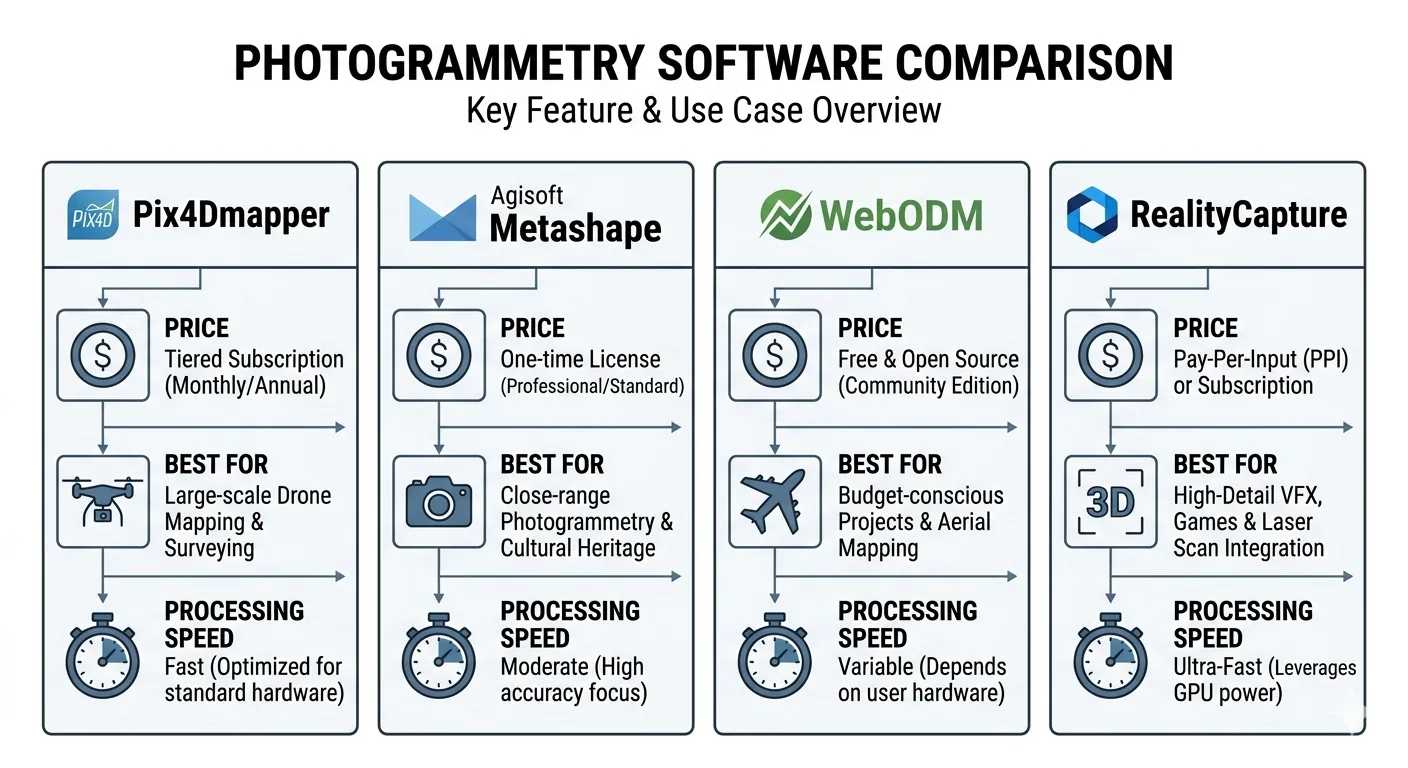
Four drone mapping software platforms. One is the industry accuracy standard. One has the best 3D mesh quality on the market. One is free. One processes a 1,000-image dataset faster than the others finish initializing.
Choosing the wrong one is expensive — in money, in time, or in a quality report that doesn’t hold up when a client pushes back.
This comparison covers what each platform actually does well, where each one breaks down, and which belongs in your workflow depending on what you’re delivering.
The Short Answer
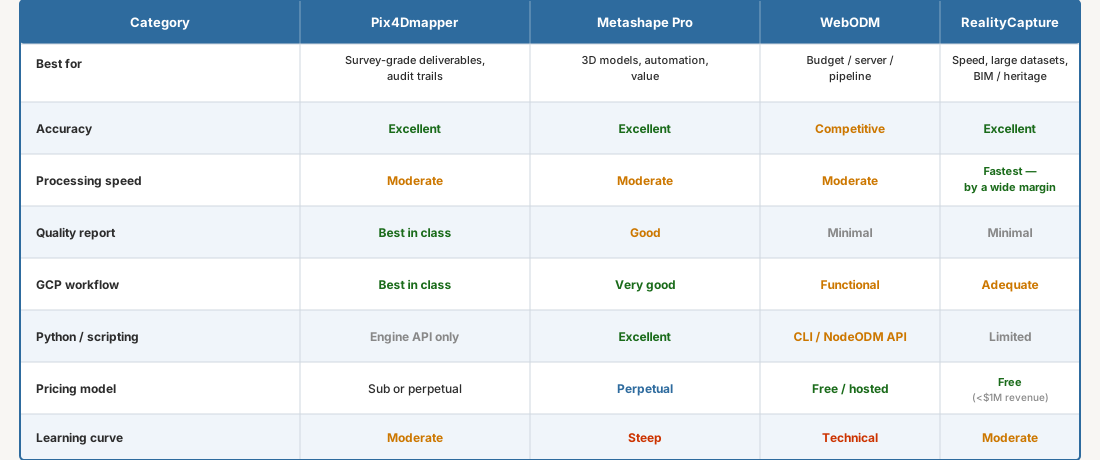
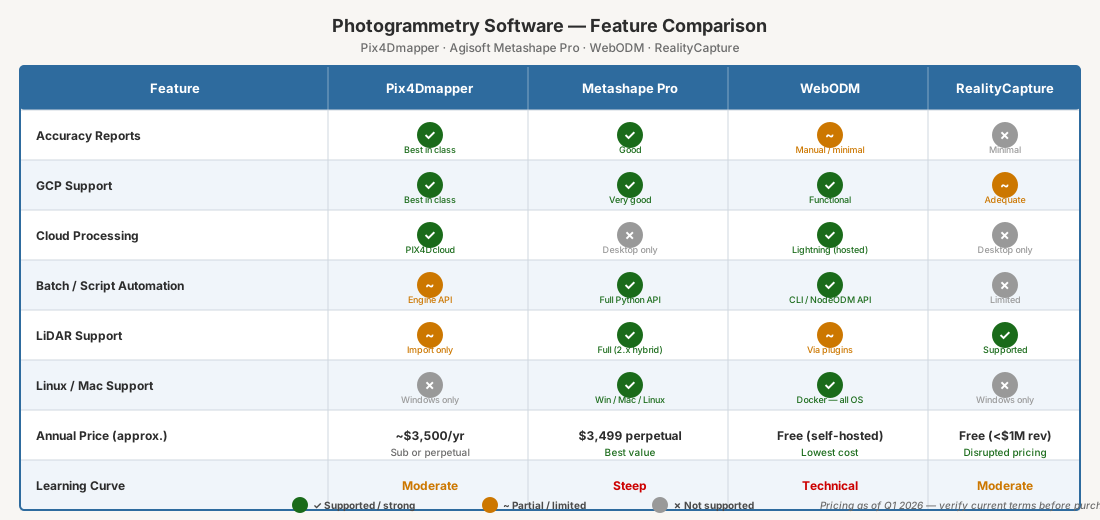
If you’re delivering to engineers, agencies, or clients who require auditable accuracy documentation: Pix4Dmapper or Metashape.
If processing time is your production bottleneck: RealityCapture.
If you need Python automation or the best 3D mesh available: Metashape.
If you’re budget-constrained, building a server pipeline, or learning the workflow: WebODM (note: WebODM split from OpenDroneMap in April 2026 — same software, new home).
Now for the detail.
Pix4Dmapper: The Audit Trail Platform
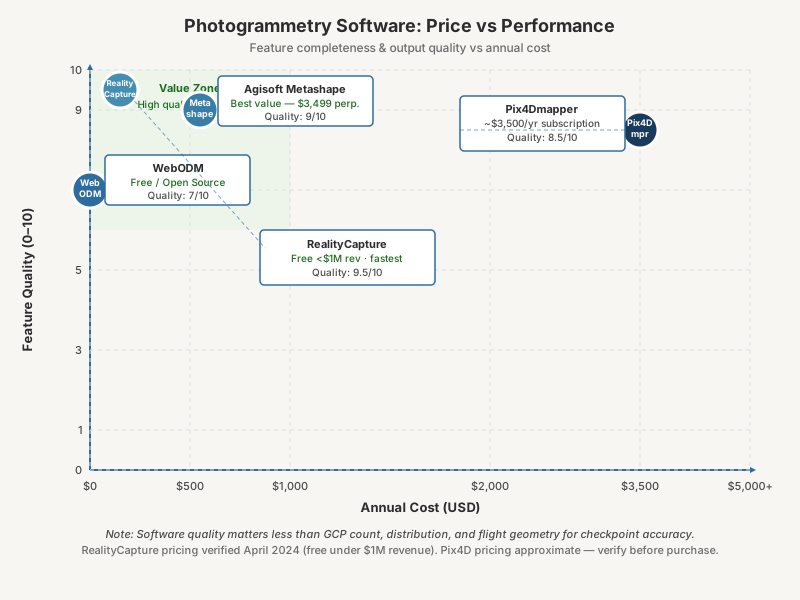
Pix4Dmapper isn’t the fastest. It isn’t the cheapest. It’s the benchmark — because of what it produces after processing: a quality report detailed enough to defend your results to a client, an engineer, or a regulatory agency.
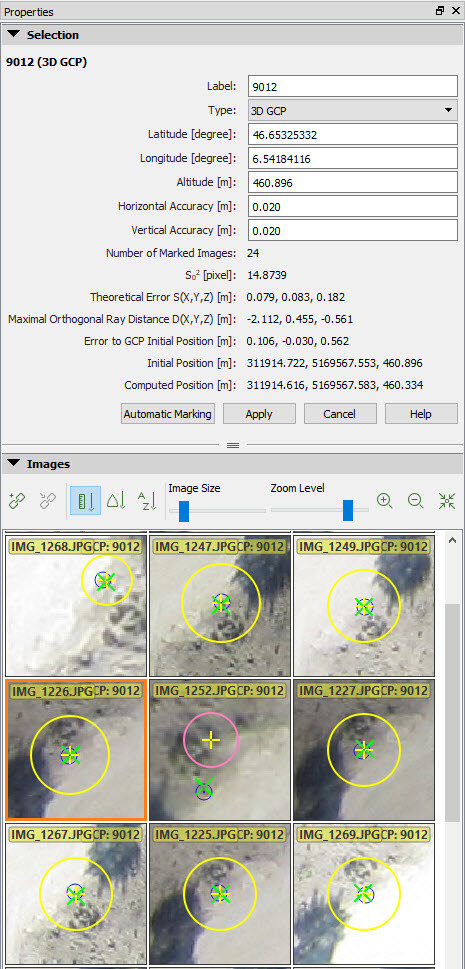 Image credit: Pix4D. Official support documentation. Used for editorial comparison.
That quality report matters more than most operators realize. A client disputes your accuracy. A regulator asks for documentation. Something looks off and you need to diagnose it fast. The Pix4D report gives you the full evidence chain — reprojection error, GCP residuals by axis, checkpoint residuals by axis, overlap map with yellow and red zones flagged, camera optimization statistics, image geolocation deviation. Everything you need to answer the question before it becomes a problem.
The GCP and checkpoint workflow is the clearest of any platform here. Import coordinates, mark points on images, designate each as GCP or checkpoint, process. The software enforces the separation — checkpoints never touch the bundle adjustment. What shows up in the final report as checkpoint RMSE is independent validation, not self-reported fit.
Other platforms blur the GCP/checkpoint line if you’re not deliberate about it. Pix4D builds the separation into the workflow so you can’t accidentally corrupt your validation. That matters more than people think.
Where Pix4Dmapper falls short:
The UI hasn’t kept pace with the processing engine — it’s dated compared to Metashape. Speed is moderate — competitive with Metashape, nowhere near RealityCapture. And if you’re not flying year-round, the subscription model is painful. You’re paying monthly whether you’re processing or not. Pix4D does offer a perpetual license option for Pix4Dmapper — worth comparing if your project load is seasonal.
The product line has also gotten confusing. Pix4Dmatic is Pix4D’s newer platform — large-scale, cloud and desktop, subscription-only. The relationship between the two is unclear to new buyers, and Pix4Dmatic’s quality reports aren’t as mature. For survey-grade deliverables, Pix4Dmapper is still the right choice. Not Pix4Dmatic. (For the 2026 restructure — Pix4Dsurvey folded in, new Standard/Analyst/Pro tiers — see the Pix4Dmatic 2.0 deep dive.)
Who should use it: Drone surveyors delivering to engineers, DOT, FEMA, or any client requiring documented accuracy with an auditable paper trail. Anyone whose business depends on being able to defend their checkpoint RMSE with a PDF.
Agisoft Metashape Professional: The Power User’s Platform
Metashape fits best when the deliverable is a 3D model, when workflow automation matters, or when a perpetual license makes more sense than an ongoing subscription.
The perpetual license is the reason. Process heavy for a few months, go quiet, pay nothing during the quiet months. If your project load is seasonal or project-based, that’s real money back in your pocket.
3D mesh quality: Metashape produces the best photogrammetric mesh of any platform in this comparison. Architectural documentation, heritage recording, structural inspection — anything where the deliverable is a model rather than an orthomosaic and DEM, Metashape wins. Denser point cloud, better complex-geometry handling, cleaner texture mapping.
Python scripting: Metashape’s underrated differentiator for high-volume shops. The Python API exposes the full pipeline — chunk creation, camera import, marker placement, alignment, dense cloud, export. You can script an entire project from raw imagery to delivered GeoTIFF and LAZ without touching the GUI.
# Automate alignment and dense cloud in Metashape
import Metashape
doc = Metashape.Document()
doc.open("project.psx")
chunk = doc.chunks[0]
chunk.matchPhotos(downscale=1, generic_preselection=True)
chunk.alignCameras()
chunk.buildDepthMaps(downscale=4, filter_mode=Metashape.MildFiltering)
chunk.buildPointCloud()
doc.save()
Process multiple projects per week and that automation compounds into serious time savings over a year.
Metashape 2.x: The 2.x series added AI-based point cloud classification — ground, vegetation, building detection — that holds up well against standalone classification tools. You can now ingest and process LiDAR data in the same chunk as photogrammetry data — useful if you’re running a hybrid payload. Depth map generation got a significant upgrade.
Where Metashape falls short:
The quality report is good — not as detailed as Pix4D’s. GCP residuals are reported by axis, but the checkpoint workflow requires deliberate setup. You must manually designate markers as checkpoints, and it’s easy to accidentally include checkpoints in the bundle adjustment if you’re not paying attention. That’s a real risk on deadline.
The processing pipeline is also more manual than Pix4D’s. Pix4D runs front to back with one click. Metashape makes you step through alignment, depth maps, dense cloud, mesh, orthomosaic, and DEM as separate operations. Experienced users like that control. New users find it confusing.
The learning curve is steeper than any platform here. Knowing which processing quality setting — “Highest,” “High,” “Medium” — to use at which stage, and why, takes time. Pix4D largely abstracts that away.
Who should use it: Operators who need 3D model quality, Python automation, or a perpetual license. GIS analysts processing multiple project types. Anyone doing architectural, heritage, or structural work where mesh quality outweighs quality report format.
OpenDroneMap / WebODM: The Free Pipeline
WebODM is the front-end. OpenDroneMap (ODM) is the processing engine. NodeODM is the API layer. That distinction matters for how you deploy.
Your entry points:
- ODM: Command-line only, runs via Docker on Linux/macOS/Windows. Free. You need to be comfortable with a terminal.
- WebODM: Browser-based GUI wrapping ODM. Self-host or use WebODM Lightning — cloud-hosted, pay-per-image or subscription plans.
- WebODM Lightning: The hosted version — lowest friction, no installation, pay as you go.
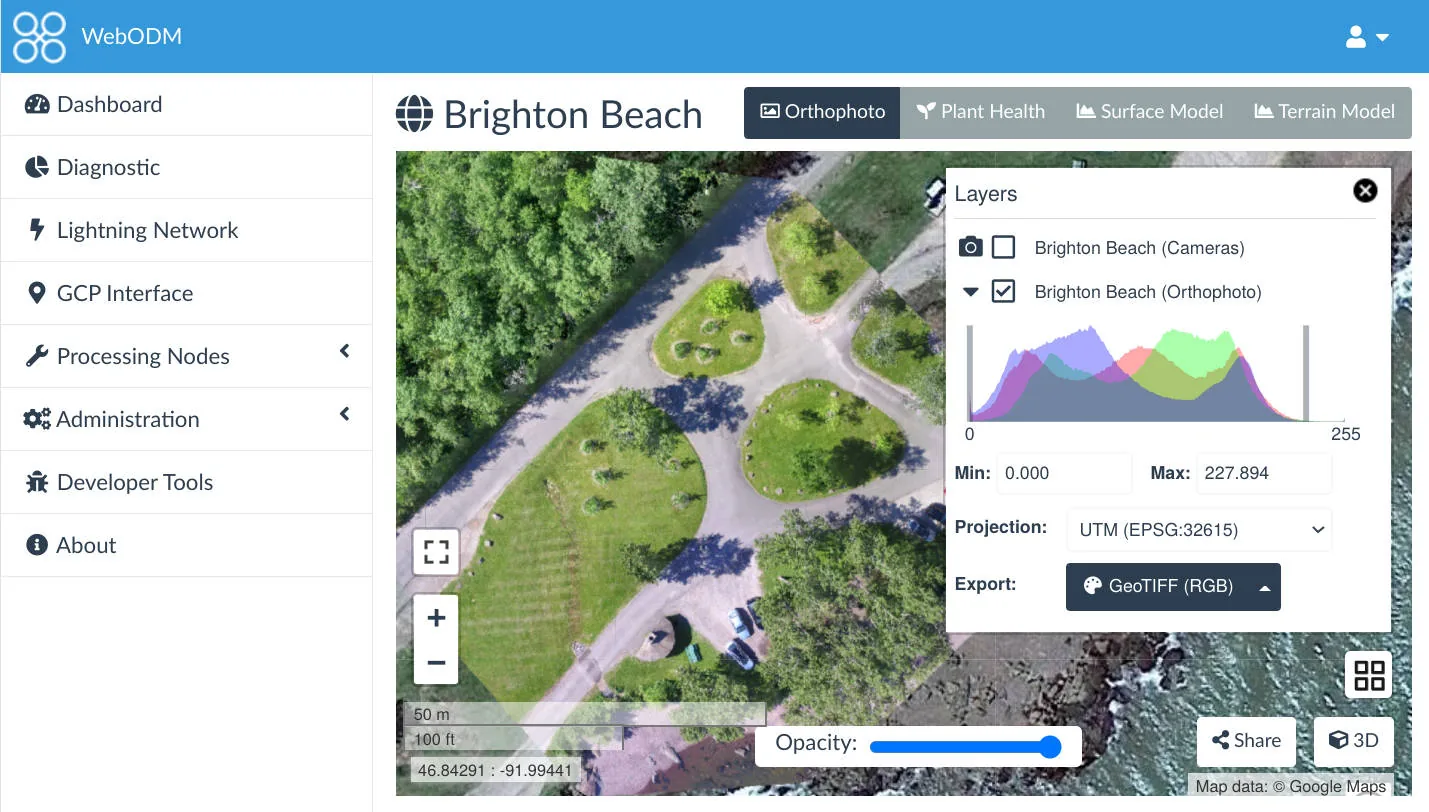 Image credit: OpenDroneMap / WebODM. Open source (AGPL-3.0). Used for editorial comparison.
Accuracy: ODM surprises people who assume free means worse. Published research consistently shows ODM producing checkpoint RMSE competitive with commercial platforms when you configure GCPs properly. On controlled datasets with adequate imagery, sub-5 cm horizontal and sub-8 cm vertical from ODM is achievable — in the same range as Pix4D and Metashape on identical inputs.
The caveat: ODM is less forgiving of marginal data. Low overlap, inconsistent exposure, challenging terrain — commercial platforms have more robust fallback processing. ODM fails harder and tells you less about why.
What ODM doesn’t do well:
Quality reporting is minimal. You get a processing log and basic statistics. No structured accuracy report. For professional deliverables requiring documented accuracy, you’re building that documentation yourself — pulling checkpoint coordinates, calculating RMSE manually, writing up the results. Workable for an experienced operator. Not workable if your clients expect a Pix4D-style PDF.
GCP and checkpoint workflow requires care. WebODM handles GCP import through a separate editor tool — functional, but more fragile than Pix4D’s workflow. Designating checkpoints separately from GCPs means deliberate file management outside the main pipeline.
Large datasets strain ODM more than commercial platforms. A 5,000-image project that Metashape or Pix4D handles routinely will need significant RAM tuning and processing time adjustment in ODM.
The server deployment case: ODM’s real professional strength is server-side pipeline integration. NodeODM exposes a REST API — you plug ODM into a custom data workflow for automated ingest, processing, and delivery at a fraction of what commercial platforms charge for equivalent access. Corridor surveys, ag monitoring, infrastructure inspection — if you’re running large volumes of standardized mapping, ODM on dedicated processing hardware delivers real cost savings without sacrificing accuracy.
Who should use it: Budget-conscious operators willing to generate their own documentation. Teams building automated processing pipelines. Anyone learning the photogrammetric pipeline before committing to a commercial license. Operations where client-facing quality reports aren’t part of the scope.
RealityCapture: The Speed Platform
RealityCapture is the outlier.
Epic Games acquired it in 2021 and restructured the pricing multiple times. As of mid-2024, RealityCapture is free to download and use for projects generating under $1 million in revenue — the previous pay-per-input pricing model was discontinued in April 2024. Above $1 million, an enterprise license applies. Verify current terms on the RealityCapture site; Epic keeps adjusting the model.
That shift opened RealityCapture to a much wider range of operators. The processing engine didn’t change — it was already the fastest photogrammetry platform available by a wide margin. It still is.
Processing speed: RealityCapture processes 2-5x faster than Metashape or Pix4D on equivalent hardware. That number isn’t marketing — it holds in practice on real datasets. A processing job that runs overnight in Metashape finishes in a few hours in RealityCapture. On large surveys — 2,000+ images, multi-battery missions across hundreds of acres — the difference is operational. You’re either sleeping while it processes or reviewing results before lunch.
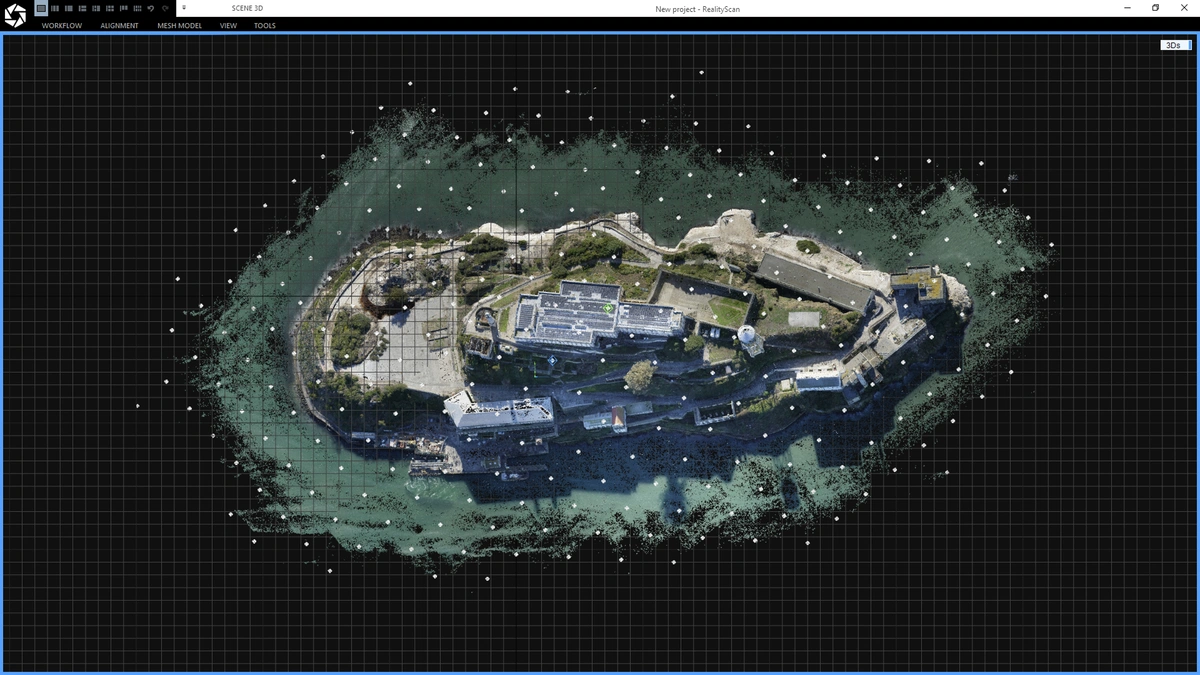 Image credit: Capturing Reality / Epic Games. Official promotional image. Used for editorial comparison.
The speed comes from a different internal architecture. RealityCapture uses graph-based registration for sparse reconstruction — a fundamentally different approach than the SfM pipeline in Pix4D and Metashape. It parallelizes more efficiently across GPU cores and uses GPU compute more aggressively. A workstation with a high-end GPU sees proportionally larger gains in RealityCapture than in any competing platform. Better GPU, bigger gap.
3D reconstruction quality: On complex geometry — buildings, structures, terrain with significant vertical relief — RealityCapture’s mesh quality is competitive with Metashape. Heritage documentation professionals favor it for exactly this reason.
Where RealityCapture falls short for survey work:
The GCP workflow exists — less polished than Pix4D’s or Metashape’s. You import GCPs, mark them on images, constrain the reconstruction — but checkpoint designation and validation require more manual management outside the software. Accuracy reporting is minimal. No equivalent to Pix4D’s quality report PDF.
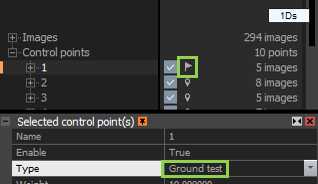 Image credit: Capturing Reality / Epic Games. Official help documentation. Used for editorial comparison.
GIS output is functional — GeoTIFF orthomosaics, LAS/LAZ point clouds, DEMs — but CRS management and coordinate system handling require more configuration than Pix4D or Metashape for standard survey workflows. You can make it work. It takes longer to set up correctly.
RealityCapture is also less integrated with the GIS ecosystem. No Python scripting equivalent to Metashape. The workflow is more manual — oriented toward 3D output, not geospatial deliverables.
Who should use it: High-volume operators where processing time is the primary constraint. Teams doing BIM integration, heritage documentation, or 3D visualization where mesh quality matters more than GIS deliverables. Anyone previously priced out of commercial photogrammetry who needs fast, capable processing without a subscription.
Accuracy: What the Research Shows
Here’s what surprises most practitioners: published research comparing these platforms shows more consistency across software than the marketing suggests. On well-executed flights with solid GCPs, all four platforms produce checkpoint RMSE within a similar range.
Software matters less than flight geometry: Agüera-Vega et al. (2017), writing in Measurement, found that GCP count and distribution had a significant effect on accuracy — increasing from 4 to 20 GCPs reduced checkpoint RMSE substantially. The study used Pix4D on controlled agricultural datasets, and the conclusion is consistent across platforms: how you distribute ground control matters more than which software runs the bundle adjustment.
Oblique imagery effect dominates everything: Nesbit & Hugenholtz (2019) in Remote Sensing documented that adding oblique passes improved vertical accuracy dramatically across all tested platforms. The flight geometry effect dwarfed any software effect. Same finding, different methodology: the fix for vertical accuracy is in the mission planning, not the software license.
Doming is geometric, not software-specific: James & Robson (2014) — the foundational paper on systematic error in SfM photogrammetry, published in Earth Surface Processes and Landforms — demonstrated that doming artifacts occur across all SfM platforms when nadir-only imagery is flown over flat terrain. The error source is geometric. Platforms differ in how visibly they report it (Pix4D flags doming explicitly in the quality report; others don’t) — not in whether it occurs.
ODM holds up on controlled datasets: Studies evaluating ODM against commercial platforms — including work published in ISPRS Annals of the Photogrammetry, Remote Sensing and Spatial Information Sciences — found checkpoint RMSE from ODM within 2–3 cm of Pix4D and Metashape on well-configured datasets with proper GCPs. The gap grows on complex terrain without adequate control.
The takeaway is simple: software choice matters less than how you fly and how you place control. A well-executed mission with proper GCPs produces accurate deliverables in any of these platforms. A bad flight produces bad deliverables regardless of what software license is on the machine.
The Decision Framework
You need auditable accuracy documentation:
Pix4Dmapper. No other platform matches the quality report for defensibility. Checkpoint RMSE by axis, independent validation separated from GCPs, overlap map, camera optimization — it’s all there. If your client, engineer, or agency needs a PDF they can file, Pix4D is the call.
You need 3D model quality or workflow automation:
Metashape Professional. Perpetual license, Python API, best mesh output. If you’re scripting batch processing or delivering 3D models alongside orthomosaics, Metashape’s depth wins.
Processing speed is the bottleneck:
RealityCapture. If your production constraint is time-in-queue, RealityCapture’s speed advantage is real. It compounds across every project.
You’re building a budget operation or automated pipeline:
WebODM / ODM. Competitive accuracy when properly configured. The tradeoff is technical overhead and manual documentation.
What actually works in practice: Many professional operations run two platforms. Metashape for 3D model work and internal processing. Pix4Dmapper for projects requiring delivered accuracy documentation. ODM for routine processing where client-facing reports aren’t part of the scope. These tools aren’t mutually exclusive — and the combination often makes more financial sense than a single expensive subscription.
For how to read the accuracy numbers that come out of these platforms — checkpoint RMSE, GCP residuals, reprojection error, what each one actually means — that breakdown is here.