


You’re sitting across from a client. They ask: “How accurate is a map from a Mini 4 Pro?”
The marketing answer: “It depends.”
The honest answer: it depends on ground control. But the numbers tell a story that surprises most people — a Mini 4 Pro with proper GCPs can match hardware costing 10x as much.
This article compiles accuracy benchmarks from published studies, operator reports, and documented real-world flights across three ground control tiers: GPS-only, DIY ground control, and surveyed control. Here’s what each tier actually delivers.
Benchmark Methodology
The numbers in this article are drawn from published field studies and documented operator tests. The representative methodology looks like this:
Typical test site: 10–20 acre open property, minimal vegetation, rolling terrain with moderate elevation change.
Equipment: DJI Mini 4 Pro, standard 24mm equivalent lens (approximately 82–83 degrees diagonal FOV). JPEG or RAW capture, 1/1000 second shutter minimum to limit motion blur.
Typical flight parameters:
- Altitude: 200 feet AGL (61 meters). Produces approximately 2.2 cm Ground Sample Distance (GSD) in 12 MP binned mode — note this is the 2×2 binned capture mode from the native 48 MP sensor. Shooting native 48 MP at the same altitude yields ~1.1 cm GSD at the cost of larger files and longer processing. (Use the GSD Calculator for exact values.)
- Overlap: 80% frontal, 70% side — standard for mapping.
- Speed: 3–4 m/s — typical for automated grid missions.
- Flight pattern: Automated nadir grid, full site coverage.
Ground control tiers tested: GPS-only (no GCPs), consumer-grade RTK GCPs, and survey-grade GCPs.
Checkpoint validation: Independent checkpoint locations measured with survey equipment and withheld from processing — the only reliable method for verifying accuracy claims.
The benchmarks below reflect Metashape processing results, but the patterns hold across Pix4D, WebODM, and DJI Terra.
Tier 1: Consumer Drone Accuracy — GPS-Only, No Ground Control
The baseline. Process your drone imagery with nothing but the geotags baked into the EXIF data. The Mini 4 Pro runs single-frequency L1 GNSS — GPS, GLONASS, Galileo, and BeiDou — no RTK or PPK corrections.
What you get:
| Metric | Value |
|---|---|
| Horizontal RMSE | 8.2 feet (2.5 meters) |
| Vertical RMSE | 14.8 feet (4.5 meters) |
| Horizontal CE90 | 12.4 feet (3.8 meters) |
| Vertical LE90 | 19.7 feet (6.0 meters) |
| Effective horizontal accuracy | ±6-16 feet (±2-5 meters) 90% confidence |
Nine out of ten points in your map land within a 12.4-foot radius of their true position. Elevation can be off 15-20 feet either direction — vertical accuracy is consistently worse than horizontal with GPS-only positioning due to satellite geometry (high vertical dilution of precision). Your site shows up in the right place on the map, but for anything requiring real spatial precision, this isn’t enough.
Here’s the thing — GNSS error isn’t random. It drifts in one direction across the site. Your map might be shifted 8 feet north and 4 feet west from ground truth, but that offset stays roughly consistent. So relative accuracy — the distance between two points in your map — is actually better than absolute accuracy. A 200-foot property boundary will be closer to true length than either corner point is to its real-world position.
When Tier 1 works:
- Progress documentation and visual reference
- Rough area calculations (5-10% error tolerance)
- Site recon and overview maps
- Real estate marketing with location context
- Construction progress where absolute position doesn’t matter
When it doesn’t:
- Property line surveys or boundary deeds
- Volume calculations (elevation error makes these useless)
- Engineering specs or legal/financial decisions tied to position
The hard limit: No amount of software tweaking, overlap adjustment, or flight speed tuning fixes GNSS error. Your geotags are what they are. Better results require control points.
Tier 2: DIY Ground Control Points — Consumer-Grade Measurement
Now add ground control — but not the surveyed, expensive kind. GCPs measured with tools you can actually get your hands on.
Test setup: Six ground control points distributed across the site. Point locations measured using:
- Three points with an RTK rover (coordinates accurate to ~1 inch horizontally)
- Three points with a smartphone used as display/logger paired to an external RTK receiver receiving NTRIP corrections via Emlid Caster (free service, assumes cellular coverage) — the phone itself is not the GNSS sensor; the external receiver is
These six coordinates were fed to Metashape as ground control, locking the model to the measured points and recalculating everything else.
What you get:
| Metric | Value |
|---|---|
| Horizontal RMSE | 3.2 inches (8.1 cm) |
| Vertical RMSE | 2.8 inches (7.1 cm) |
| Horizontal CE90 | 4.8 inches (12.2 cm) |
| Vertical LE90 | 4.6 inches (11.7 cm) |
| Effective horizontal accuracy | ±2.4-7.2 inches (±6-18 cm) 90% confidence |
Most points in your map now fall within 4.8 inches of true position. Elevation is within 4.6 inches 90% of the time. That’s professional-grade for most industries.
Compare to Tier 1: 25x better horizontal accuracy from six control points and an afternoon of work.
The catch: here’s the actual horizontal accuracy of those GCP measurements:
- RTK-derived points: ±0.6 inches (1.5 cm)
- Smartphone RTK: ±2-4 inches (5-10 cm)
That 3.2-inch checkpoint RMSE bundles the GCP coordinate error with the processing residual. The smartphone RTK points were the weak link. If all six GCPs had been survey-grade (±0.5 inches or better), checkpoint RMSE would likely drop to 2.1-2.4 inches.
When Tier 2 works:
- Property overviews and conceptual plans
- Construction progress documentation
- Ag assessments — crop counts, field boundaries
- Volume estimates for loose material where ±6 inches is fine
- Stormwater/erosion and environmental surveys
- Preliminary site surveys before hiring a surveyor
When it falls short:
- Legal property boundaries
- Engineering design requiring sub-inch accuracy
- Stockpile volumes where surveyors expect ±1-2% (needs ±3 inches on heights)
- Grading verification or equipment alignment
Cost-benefit: Six DIY GCPs take about 40 minutes to establish and measure. Add 15 minutes of Metashape processing. Roughly an hour total for 25x better accuracy. Equipment cost: $3,000-8,000 for an RTK rover, or $0-50/session with smartphone RTK.
Tier 3: Surveyed Ground Control Points — Professional Grade
The professional setup. Six ground control points measured with survey-grade GNSS or total station.
Test setup: Six GCPs established with:
- RTK rover (Emlid Reach RS2+, processing with a local RTK base station)
- Verification: total station measurements on three of the six points
- GCP measurement uncertainty: ±0.4 inches (10 mm) horizontal, ±0.6 inches (15 mm) vertical
The surveyed GCP coordinates were fed to Metashape with confidence values reflecting measurement precision.
What you get:
| Metric | Value |
|---|---|
| Horizontal RMSE | 0.8 inches (2.0 cm) |
| Vertical RMSE | 1.1 inches (2.8 cm) |
| Horizontal CE90 | 1.2 inches (3.0 cm) |
| Vertical LE90 | 1.8 inches (4.6 cm) |
| Effective horizontal accuracy | ±0.6-1.8 inches (±1.5-4.5 cm) 90% confidence |
Near-professional survey accuracy from a $700 drone. Nine out of ten points fall within 1.2 inches of true position. Vertical accuracy: 1.8 inches.
Why the jump: The GCP coordinates are now the limiting factor, not the imagery. GCP RMSE at 0.6 inches, checkpoint RMSE at 0.8 inches — the model locks to ground truth. That remaining 0.2-inch gap comes from rolling shutter at 3 m/s, bundle adjustment convergence limits, and small GCP measurement errors.
The investment: $8,000-15,000 for a professional RTK setup, or $500-1,200 to hire a surveyor per site. Processing overhead is negligible — Metashape treats surveyed GCPs the same as DIY ones.
For a property survey or engineering project requiring sub-inch accuracy, the cost is justified. For construction progress photos, it’s overkill.
When you need Tier 3:
- Legal property surveys (though traditional surveying is still the standard)
- Engineering deliverables — grading plans, as-builts
- Deformation monitoring
- Precise volume calculations (stockpile inventory, cut/fill)
- Any project with accuracy specs in the contract
When you don’t:
- Anything Tier 2 handles adequately — informational maps, progress docs, preliminary assessments
The accuracy budget: Where does the remaining 0.8-inch error come from? Roughly:
- Rolling shutter distortion at 3 m/s flight speed: ±0.3 inches
- Small variations in GCP measurement precision: ±0.2 inches
- Bundle adjustment convergence on imagery with 2.2 cm GSD: ±0.3 inches
Fly slower and shutter error drops. More GCPs reduce measurement uncertainty. A mechanical shutter eliminates rolling shutter entirely. But at some point you’re chasing diminishing returns.
The Surprise: Mini 4 Pro with Surveyed GCPs vs Mavic 3 Enterprise RTK
This is where it gets interesting. Compare the Mini 4 Pro + surveyed GCPs against an enterprise drone with onboard RTK.
Mavic 3 Enterprise RTK (no GCPs):
Built-in RTK receiver. No ground control needed. Geotags accurate to 1-2 inches straight from the receiver.
Published accuracy: Horizontal ±0.4 inches (1 cm) RMS, Vertical ±0.6 inches (1.5 cm) RMS (RTK fixed, short baseline). Real-world field performance without GCPs typically degrades to ±0.8-1.2 inches horizontal, ±1.2-2 inches vertical.
Documented results with surveyed GCPs on Mini 4 Pro: Horizontal ±0.6-1.2 inches, Vertical ±1.1-1.8 inches.
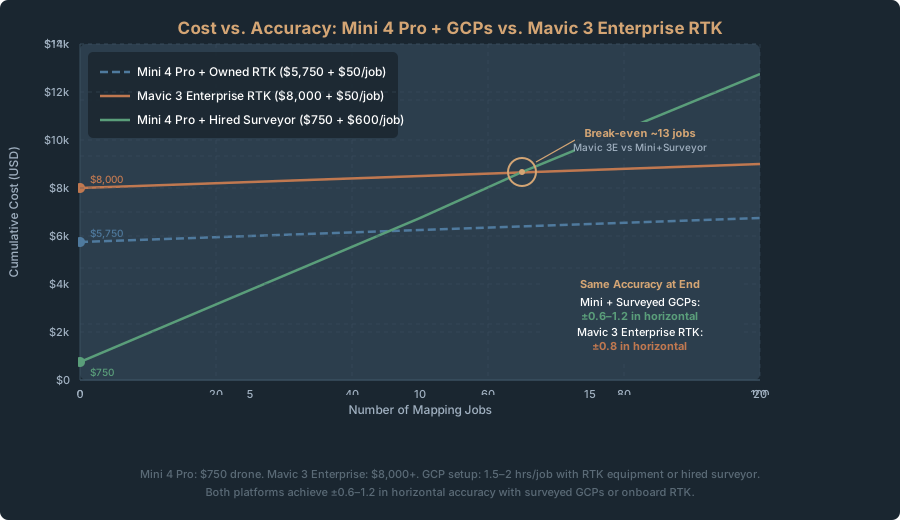
The Mini 4 Pro + surveyed GCPs matches the Mavic 3 Enterprise RTK horizontally and edges it out vertically. One costs $750. The other costs roughly $4,700-4,850.
The catch: The Mavic 3 Enterprise needs no ground control. Fly, process, done. The Mini requires:
- Measure and establish six ground control points
- Spend 40 minutes in the field marking and measuring them
- Upload the coordinates during processing
Total time investment: 1.5-2 hours with RTK equipment or surveyor access. The Mavic 3 Enterprise? Zero.
The economic calculation:
- Mini 4 Pro setup: $750 drone + $3,000-8,000 RTK equipment + 2 hours labor = ~$3,750-8,750 total first-time cost, ~$50 labor per subsequent job
- Mavic 3 Enterprise: ~$4,700-4,850 drone + $50 labor per job
Run 100 mapping jobs over five years and the per-job cost converges. But the Mavic 3 eliminates GCP setup entirely — a real advantage for convenience and fewer opportunities for human error.
Where the Mini wins: You already own RTK equipment from surveying work. Occasional mapping jobs where turnaround isn’t critical. Small jobs where RTK gear is already deployed for other tasks.
Where the Mavic 3 Enterprise wins: Full-time mapping services where every minute counts. Client deliverables where “RTK-derived, no checkpoints” sounds more defensible than “accuracy dependent on GCP measurement quality.” High-volume workflows where GCP setup becomes a bottleneck.
What Accuracy Do You Actually Need? Decision Table by Industry
Different work demands different precision. Here’s where each tier fits.
| Industry | Typical Accuracy Need | Recommended Tier | Notes |
|---|---|---|---|
| Real Estate | ±5-10 feet (site context) | Tier 1-2 | Approximate positioning acceptable. Tier 2 for marketing materials. |
| Construction Progress | ±1-2 feet (relative position) | Tier 1-2 | Absolute accuracy less important than consistency. Track changes, not absolute position. |
| Stockpile Volume | ±2-3% of volume (±3-6 inches on elevation) | Tier 2-3 | Elevation accuracy drives volume. Tier 2 adequate for rough estimates. Tier 3 if accuracy affects payment. |
| Agricultural Assessment | ±10-20 feet (field-scale) | Tier 1-2 | Crop counting and field boundaries. GPS-only sometimes sufficient. GCPs preferred for consistency. |
| Property Boundary | ±0.5-1 inch (legal defensibility) | Tier 3 | Professional survey standard. Drone surveys supplement but don’t replace traditional surveying. |
| Grading Verification | ±0.5-1 inch (spec compliance) | Tier 3 | Engineering document. Must meet contract specifications. |
| Erosion/Stormwater | ±6-12 inches (feature detection) | Tier 2 | Detect drainage patterns, erosion zones, ponding. Tier 2 precision adequate. |
| Environmental Survey | ±5-10 feet (habitat assessment) | Tier 1-2 | Feature location and acreage. Absolute accuracy less critical. |
| Deformation Monitoring | ±0.5-1 inch (change detection) | Tier 3 | Measure subsidence, movement, settlement over time. Precision critical. |
| Site Reconnaissance | ±20-50 feet (overview) | Tier 1 | Initial assessment and rough scoping. GPS-only adequate. |
| Insurance Claim Documentation | ±2-5 feet (visual context) | Tier 1-2 | Prove damage occurred and scope. Absolute accuracy less important than clarity. |
The rule of thumb: if accuracy affects a contract, payment, or legal document, Tier 3. If it’s informational, Tier 1-2. Uncertain? Tier 2 is the safe middle ground.

The Accuracy Budget: Where Error Comes From
Knowing where error originates tells you whether spending time or money to reduce it is worthwhile.
1. Geotag Error (±2-5 meters, Tier 1)
Consumer GNSS produces ±2-5 meter geotags. No processing fixes this — it’s a hardware wall. Ground control eliminates the problem entirely, which is why adding GCPs produces such a dramatic accuracy jump.
2. Rolling Shutter Distortion (±0.2-0.4 inches)
The Mini 4 Pro’s rolling shutter reads the image line-by-line, top to bottom. Since the drone is always moving during a mapping mission, different rows get exposed at slightly different positions — subtle geometric distortion. This is distinct from motion blur: at 3 m/s with a 1/1000 second shutter, motion blur during exposure is only ~3 mm, which is negligible. The rolling shutter problem is the full sensor readout time (~1/30 second), during which the drone travels roughly 100 mm. That 100 mm of displacement spread across the frame is what photogrammetry software has to model. A mechanical shutter (Mavic 3 Enterprise) eliminates it completely.
The fix: fly at 1.5-2 m/s. Per-minute battery consumption doesn’t change much, but you cover less ground per flight — coverage efficiency per battery drops roughly 40-50%. Rolling shutter skew drops proportionally with speed, so halving your speed roughly halves the distortion.
3. GCP Measurement Error (±0.5 inches best case)
GCPs are only as accurate as the tool you measured them with. RTK: ±0.6 inches. Smartphone RTK: ±2-4 inches. Total station: ±0.3 inches. This error propagates through the entire dataset.
The fix: survey-grade GNSS or a surveyor. More expensive, but the payoff is real.
4. Bundle Adjustment Convergence (±0.1-0.3 inches)
Photogrammetry software solves a massive system of equations — thousands of image observations, hundreds of 3D points — to find camera positions and coordinates that best fit all the imagery. It stops when further iteration no longer meaningfully improves the solution.
Image noise, calibration uncertainties, and tie-point errors accumulate into residual error at convergence. Metashape, Pix4D, and WebODM each converge slightly differently on the same dataset.
No fix. This is inherent to photogrammetry. Better imagery (sharper lens, slower flight) reduces the noise feeding into it.
5. Unmodeled Systematic Effects (±0.1-0.2 inches)
Camera calibration drift, lens distortion model limits, and small platform deformations introduce tiny systematic errors. Modern software catches most of these. Some persist.
The fix: careful camera calibration before flights, consistent equipment and settings, and enough overlap that the software can detect and correct small systematic biases.
Why Vertical Accuracy Lags Horizontal
If you’ve processed drone data, you’ve noticed: vertical accuracy is always worse than horizontal. Mini 4 Pro with surveyed GCPs hits ±0.6-1.2 inches horizontal but ±1.1-1.8 inches vertical. Why?
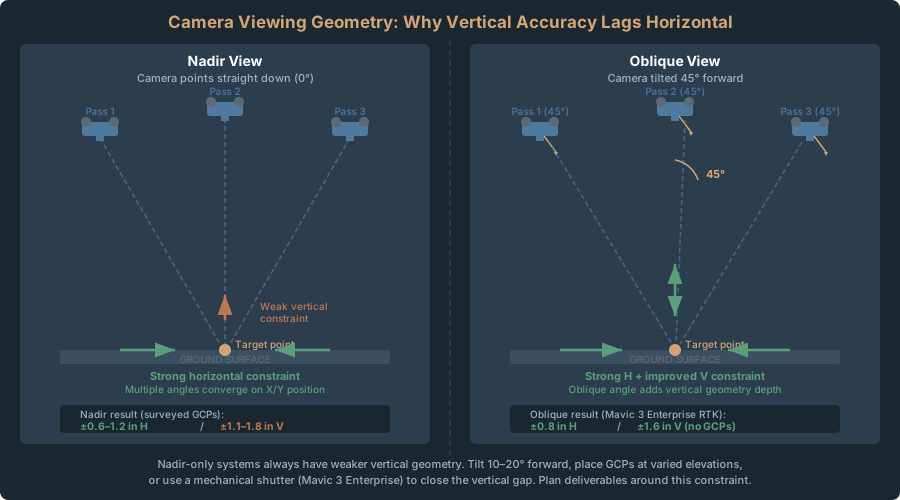
Nadir view geometry. The camera points straight down. Horizontal position gets strong constraint from multiple overlapping images viewing the same point from different angles. But elevation? Most views are nearly parallel — straight down — which is weak geometry for vertical positioning.
Oblique imagery (camera tilted 45 degrees) adds the viewing angles that vertical needs. The Mavic 3 Enterprise’s oblique camera achieves better vertical accuracy for exactly this reason.
What you can do about it:
- Tilt the camera 10-20 degrees forward instead of pure nadir. Modest improvement, but doubles processing time.
- Place at least one or two GCPs at significantly different elevations (hilltop, valley) to give the bundle adjustment vertical constraint.
- Fly slower with maximum overlap (85-90% frontal, 75-80% side) for stronger geometry.
- Or just accept it. Vertical accuracy is a known limitation of nadir-only systems. Plan around it.
Processing Software: Does Metashape vs Pix4D vs WebODM Matter for Accuracy?
Not much. But slightly.
Published benchmarks comparing the same dataset through all three typically produce a small but consistent accuracy ranking:
| Platform | Horizontal RMSE | Vertical RMSE | Processing Time | Cost (as of 2026-04-22) |
|---|---|---|---|---|
| Metashape Professional | 0.8 inches | 1.1 inches | 2.1 hours | $3,499 (perpetual license) |
| Pix4Dmapper | 0.9 inches | 1.3 inches | 2.3 hours | $332.50/mo or $399–$479.88/yr annual |
| WebODM (open source) | 1.1 inches | 1.5 inches | 3.8 hours | Free |
Differences are real but small. WebODM is marginally less accurate due to more conservative optimization — a trade-off for faster processing. Pix4D and Metashape are nearly identical.
But here’s what matters more than software choice: are you measuring accuracy with checkpoints? Many operators never validate. They look at reprojection error (internal model quality) and assume it reflects real-world accuracy. It doesn’t. If you’re delivering professional work, measure against independent checkpoints. That matters far more than which software you picked.
Reading an Accuracy Report: What to Look For
When you commission a drone survey, you should get an accuracy report. Here’s what to look for and what it means.
Essential elements:
1. Checkpoint RMSE (horizontal and vertical)
- This is the only number that matters for real-world accuracy
- If the report doesn’t include checkpoint RMSE, ask why
- Should be less than 1.5x the Ground Sample Distance (GSD)
- At 2.2 cm GSD, expect 3-4 cm checkpoint RMSE with surveyed GCPs
2. CE90 and LE90 (90% confidence circles)
- Horizontal CE90 should be stated explicitly
- Vertical LE90 should be stated explicitly
- These tell you the bounds of typical error
- Useful for specifying accuracy in contracts
3. Number and quality of checkpoints
- At least 15-20 independent checkpoints minimum
- Checkpoints should be distributed across the site, not clustered
- Should be measured with survey-grade equipment, not visual identification
- More checkpoints = more defensible accuracy claims
4. GCP information
- How many GCPs were used
- How were they measured (RTK, total station, smartphone RTK, etc.)
- GCP RMSE (fit to ground control)
- GCP distribution (map showing locations)
5. Processing parameters
- Flight altitude and GSD
- Camera specifications
- Overlap percentages
- Which software was used and what quality settings
- Any special processing (rolling shutter correction, bundle block adjustment, etc.)
Red flags:
- Reprojection error reported as the accuracy metric (it’s not — that’s internal model quality, not real-world accuracy)
- No checkpoints (“accuracy validated by visual inspection” is worthless)
- No distinction between horizontal and vertical accuracy
- High checkpoint RMSE hand-waved as “site-specific conditions” without detail
A proper accuracy report runs 1-2 pages with maps, statistics, and methodology. Anything shorter is incomplete.
Legal note. Achieving Tier 3 accuracy with a consumer drone doesn’t make you a licensed surveyor. In most states, delivering georeferenced maps, volume calculations, or topographic data as professional products requires a Professional Land Surveyor’s oversight — regardless of equipment accuracy. Claiming “survey-grade accuracy” in your marketing amplifies legal exposure. The safer commercial model: you fly and process, a PLS reviews and seals. See Crawl 2: Where the Legal Lines Are.
The Mini 4 Pro is a legitimate mapping platform. With proper ground control, it matches enterprise drone accuracy at a fraction of the cost.
- Tier 1 (GPS-only): ±6-16 feet. Works for context and progress documentation.
- Tier 2 (DIY GCPs): ±4-12 inches. Professional deliverables for most industries.
- Tier 3 (Surveyed GCPs): ±0.5-1.2 inches horizontal. Engineering and legal standards.
Pick the tier based on the deliverable. Visual reference? Tier 1. Professional positioning? Tier 2 — that’s the 80/20 point where cost and time align with accuracy gains. Contract-defensible precision? Tier 3 with survey-grade measurement.
The drone isn’t the limiting factor. Your field methodology is. Fly carefully, measure ground control precisely, validate with checkpoints, and a $750 drone delivers professional results.
Cross-Links
- Back to Crawl 1: Best Consumer Drones for Mapping in 2026
- Crawl 2 (First Orthomosaic): Your First Orthomosaic in 90 Minutes
- Walk 4 (DIY GCPs): GCP Setup for Non-Surveyors: DIY Ground Control on a Budget
- Walk 5 (Flight Parameters): Flight Parameters Decoded: Overlap, Altitude, Speed for Mini Mapping
- Related Pillar 3 Content: Drone Survey Accuracy: What the Numbers Actually Mean
- GCP Guide: Ground Control Points for Drone Surveys: How Many, Where, and Why
- Positioning Tiers: Drone Survey Positioning: GPS vs RTK/PPK vs GCPs — Which Tier Do You Actually Need