You want to map with a consumer drone. Not a Matrice 350 with a P1 payload. Not an eBee with a survey-grade GNSS receiver. A sub-250-gram drone that fits in a jacket pocket, flies without Remote ID in most jurisdictions, and costs under $1,200.
Here’s the question nobody answers honestly: can these drones produce usable mapping data? Yes. With constraints. Across real mapping jobs these platforms cover — property boundaries, small construction sites, agricultural assessments — results range from surprisingly good to frustratingly inconsistent depending on how they’re flown and what accuracy is actually required.
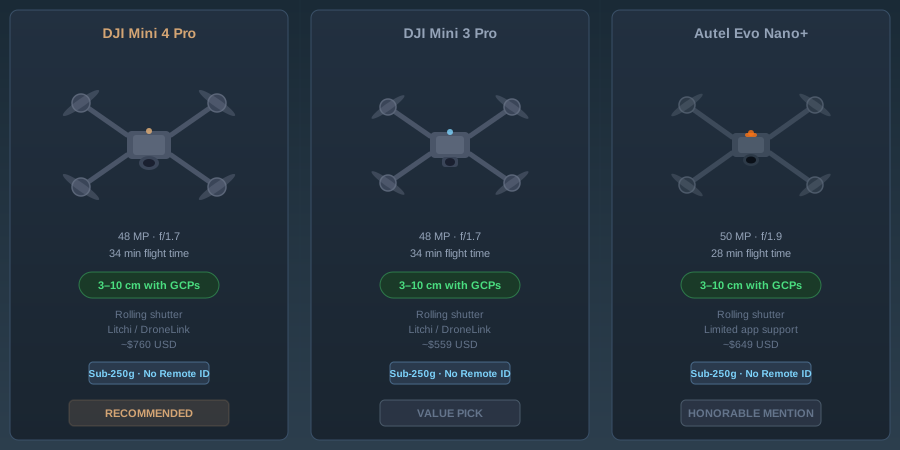
This guide covers three drones worth considering for mapping in 2026: the DJI Mini 4 Pro, the DJI Mini 3 Pro, and the Autel Evo Nano+. I’ll give you the specs that matter for photogrammetry, the ones that don’t, and an honest verdict on each.
Why Sub-250g Matters for Mapping
Weight class is a regulatory boundary, not just a spec sheet number.
In the United States, drones under 250 grams are exempt from Remote ID requirements under current FAA rules. That means no broadcast module, no registration (for recreational operators), and fewer operational restrictions. For commercial Part 107 pilots, the sub-250g class simplifies LAANC authorizations in controlled airspace — you’re still filing, but the approval process moves faster with fewer flags.
National parks, state forests, and many restricted areas that prohibit “drone operations” often define drones by weight class. Sub-250g platforms sometimes fall into a regulatory gray zone that larger platforms don’t. I’m not telling you to fly in national parks — I’m telling you the regulatory landscape treats these drones differently.
For mapping professionals, the practical advantage is access. You can deploy a Mini 4 Pro on a site where pulling out a Phantom 4 RTK would trigger a shutdown. Construction sites with active airspace restrictions, urban environments with proximity concerns, sensitive government facilities where you need a lightweight platform for a quick orthomosaic — the sub-250g class gets you through doors that heavier platforms can’t.
The Specs That Actually Matter for Mapping
Before comparing these three drones, you need to know which specifications affect mapping quality and which are marketing noise.
Sensor size and resolution. Larger sensors capture more light per pixel, producing cleaner imagery with less noise. For photogrammetry, this means better feature matching in shadow areas and more reliable tie points. All three of these drones use 1/1.3-inch sensors — adequate for mapping, not exceptional.
Rolling shutter vs. mechanical shutter. This is the single biggest quality differentiator for mapping. Rolling shutter sensors read the image line by line from top to bottom. If the drone is moving during capture — and it always is — each line of the image is exposed at a slightly different position. That produces geometric distortion that degrades your point cloud accuracy. Mechanical shutters expose the entire frame simultaneously. No motion blur, no rolling shutter distortion.
To put it plainly: rolling shutter costs you 1-3 centimeters of accuracy in photogrammetric processing unless your software compensates for it and your flight speed is slow enough to minimize the effect.
GPS accuracy. Consumer drones use single-frequency L1 GNSS — no RTK, no PPK, no multi-frequency corrections. Standalone GPS accuracy is 2-5 meters horizontal. That’s your geotag accuracy before processing. With sufficient GCPs (5-8 well-distributed ground control points), you can achieve 3-10 centimeter accuracy in your final deliverables regardless of geotag quality. Without GCPs, you’re working with meter-level absolute accuracy.
Wind resistance. Mapping requires consistent altitude and overlap. Wind degrades both. A drone rated for Level 5 winds (29-38 km/h) will maintain altitude better than one rated for Level 4, producing more consistent GSD across the dataset.
Battery life. Mapping missions burn battery faster than casual flying. Continuous photo capture, sustained forward flight, GPS logging — expect 60-75% of the advertised flight time on a mapping mission. A 34-minute advertised battery gives you roughly 22-25 minutes of usable mapping time.
Head-to-Head Comparison
| Specification | DJI Mini 4 Pro | DJI Mini 3 Pro | Autel Evo Nano+ |
|---|---|---|---|
| Weight | 249g | 249g | 249g |
| Sensor | 1/1.3” CMOS, 48MP | 1/1.3” CMOS, 48MP | 1/1.28” CMOS, 50MP |
| Effective pixels (mapping) | 12MP (Quad Bayer) | 12MP (Quad Bayer) | 12.5MP (Quad Bayer) |
| Shutter type | Rolling | Rolling | Rolling |
| Lens FOV | 82.1 degrees | 82.1 degrees | 84 degrees |
| Min shutter speed | 1/8000s | 1/8000s | 1/8000s |
| ISO range | 100-6400 | 100-6400 | 100-6400 (photo) |
| GNSS | GPS + Galileo + BeiDou | GPS + Galileo + BeiDou | GPS + GLONASS + Galileo + BeiDou |
| Max flight time | 34 min | 34 min | 28 min |
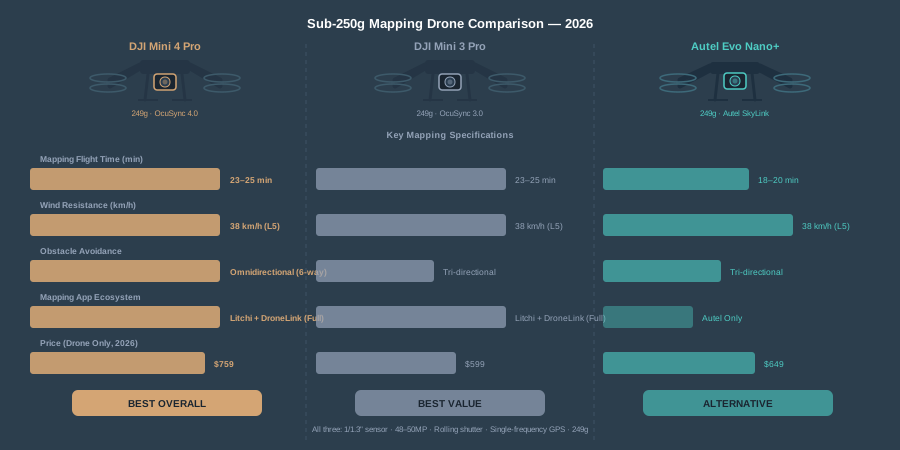
| Mapping flight time | ~23-25 min | ~23-25 min | ~18-20 min |
| Wind resistance | Level 5 (38 km/h) | Level 5 (38 km/h) | Level 5 (38 km/h) |
| Obstacle avoidance | Omnidirectional | Tri-directional | Tri-directional |
| Transmission range | 20 km (OcuSync 4.0) | 12 km (OcuSync 3.0) | 10 km (Autel SkyLink) |
| Interval shooting | 2s minimum | 2s minimum | 2s minimum |
| RAW capture | DNG + JPEG | DNG + JPEG | DNG + JPEG |
| Third-party mapping apps | Litchi, DroneLink | Litchi, DroneLink | Autel Explorer, limited third-party |
| Price (2026) | ~$759 (drone only) | ~$599 (drone only) | ~$649 (drone only) |
| Fly More Combo | ~$959 | ~$799 | ~$849 |
GSD Reality Check
Ground Sample Distance — the real-world size of each pixel — determines what you can resolve in your maps. Here’s what these drones produce at common mapping altitudes, using the 12MP effective resolution in standard photo mode:
| Altitude (AGL) | GSD (approx.) | Suitable For |
|---|---|---|
| 30m (100 ft) | ~1.1 cm/px | Detailed site mapping, crack detection |
| 60m (200 ft) | ~2.2 cm/px | Construction progress, property surveys |
| 90m (300 ft) | ~3.3 cm/px | Agricultural assessment, large area coverage |
| 120m (400 ft) | ~4.4 cm/px | Reconnaissance, land use mapping |
All three drones produce nearly identical GSD at equivalent altitudes — the sensor sizes and focal lengths are close enough that the difference is sub-millimeter per pixel.
The practical constraint isn’t GSD. It’s coverage. At 60 meters altitude with 80% frontal overlap and 70% side overlap, a single battery covers roughly 8-12 acres on the Mini 4 Pro and Mini 3 Pro, and 5-8 acres on the Evo Nano+ due to shorter battery life. For larger sites, you’re swapping batteries. Budget three batteries minimum for any mapping job.
DJI Mini 4 Pro: The Current Best Option
The Mini 4 Pro is the drone I’d hand to someone who asked “which consumer drone should I buy for mapping?” without any other context.
What works for mapping. OcuSync 4.0 gives you rock-solid video transmission at distances you’ll never need for mapping but that translates to zero dropouts at survey altitudes. Omnidirectional obstacle avoidance means the drone handles low-altitude mapping flights near structures without you babysitting collision alerts. DJI’s waypoint mission system — built into DJI Fly — handles basic grid patterns for photogrammetric flights. Third-party apps like Litchi and DroneLink provide full automated mapping mission support with configurable overlap, altitude, and camera trigger intervals.
The 34-minute battery translates to about 23-25 minutes of mapping time. That’s workable. Not generous, but workable.
What limits it for mapping. Rolling shutter. Every image captured while the drone is in motion carries geometric distortion. At 5 m/s flight speed and a 1/1000s shutter, you get roughly 5mm of rolling shutter smear. Photogrammetry software (Metashape, Pix4D, WebODM) can model and partially correct this, but it introduces noise into your bundle adjustment. Fly slower (3 m/s) or force a faster shutter speed to minimize the effect.
Single-frequency GPS geotags are 2-5 meters accurate. You need GCPs for anything beyond rough area estimates. This isn’t a limitation unique to the Mini 4 Pro — it’s universal across consumer drones.
No native DJI mapping app. DJI Fly’s waypoint mode works but wasn’t designed for photogrammetric missions. You’ll want Litchi ($25 one-time, Android and iOS) or DroneLink ($0-30/month) for proper grid planning with overlap controls.
Verdict. The Mini 4 Pro is the most capable consumer mapping drone available in 2026. Best transmission system, best obstacle avoidance, longest effective mapping time in the sub-250g class. The rolling shutter is the elephant in the room, but it’s the same elephant in every drone on this list. If you’re buying one consumer drone for mapping, this is the one.
DJI Mini 3 Pro: The Budget-Conscious Pick
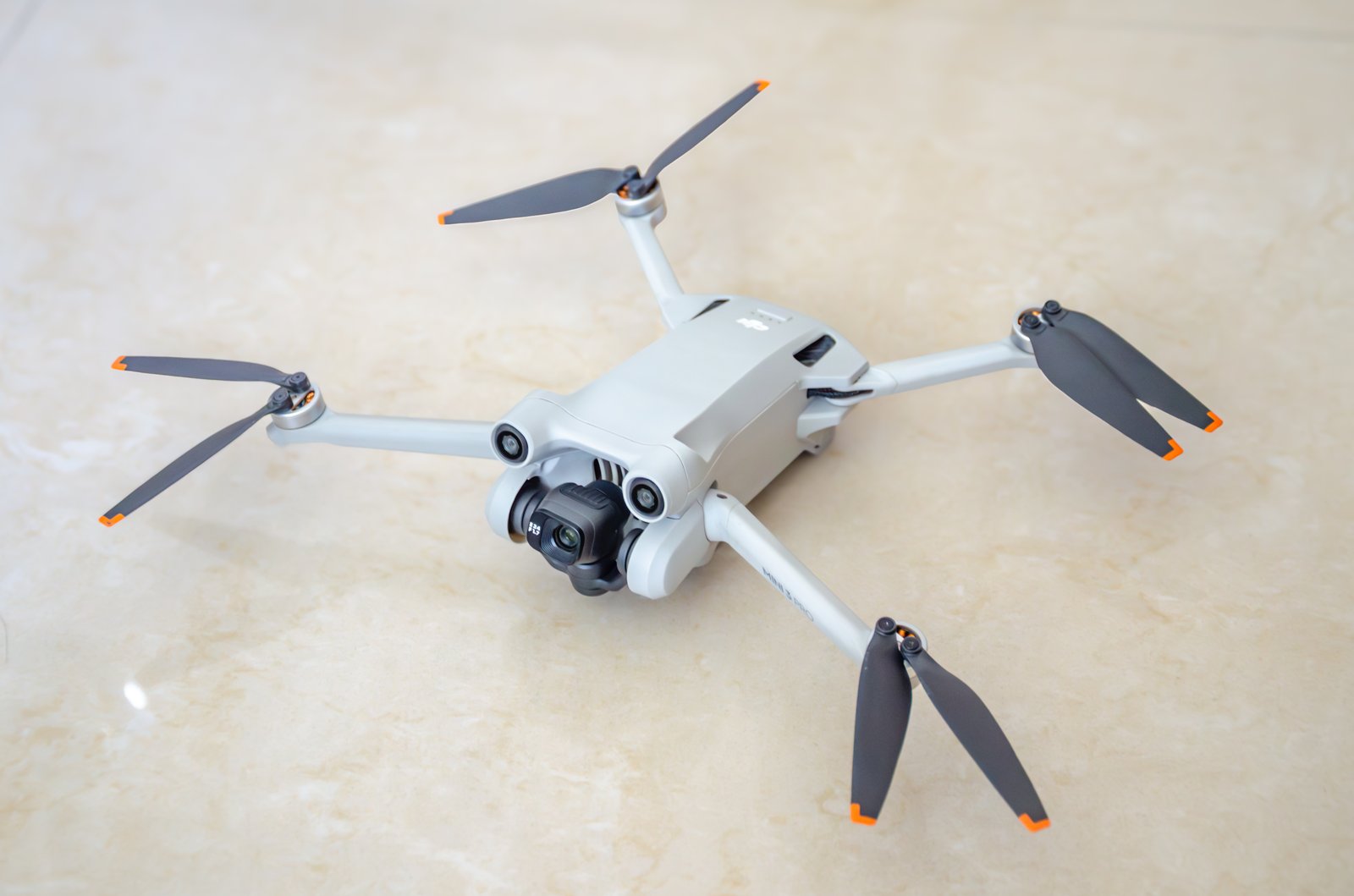 YikyuenG, via Wikimedia Commons, CC BY-SA 4.0
The Mini 3 Pro shares the same sensor as the Mini 4 Pro and still flies well in 2026. It’s cheaper, and for pure mapping work, the differences from the Mini 4 Pro are smaller than you’d expect.
What works for mapping. Same 1/1.3-inch sensor, same 48MP Quad Bayer array, same 12MP effective resolution for mapping photos. Same battery life. Same wind resistance rating. DJI Fly waypoints work identically. Litchi and DroneLink support is mature and reliable. The camera system produces the same GSD, same dynamic range, same RAW quality.
For a mapping-only workflow, the imagery from a Mini 3 Pro and Mini 4 Pro is functionally identical. Operators running both through Metashape side-by-side consistently report the same RMSE with the same GCP configuration. The sensor is the sensor.
What limits it for mapping. Tri-directional obstacle avoidance instead of omnidirectional — no rear or upward sensors. This matters less for mapping (you’re flying forward in grid patterns) but makes low-altitude flights near structures riskier. If you clip a tree branch on a lateral pass, you’ll know.
OcuSync 3.0 versus 4.0 means shorter effective transmission range — 12 km versus 20 km. For mapping at survey altitudes (30-120m AGL), this difference is irrelevant. You’re never 12 km from your controller during a mapping mission.
The controller situation is where DJI got you. The Mini 3 Pro ships with the RC-N1 (phone-required) controller. The DJI RC (built-in screen) is an upgrade. You want the built-in screen for mapping — holding your phone in sunlight while trying to monitor a mission is miserable. Budget the extra $100-150 for the DJI RC version.
Verdict. The Mini 3 Pro is the value play. Save $150-200 compared to the Mini 4 Pro and get identical mapping imagery. The obstacle avoidance downgrade is the only meaningful mapping difference. If you’re flying open areas — agricultural fields, vacant lots, construction sites without tight obstacles — the Mini 3 Pro does the same job for less money.
Autel Evo Nano+: The Alternative Ecosystem
The Evo Nano+ is the non-DJI option. For some operators, that’s a selling point. Autel’s ecosystem is smaller but the hardware is competitive.
What works for mapping. The 1/1.28-inch sensor is marginally larger than DJI’s 1/1.3-inch — about a 3% increase in sensor area. Practically meaningless for mapping, but the 50MP native resolution gives you slightly more cropping flexibility. RYYB color filter array (similar to Huawei’s smartphone approach) captures more light than traditional RGGB sensors, producing cleaner low-light imagery. For mapping, this helps on overcast days or early/late flights with flat lighting.
Quad-constellation GNSS — GPS, GLONASS, Galileo, BeiDou — gives the Evo Nano+ the most satellite coverage of the three drones. More satellites means better geometry and faster cold-start lock. In urban canyons or near tall structures, the GLONASS addition helps. Your geotags are still 2-5 meters, but the fix is more reliable in constrained environments.
What limits it for mapping. Battery life is the killer. 28 minutes advertised translates to 18-20 minutes of mapping time. That’s roughly 30% less coverage per battery than the DJI options. For a 20-acre site at 60m altitude, you’re looking at 4-5 batteries instead of 3. That’s more time, more battery costs, and more opportunities for stitching artifacts between flights.
Third-party app support is thin. Litchi does not support the Evo Nano+. DroneLink does not support it. Autel’s own Explorer app handles waypoint missions, but the mapping-specific features — configurable overlap grids, terrain following, camera trigger intervals — are less mature than what Litchi offers for DJI. You can make it work, but you’re fighting the software instead of flying the mission.
Autel’s SDK is available but the developer community is a fraction of DJI’s. If something doesn’t work, your troubleshooting resources are limited. DJI forums have thousands of mapping-specific threads. Autel forums have dozens.
Verdict. The Evo Nano+ is a capable camera drone with a slightly better sensor on paper. But mapping is a software-dependent workflow, and Autel’s mapping app ecosystem is years behind DJI’s. The shorter battery life compounds the problem. If you’re already in the Autel ecosystem or have a specific reason to avoid DJI, the Nano+ works. For a first mapping drone with no ecosystem commitment, the DJI options are easier paths.
Rolling Shutter: The Uncomfortable Truth
None of these drones have a mechanical or global shutter. All three use rolling shutter CMOS sensors. For casual photography, this doesn’t matter. For photogrammetry, it introduces systematic geometric error.
Here’s what happens. The drone captures an image while moving at 5 m/s. The rolling shutter reads the sensor top-to-bottom in roughly 10-15 milliseconds. During those milliseconds, the drone moves 5-7.5 centimeters. The top of your image was captured at a different position than the bottom. Your photogrammetry software models a frame captured at a single position — but the image contains data from a range of positions.
Modern processing software handles this. Metashape has a rolling shutter compensation model. Pix4D compensates automatically if you enable it. WebODM’s OpenSfM pipeline includes rolling shutter correction. The compensation works — it reduces the error from centimeters to sub-centimeter — but it doesn’t eliminate it entirely.
Mitigation strategies:
- Fly slower. 3 m/s instead of 5 m/s. Less drone movement per shutter read cycle means less distortion per image.
- Force faster shutter speeds. 1/1600s or faster in bright conditions. The sensor reads faster at higher shutter speeds, reducing the exposure window.
- Use stop-and-capture mode. Some mission planning apps can pause the drone at each photo point, capture a stationary image, then resume flight. Eliminates rolling shutter distortion entirely but doubles your mission time and battery consumption.
- Increase overlap. 85% frontal, 75% side overlap gives the software more redundant observations to average out rolling shutter artifacts.
The bottom line: rolling shutter on consumer drones is a known limitation with known workarounds. It does not disqualify these drones from mapping work. It does mean you need to fly deliberately and process carefully.
App Support for Automated Mapping Missions
Manual flying doesn’t work for mapping. You need automated grid patterns with consistent overlap, altitude, and camera trigger timing. Here’s what’s available.
DJI Fly (Mini 4 Pro and Mini 3 Pro) Built-in waypoint mode handles basic flight paths. You can set altitude, speed, and camera actions at each waypoint. For mapping, you’d manually create a grid pattern — doable but tedious. No automatic overlap calculation, no terrain following, no estimated coverage display. It works in a pinch.
Litchi ($25 one-time purchase) The standard for consumer DJI mapping missions. Grid pattern generator with configurable frontal and side overlap percentages. Terrain following using elevation data. Camera trigger at distance or time intervals. Mission planning on a desktop with Google Earth overlay, then sync to the controller. Supports Mini 4 Pro and Mini 3 Pro. Does not support Autel.
DroneLink (free tier available, $30/month for Pro) Similar to Litchi with more advanced features: adaptive overlap based on altitude, multi-battery mission planning, real-time GSD calculator. Supports both DJI Mini platforms. Does not support Autel.
Autel Explorer (free with drone) Autel’s native app includes waypoint missions and basic grid patterns. Functional but less polished than Litchi. Limited overlap configuration options. No third-party mission planning integration.
DJI Fly Mission Hub (web-based) Plan waypoint missions in a browser, sync to DJI Fly app. Useful for pre-planning complex flights but not mapping-specific.
For mapping workflow, Litchi on a DJI Mini 4 Pro or Mini 3 Pro is the proven combination. It’s what most consumer drone mappers use, and for good reason — it works reliably with minimal setup.
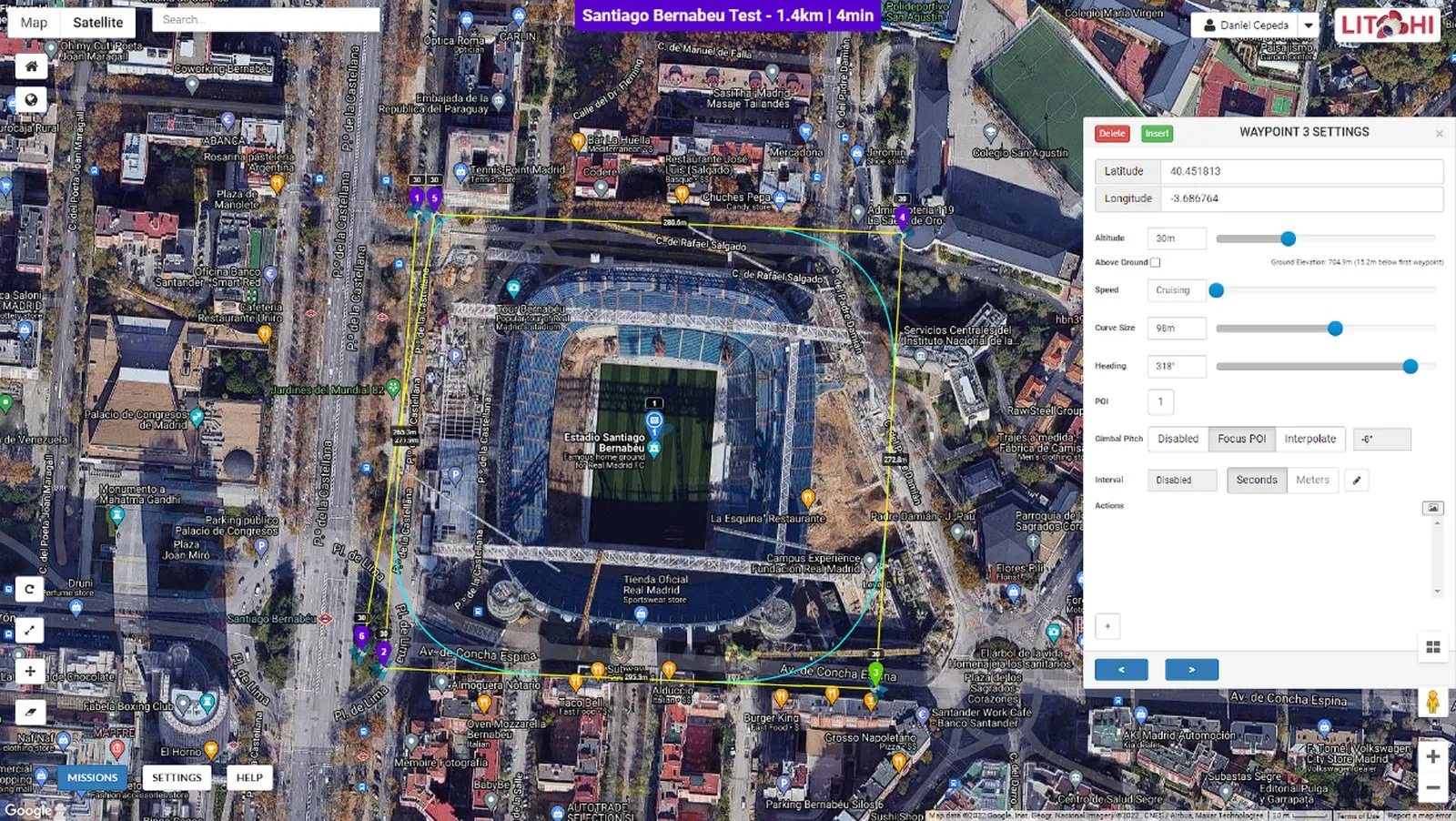 Screenshot: Litchi Mission Hub (flylitchi.com)
Recommended Accessories for Mapping
You can’t map with just a drone. Here’s what you need in your kit.
Ground Control Points (GCPs). For any project requiring better than 2-meter accuracy — which is every mapping project — you need GCPs. Pre-made targets from Propeller, AeroPoints, or simple checkerboard panels (12x12 inches minimum, high contrast) placed at surveyed coordinates. Budget 5-8 per site. You can make your own from corrugated plastic and spray paint for under $5 each. Survey them with a handheld GNSS receiver or total station.
MicroSD cards. Samsung EVO Plus 128GB ($12-15) or SanDisk Extreme 128GB ($14-18). UHS-I, V30 rated minimum. The drone writes 12MP images at roughly 8-12MB each (RAW+JPEG). A 128GB card holds 5,000+ mapping images — more than enough for a full day. Carry two. Cards fail. Format before every job.
Tablet mount and sun shade. If you’re using the RC-N1 controller with a phone, a proper tablet mount (8-10 inch tablet) gives you a usable display for monitoring missions. The Freewell or PGYTECH tablet holders work with DJI controllers. A sun shade is mandatory — you can’t see a phone screen at noon in July.
Extra batteries. Three batteries minimum for mapping. The Fly More Combo gets you there for the DJI platforms. For the Evo Nano+, budget four batteries given the shorter flight time. Intelligent Flight Batteries for the Mini 4 Pro run $55 each. Mini 3 Pro batteries are the same price and cross-compatible. Autel Nano+ batteries run $65 each.
Landing pad. A 50-75cm foldable landing pad keeps dust and debris off the camera lens during takeoff and landing. $15-25 on Amazon. Not optional on dirt or gravel sites — one grain of sand on the lens ruins your dataset.
ND filters. For bright conditions, an ND8 or ND16 filter lets you force a specific shutter speed without overexposure. PolarPro, Freewell, and PGYTECH all make filter sets for these drones ($30-60 per set). For mapping, you want the fastest possible shutter speed to minimize rolling shutter — ND filters help you get there in bright conditions without blowing out highlights.
Accuracy: What to Realistically Expect
Let me be direct about accuracy expectations with consumer drones.
Without GCPs: 2-5 meter absolute horizontal accuracy, 3-8 meter vertical. This is GPS geotag accuracy. Your orthomosaic will look good — features will be internally consistent — but the entire dataset could be shifted meters from its true position. Fine for visual reference. Not fine for measurement.
With GCPs (5-8 well-distributed): 3-10 centimeter horizontal, 5-15 centimeter vertical. This is where consumer drones become genuinely useful for mapping work. The GCPs anchor your dataset to real-world coordinates and the photogrammetric bundle adjustment tightens everything up. Mini 4 Pro datasets with 6 GCPs and 80/70 overlap at 60 meters AGL consistently land in the 5-8 cm horizontal RMSE range.
With GCPs and optimal flight parameters: 2-5 centimeter horizontal is achievable if you fly slow (3 m/s), use stop-and-capture, shoot at 80/75 overlap, and place 8 GCPs on a site under 10 acres. At that point, you’re spending 3x the flight time compared to a standard mission, but the accuracy approaches what RTK drones deliver without corrections.
The honest comparison. An RTK-equipped DJI Matrice 350 with the P1 camera achieves 1-3 centimeter accuracy without GCPs. A consumer Mini 4 Pro with 6 GCPs achieves 5-8 centimeters. That’s a 3-5x accuracy gap. For survey-grade deliverables, the professional platform wins. For site documentation, progress monitoring, volumetric estimates, vegetation mapping, and preliminary design — consumer drone accuracy is sufficient.
Which Drone Should You Buy?
Buy the DJI Mini 4 Pro if you want the best overall mapping platform in the sub-250g class. Best obstacle avoidance, best transmission, best third-party app support, longest effective mapping time. It’s $150 more than the Mini 3 Pro and worth every dollar for the omnidirectional sensors alone — mapping flights near structures are significantly less stressful.
Buy the DJI Mini 3 Pro if you’re budget-conscious and primarily mapping open areas. Same sensor, same image quality, same mapping software compatibility. Save the $150 and put it toward extra batteries or GCP targets. Just get the DJI RC controller version — the phone-holder RC-N1 is miserable for mission monitoring.
Buy the Autel Evo Nano+ if you’re committed to the Autel ecosystem, need quad-constellation GNSS for urban environments, or have a specific reason to avoid DJI. Be prepared to spend more time fighting mapping software and carrying extra batteries.
Don’t buy any of these if you need survey-grade accuracy without GCPs, need to fly sites larger than 30 acres regularly, or need a mechanical shutter for high-speed mapping. For those use cases, you’re looking at the Phantom 4 RTK (used market), DJI Mavic 3 Enterprise, or stepping up to the Matrice platform.
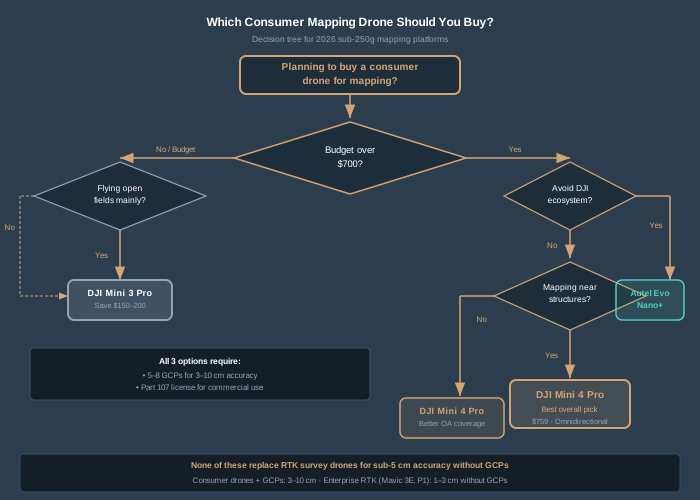
Bottom Line
Consumer drones can map. Not at survey-grade accuracy, not without ground control, and not without understanding their limitations — but they produce usable data for a wide range of professional applications at a fraction of the cost of enterprise platforms.
The DJI Mini 4 Pro is the best consumer mapping drone in 2026. The Mini 3 Pro is the smart budget pick. The Autel Evo Nano+ is a capable alternative with ecosystem limitations.
All three share the same fundamental constraint: rolling shutter and single-frequency GPS. Work within those constraints — fly slow, use GCPs, process carefully — and these sub-250g drones produce mapping data that would have required a $15,000 platform five years ago.
That’s not marketing. That’s field-tested reality.
For positioning method details, see RTK vs PPK Drone Mapping: Which Should You Use?. For ground control guidance, check out Ground Control Points for Drone Surveys.